Two people are smiling while sitting at a laptop.
Enterprise

The latest Intuit Enterprise Suite features for your clients’ businesses

Table of contents

Table of contents

What’s new for February 2026

As organizations scale, financial complexity compounds, with more entities, more approvals, and greater compliance exposure. The latest improvements to Intuit Enterprise Suite are designed for the point where spreadsheets and manual processes begin to break down, helping your clients put durable structure and real-time insight in place, before complexity turns into risk. 

These new features offer scalable and compliant AI-driven automation, centralized financial management, and decision-grade reporting. Enhancements include expanded industry-specific functionality; specifically, a new construction edition, which is the first of several upcoming industry-specific editions of Intuit Enterprise Suite.

The new construction capabilities are available today in beta** for your clients on Intuit Enterprise Suite in the construction industry at no additional cost. Intuit Enterprise Suite already serves field services, healthcare, nonprofit, and manufacturing businesses with customizable, industry-specific KPIs and dashboards and is building on these capabilities to create more powerful and robust vertical-specific solutions for these industries.

A blue ribbon is being used to power a machine.

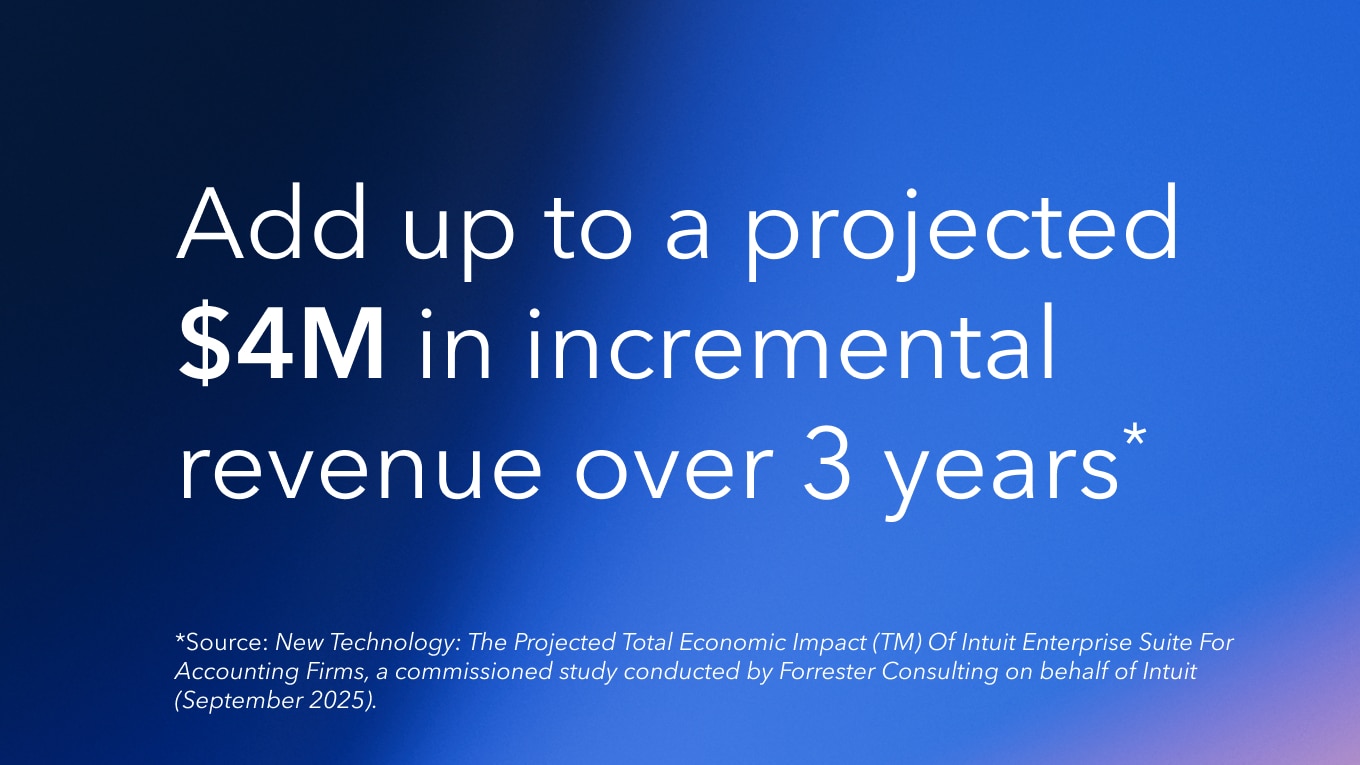
*New Technology: The Projected Total Economic Impact Of Intuit Enterprise Suite For Accounting Firms, a commissioned study conducted by Forrester Consulting on behalf of Intuit (September 2025).

Modernized business intelligence

With new tools and flexibility for reports, app integrations, KPIs, and dashboards, you and your clients get the business insights and analysis you need with real-time performance tracking all in one place.

  • Improved modern report view: Get quicker access to insights with more streamlined reporting that has more accessible customization. The intuitive, enhanced modern view is now the standard for all reports, with automatic refresh, consistent customizations, ordering that aligns with GAAP reporting standards, zero-balance visibility, and more.
  • Calculated fields: Get the views your clients need without data exports and spreadsheet calculations. Create custom formulas and perform calculations on top of existing report data, save your report, and come back to it anytime, all without tedious workarounds.
  • Management reports: Simplify customizing and sharing company-level and multi-entity management reports that offer more KPIs and custom metrics to fit your clients’ goals. For example, add KPI widgets and charts in consolidated view and use smart chips to automatically update dates and figures throughout a report.
  • More app integrations: In one place, analyze key business and financial metrics from multiple systems and see how everything fits together, without manual work. Clients can connect more third-party CRM and workforce tools, and combine the data directly with their data in Intuit Enterprise Suite. 
  • KPIs and dashboards: Expanded KPIs and dashboards allow you and your clients to track metrics using accounts from their chart of accounts as variables, specify a time period for each metric, and pull in variables from third-party data, among other capabilities.

For your mid-market clients, Intuit Intelligence delivers AI-powered insights embedded into core business workflows, helping teams better understand and act on their data. By analyzing financial and operational information in context, it reduces manual analysis, surfaces meaningful patterns, and enables faster, more confident day-to-day decisions.

For businesses with greater scale and complexity using Intuit Enterprise Suite, Intuit Intelligence extends these capabilities with deeper, cross-entity visibility and enterprise-grade insights. Embedded across consolidated reporting, advanced accounting, and multi-entity operations, it helps your clients understand cost drivers, evaluate profitability at scale, and maintain control as the business grows.

Dimension enhancements

Dimension assignment: Assign dimensions faster and with more flexibility to help streamline financial workflows. You and your clients can now access dimension assignment from the Fixed assets and Business feed pages, assign dimensions in bulk to all items, and move transactions to Save it for later to delay assigning them.

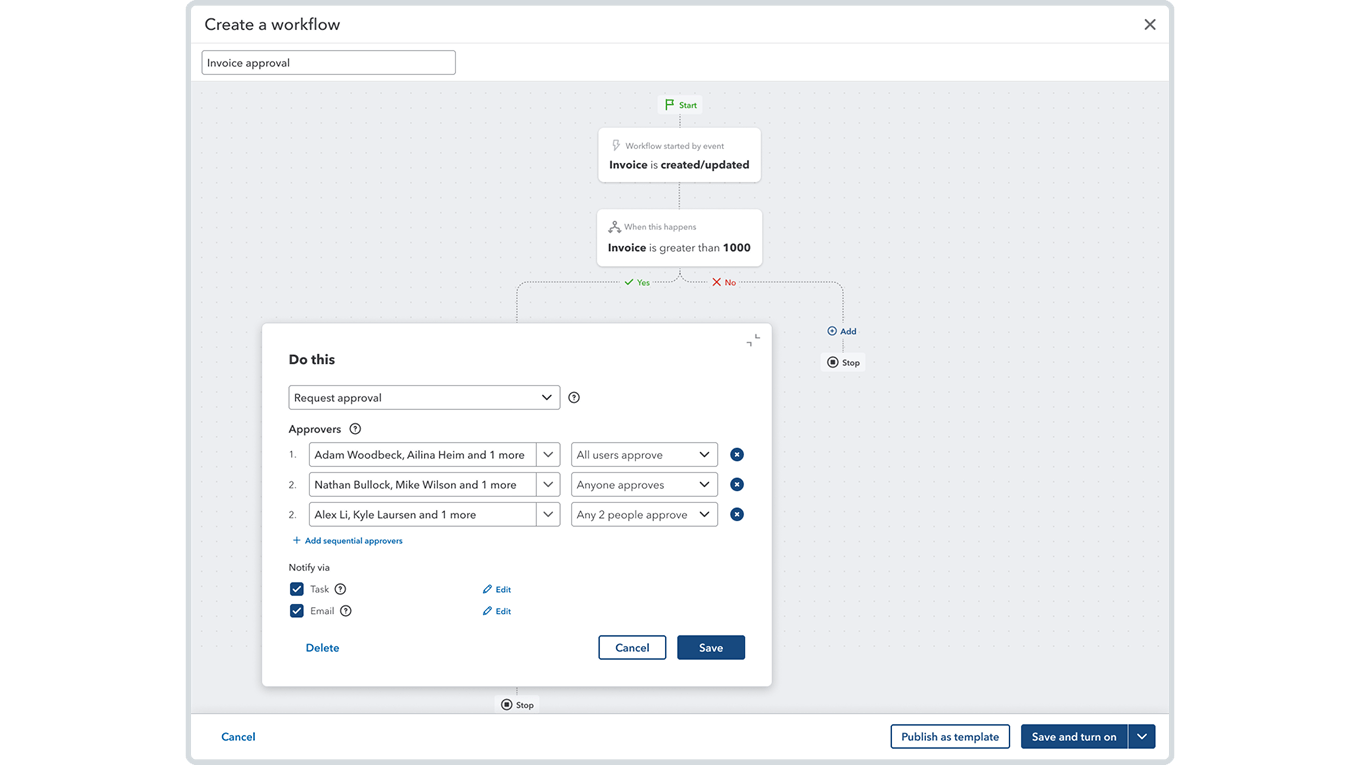
Parallel approval

Workflow automation enhancements

Further customize workflows and maintain more detailed audit trails to help your clients’ businesses reduce tedious tasks while adding transparency and accountability. 

  • Parallel approvals: Get more flexibility to create complex workflows that meet your clients’ business needs by including parallel approvals with up to five approvers.
  • Detailed audit trails: Keep your clients’ businesses audit-ready with more detailed audit trails for transaction forms approved through their workflows, such as invoices and purchase orders.
  • Dimensions on workflow automation: Help make approvals, reminders, and tasks more efficient by setting dimension-based conditions in workflows to more closely match your client’s business structure and financial reporting requirements.
quote image
Intuit Enterprise Suite really hammers home a lot of those needs that the clients have been begging for for a while to move into that mid-market, medium-sized business world.
Patrick Ball, Director of Technology Advisory, Aprio

Intuit Enterprise Suite construction edition (beta)

Your clients in the construction industry can now use Intuit Enterprise Suite to help manage projects end-to-end, from winning bids, through project planning and execution, to project close, all with AI automating steps along the way. With Home, Reports, and Dashboards surfacing the most industry-relevant information, construction businesses can bring project operations and finances under one roof.

  • Project phases: Construction clients can stay on top of cash flow, profitability, and effective project management in one place by planning and tracking their budget and progress against project phases.
  • Cost groups: You and your clients can plan and track project costs for better job costing and project profitability tracking by designating industry-standard cost groups in their list of products and services, like labor, materials, equipment, or subcontractor, and tracking cost groups across budgets, expenses, POs, and bills. 
  • Project budgets enhancements: Help control costs, keep projects on track, and protect margins with the simplified setup, real-time insights, and more comprehensive reporting in project budgets. Track budgets and variances by phase, get real-time insights on budget overruns in their project summary dashboard, export or print budgets, and compare budget versions across all project cost reports.
  • Proposals: To help their businesses win more bids, your clients can create proposals from estimates or vice versa, or build a customized proposal document with integrated e-signatures using a proposal document builder. Your clients’ customers can sign documents, make deposits, and review their project’s scope and approved costs from a client portal.
  • Negative change orders: Protect your clients’ margins by eliminating offline calculations. Intuit Enterprise Suite can now handle negative change orders to better account for price adjustments and scope reductions.
  • AIA style invoicing: Clients’ can build trust with their customers by providing invoices that include information and transparency. The new AIA-style invoicing format in Intuit Enterprise Suite can track the total contract value on estimate, invoiced to date, invoice amount, and remaining balance at the phase level.

Multi-entity financial management

New consolidated reports: Get additional visibility on cross-entity financial data with five new consolidated reports: Invoice list, Transaction list by date, Transaction detail by account, Deposit detail, and Check detail.

Intuit AI enhancements

Enhanced automation helps you and your clients maintain control over work to be done while proactively handling routine financial tasks and unlocking critical insights. This gives your clients and firm time back to focus on what’s important.

  • Sales Tax Agent: Early access availability of Sales Tax Agent now also includes a new filing pre-check tool that automatically scans for mismatches between Profit & Loss (P&L) and Sales Tax Liability (STL) reports.
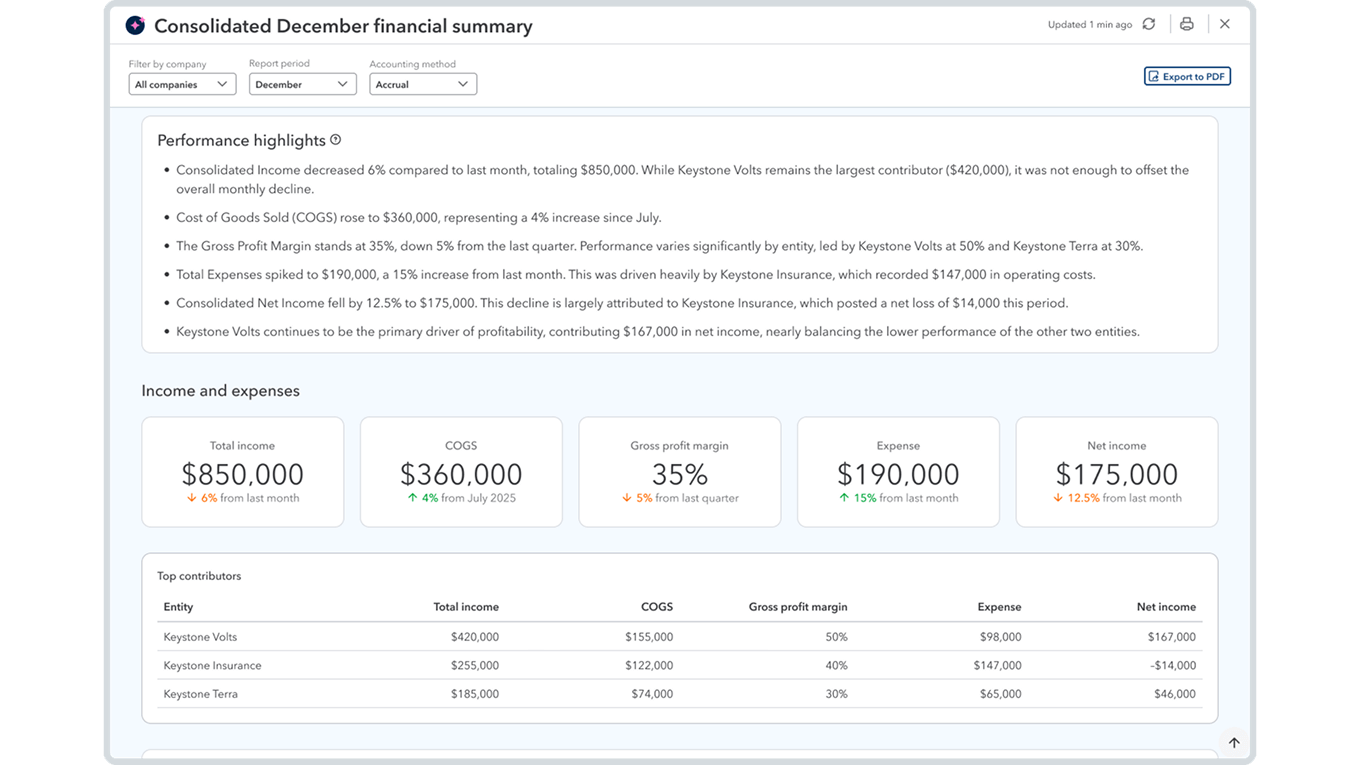
  • Finance Agent: Get a clear and timely view of your multi-entity clients’ financial performance by customizing the monthly performance summary and recommendations, and drilling down from a parent-level view of performance into individual entities as needed.
  • Accounting Agent: Review and post transactions more efficiently and help grow your clients’ businesses using AI that scans and analyzes incoming bank feed transactions, matches transaction data like vendors and categories, and groups matches for review.
Finance or Accounting agent

Inventory and order management

Strengthen your clients’ inventory and order management workflows with enhancements and new features that help prevent rework, boost accuracy, and more closely connect sales, inventory, and accounting.

  • Item receipt: An item receipt is now the official record of physical goods received in Intuit Enterprise Suite. This means you and your clients can use the platform for an efficient, modern inventory receive-to-pay workflow with inventory accuracy, financial accuracy, operational efficiency, and supplier accountability.
  • Moving Average Cost valuations: When migrating from QuickBooks Desktop, your clients can now choose to continue using their Moving Average Cost (MAC) valuations instead of switching to FIFO, to maintain the accuracy of their inventory valuations and COGS. 
  • Sales order enhancements: You and your clients can customize sales orders using several enhancements to fit their workflow and help data remain consistent throughout the order-to-cash process. For example, sales orders now connect to POs, estimates, and invoices. In addition, you can track sales order changes using more detailed audit logs and generate reports that include more sales order data.

Workforce management

Enhanced features help your clients simplify work assignments, manage paychecks, and get unified visibility of all W-2 and multi-entity employee information.

  • Garnishments: QuickBooks Payroll customers can now handle the full garnishment lifecycle in one place, with richer context and automated bookkeeping. New capabilities include associating each garnishment with its agency and viewing and tracking garnishment liabilities by employee, among others.
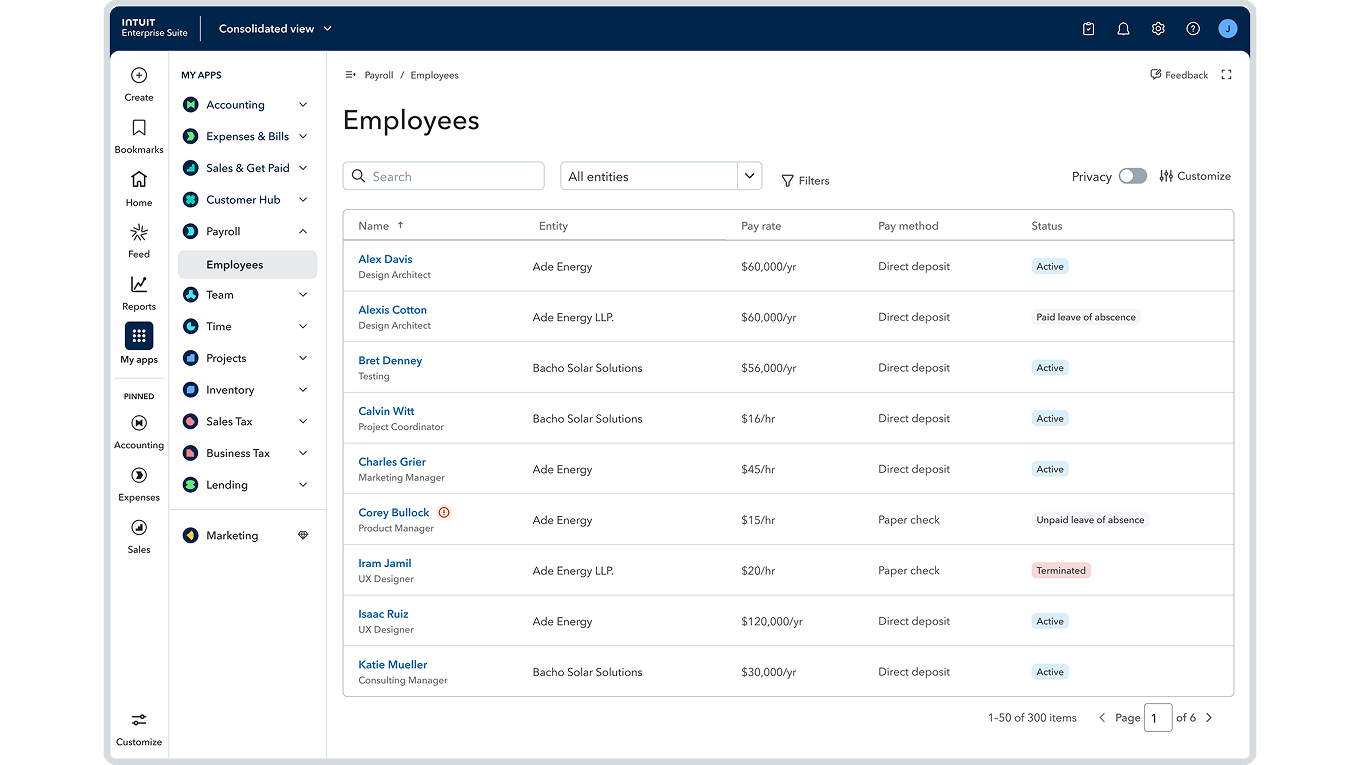
  • Consolidated employee list: Intuit Enterprise Suite customers using QuickBooks Payroll Elite can now streamline workforce management and eliminate repetitive tasks across accounts, with unified visibility of all W-2 and multi-entity employee information.
  • Assignments in QuickBooks Time: Businesses using Payroll Premium and Elite can manage all assignments in one place to reduce confusion, errors, and rework while improving overall payroll and job-costing accuracy.
Consolidated employee list

The AI-native, enterprise-grade ERP

Together, these improvements to Intuit Enterprise Suite give enterprise finance leaders and their accounting professionals the control, audit-ready rigor, and real-time insight they need to close faster, plan smarter, and scale without added friction.

For more information or to see a demo of Intuit Enterprise Suite, schedule a meeting with one of Intuit’s accountant team members. 

To get the full details, see the Intuit Enterprise Suite winter 2026 release notes.


Firms can now earn a percentage of revenue for up to three years for each client that subscribes to Intuit Enterprise Suite.* Also available is a new Intuit Enterprise Suite ProAdvisor Academy certification to help you confidently recommend the platform for your clients.


Disclaimers

Important pricing details and product information

Money movement services are provided by Intuit Payments Inc., licensed as a Money Transmitter by the New York State Department of Financial Services. For more information about Intuit Payments' money transmission licenses, please visit https://www.intuit.com/legal/licenses/payment-licenses/.

This information is intended to outline our general product direction but represents no obligation and should not be relied on in making a purchasing decision. Additional terms, conditions and fees may apply with certain features and functionality. Eligibility criteria may apply. Product offers, features, and functionality are subject to change without notice.

** Features in beta are subject to change or discontinue at any time, and Intuit may introduce fees or other pricing requirements for such features in the future.

Terms, conditions, pricing, special features, and service and support options subject to change without notice.


Recommended for you

Looking for something else?

Get QuickBooks

Smart features made for your business. We've got you covered.

Tax Pro Center

Expert advice and resources for today’s accounting professionals.

QuickBooks Support

Get help with QuickBooks. Find articles, video tutorials, and more.

How can we help?
Talk to sales 1-800-497-1712

Monday - Friday, 5 AM to 6 PM PT

Get product support