Illustration showing two professionals standing at a crossroads, choosing between a traditional on-premises server in a red brick building and a modern cloud-based data center in a blue office building, symbolizing the decision between on-premises and cloud ERP systems.
Enterprise

Types of ERP systems: Which enterprise resource planning software is right for you?

The right enterprise resource planning (ERP) system can transform how a business operates, just as easily as the wrong one can hold it back for years. As accountants support their clients in navigating increasing operational complexity, global market demands, and shifting client expectations, the ERP market is surging—projected to nearly triple from $81.15 billion in 2024 to $238.79 billion by 2032, according to a report from Fortune Business Insights.

But with dozens of options available, each promising to revolutionize business management, what's the best way to identify the right ERP system for every client?

This guide breaks down the different types of ERP systems to help you align ERP architecture with the strategic growth objectives of your clients.

What are ERP systems?

ERP sits at the intersection of technology and business intelligence. These comprehensive platforms integrate business processes across departments, from finance and inventory management to human resources and customer relationship management.

For your clients, choosing the right ERP isn't just an accounting upgrade—it's a way to connect every part of their business on a single platform. Modern ERPs offer real-time visibility into operations, automate complex workflows, and provide the data insights leadership teams need to make informed strategic decisions. What's more, AI-native ERPs help move clients from a system of record to a system of intelligence and agency, so they can spend less time on past consolidation and more time actively planning their next steps.

As a trusted advisor, understanding the true scope of an ERP helps you guide your clients toward solutions that support not just financial reporting, but also overall business growth. You help your CFO clients and their finance teams become growth drivers for the business.

Why choosing the right ERP system matters

A well-chosen ERP system streamlines business operations, enhances financial management accuracy, creates efficiencies that directly impact the bottom line, and frees up time to focus on future strategy.

Conversely, a poor fit can lead to wasted resources, frustrated employees, and missed opportunities for growth, as finance teams continue to spend too much time reconciling reports and looking backward.

The stakes are particularly high for accountants advising their clients. The right ERP strengthens your role as a strategic partner, while the wrong choice can complicate even basic tasks, affect the firm's relationship with their clients, and even impact firm economics. Key factors to consider as you assess your options include:

  • How does this change my firm's economics?
  • How does this help me generate materially higher advisory revenue per client?
  • How can this help my tax advisory business?
  • How does this improve my ability to hire, retain, and inspire top talent?
  • How does this align with my 5–7 year vision for my firm?
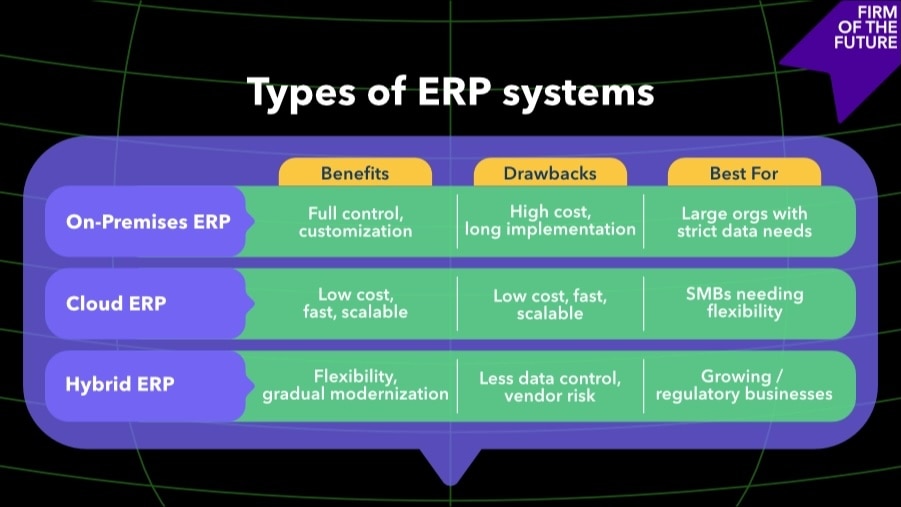
Comparison table outlining on-premises, cloud, and hybrid ERP systems — detailing benefits, drawbacks, and ideal use cases for each type.

Main types of ERP systems

Understanding various ERP types helps you guide clients to solutions that match their unique needs. Each deployment model offers distinct advantages and challenges, with the best choice depending on your client's company size, industry requirements, and IT capabilities.

Let's explore the three main types of enterprise resource planning systems and which one makes the most sense for different business scenarios:

1. On-premise ERP

On-premise ERP systems are installed locally on a company's own servers and managed in-house.

  • Benefits: Full control over data, security, and system customization.
  • Drawbacks: Higher upfront costs for hardware and IT resources, longer implementation timelines, hardware depreciation, ongoing maintenance responsibility, and security risks.

2. Cloud ERP

Cloud ERP systems are hosted remotely by a vendor and accessed through the internet. AI-native ERP systems, a type of cloud ERP, are designed as complete, forward-looking systems of intelligence, allowing for consolidated workflows and real-time visibility.

  • Benefits: Lower total cost of ownership, faster implementation, automatic updates, more visibility, and easy scalability as a business grows.
  • Drawbacks: Less control over data storage and potential concerns about vendor reliability.

3. Hybrid ERP

Hybrid ERP systems blend on-premise infrastructure with cloud-based services, giving companies flexibility to keep sensitive data in-house while leveraging the cloud for scalability and innovation.

  • Benefits: Greater flexibility and the ability to modernize gradually without a full system overhaul.
  • Drawbacks: More complex integration and potential management challenges between systems.

Tiered ERPs

Tiers add another layer to how ERP systems are categorized. While deployment types (on-premise, cloud, hybrid) describe how a system is delivered, tiers describe who the system is designed for. Tiers take into account factors, such as business complexity, transaction volumes, and industry-specific needs. Deployment types exist across all tiers—for example, you can have a Tier I cloud ERP for a global enterprise or a Tier III on-premises ERP for a small business.

  • Tier I ERP: These systems support complex operations, multiple geographies, and regulatory environments. They offer extensive customization for needs like global multi-currency and multi-tax jurisdiction, but come with higher costs and longer implementation times.
  • Tier II ERP: These solutions offer a balance of robust functionality and faster, more affordable deployment for multi-entity organizations, for example. They are often industry-specific and can support regional operations.
  • Tier III ERP: These systems focus on core functionalities, such as accounting, inventory management, and payroll, for single-entity operations with standard reporting needs. They are typically simpler, easier to implement, and more cost-effective—ideal for companies with leaner operations.

Specialized ERP systems by industry

While general-purpose ERPs serve many businesses well, industry-specific solutions offer workflows tailored to unique sector challenges. These vertical systems are designed to address the increased complexities of your clients' supply chain management, compliance requirements, and operational workflows. These are critical factors for avoiding the increased costs and silos resulting from extra systems and manual processes.

According to the 2024 ERP Report from Panorama Consulting Group, organizations that use specialized systems tend to achieve impressive results: 95% report an improvement in customer experience, 91% report better standardization, and an additional 91% report reduced IT maintenance costs.

Examples of specialized ERP functionality include:

  • Construction ERPs: Multi-entity budget vs. actual tracking, portfolio-level WIP and profitability reporting, enterprise-level AIA progress invoicing, phase- and cost-group level performance visibility, and centralized project budget and cost group management.
  • Manufacturing ERPs: Inventory management, accounting, and operations, order-level profitability, cash flow, fulfillment controls, and production monitoring.
  • Nonprofit ERPs: Compliance tools, advanced donor management, grant management, multidimensional accounting, and data security.
  • Field Services ERPs: Scheduling and dispatch, work order management, invoicing, CRM and lead management, estimates and upsells, customer operations, and connected payments and billing.
  • Healthcare ERPs: Patient management, clinical workflow tools, human resources, and regulatory compliance.
  • Retail ERPs: Pricing management, integrated inventory, CRM systems, and customer/business intelligence.

Understanding industry-specific ERP capabilities helps you guide your clients toward solutions that eliminate fragmented data and deliver an optimized, end-to-end experience through industry-tailored workflows.

Key factors to consider when helping your clients choose ERP software

Business size and complexity

Small- to mid-sized businesses often benefit from cloud-based or hybrid solutions, while larger enterprises may require Tier I systems for complex needs. Clients experiencing significant growth might need a more robust ERP solution.

Ease of implementation

Look for ERPs with industry-specific templates or pre-configured modules to reduce implementation time and risks. If an ERP requires customization, ensure your client has the resources to manage it effectively.

Integration with accounting software

Choose ERPs that integrate well with existing systems, offering real-time syncing to reduce manual entry and errors. For businesses with multiple entities, ensure the ERP manages intercompany transactions seamlessly.

Customization vs. plug-and-play

Out-of-the-box solutions work for simpler operations, while complex industries may require customization. Help your clients prioritize essential customizations over optional ones to avoid unnecessary costs and delays.

Support and scalability

Consider how well the ERP will scale with your client's future growth. Assess vendor support channels and integrations, responsiveness, and the availability of training resources to ensure long-term success.

Why Intuit Enterprise Suite is a smart choice

After evaluating your client's specific needs, business size, and growth trajectory, you may find that Intuit Enterprise Suite is the perfect fit. It's an AI-native ERP designed to help growing businesses seamlessly scale while maintaining operational efficiency and financial accuracy.

What makes Intuit Enterprise Suite stand out from other ERP solutions? Intuit Enterprise Suite is the AI-native ERP that gives modern finance teams the power of an enterprise system without the pain. Built to serve growing, complex businesses—whether they're outgrowing basic accounting tools or need to unify operations across multiple entities—it consolidates accounting, workforce management, payments, and marketing into a connected platform that does more than just store data.

It recognizes, predicts, and provides alerts based on that data. What sets Intuit Enterprise Suite apart is its AI-native system of intelligence and agency, which allows CFOs and their teams to become forward-looking growth drivers for their businesses.

How Intuit Enterprise Suite compares to traditional ERPs

Unlike legacy ERP systems that are costly, complex to implement, and slow to adapt, Intuit Enterprise Suite delivers enterprise-grade financial management without forcing mid-market businesses to accept those trade-offs. Here's how it stacks up:

1. Fast, smooth migration

Migration is streamlined with guided onboarding, AI automation, and dedicated customer success support. Every customer is paired with a dedicated support specialist who builds a personalized setup plan, oversees data migration from any software, and ensures the first month-end close runs smoothly. Customers also receive proactive business reviews, early access to new features, and faster issue resolution with expert escalation support when needed. An ERP that's intuitive from day 1 means value is clear almost immediately, instead of taking months to show up.

2. A better ERP experience at a lower cost

Intuit Enterprise Suite offers a modern interface that's easy to adopt and gives teams the enterprise power they need without the complexity they don't. This integrated and powerful solution is intuitive to learn, fast to implement, and built to perform.

3. A connected ecosystem that adapts to your business

With Intuit Enterprise Suite, you can serve 20+ industries from professional services to construction to nonprofits — the platform combines native workforce, payments, and marketing apps with 850+ best-of-breed integrations. Industry-tailored workflows, reports, and dashboards are built in, so the platform adapts to how each business operates without heavy customization. It evolves with your clients' needs, whether they're scaling through acquisition, expanding into new markets, or managing increasingly complex operations.

When is your client ready for Intuit Enterprise Suite?

As you help your clients evaluate ERP solutions, understanding when Intuit Enterprise Suite is the right fit comes down to mapping client complexities to the right architecture. Here are some signs that your client might be ready for Intuit Enterprise Suite:

  • Increased complexity: If your client is scaling quickly in terms of revenue, staff, or market reach, Intuit Enterprise Suite delivers the enterprise-grade control and automation needed to support that growth without the implementation friction that slows teams down.
  • Industry-specific needs: If your client's business has outgrown simple accounting tools and requires more robust, industry-specific reporting, Intuit Enterprise Suite provides advanced systems to track profitability, manage cash flow, and drive growth with one connected system, for businesses across construction, manufacturing, and more.
  • Multiple entities/subsidiaries: If your client is managing multiple entities, subsidiaries, or dimensions, Intuit Enterprise Suite simplifies managing intercompany transactions and consolidating financial data across all units.
  • QuickBooks users ready to level up: Look to Intuit Enterprise Suite if your client is seeking a solution that can scale with their business while still integrating seamlessly with the systems they use, such as third-party apps. Migration is fast: QuickBooks users upgrading to Intuit Enterprise Suite get going in days, not months.
Ready to explore how an AI-native ERP can give your clients enterprise-grade power without enterprise pain? Intuit Enterprise Suite is intelligent, adaptive, and tailored for their businesses, so they can get to value faster.

FAQs

What are the 3 common types of ERP?

The 3 primary types of enterprise resource planning systems are on-premise ERP (installed on company servers), cloud ERP (hosted remotely and accessed via internet), and hybrid ERP (combining both approaches).

What is the most common ERP system?

Cloud-based ERPs are the most common system.

What is the difference between ERP and accounting software?

Traditional accounting software focuses solely on financial management, including bookkeeping, invoicing, and basic reporting. ERP systems integrate these financial functions with other business operations, such as inventory, HR, CRM, and supply chain management, providing a comprehensive business management solution. AI-native ERPs are audit-ready by design, and they enable clients to make the shift from a system of record and reporting to a system of intelligence and agency that allows your firm to look ahead and spend more time planning their future.

How do ERP systems benefit accountants?

ERPs provide a platform for business intelligence that support client advisory services offerings. They can also help automate routine tasks, provide real-time financial insights, ensure data accuracy across departments, and enable sophisticated reporting and forecasting capabilities.

Is QuickBooks an ERP system?

QuickBooks itself is accounting software, not a full enterprise resource planning solution. However, Intuit Enterprise Suite builds on the QuickBooks platform to deliver ERP functionality, including multi-entity consolidation, customizable reporting dimensions, and industry-specific modules.

Can small businesses use ERP systems effectively?

Absolutely. Modern cloud-based ERP systems are designed for any size business, offering scalable pricing, fast implementation, and user-friendly interfaces that don't require extensive IT resources.

What industries benefit most from ERP software?

Construction, manufacturing, nonprofit, retail, healthcare, and field services see significant benefits from ERP implementation due to their complex operations, data management needs, and regulatory requirements.

How long does it take to implement an ERP system?

Implementation timelines vary widely—from a few weeks for cloud-based solutions such as Intuit Enterprise Suite to 6-18 months for complex enterprise systems. Cloud ERPs typically offer the fastest deployments. With Intuit Enterprise Suite, for example, migration is much faster. It is streamlined with guided onboarding, AI automation, and dedicated support, delivering a low-cost, low-disruption implementation that enables immediate time-to-value. Furthermore, if your client is upgrading from QuickBooks to Intuit Enterprise Suite, they can get going in days, not months.

What are the key modules in an ERP system?

Core ERP modules typically include financial management, inventory control, supply chain management, human resources, CRM, and reporting/analytics. Industry-specific systems add specialized modules for manufacturing, healthcare, retail, or other sectors.

Do ERP systems work for remote teams?

Yes, especially cloud ERP systems, which provide secure access from anywhere with internet connectivity. Modern ERPs support real-time collaboration, mobile access, and role-based permissions—ideal for distributed workforces.

How do cloud ERP systems differ from on-premise ones?

Cloud ERPs offer lower upfront costs, automatic updates, easier scalability, and remote accessibility. On-premise systems provide more control over data and customization but require significant IT infrastructure and maintenance.

What should businesses look for in an ERP vendor?

Look for vendors with proven industry experience, strong implementation support, reliable customer service, and a solid product roadmap. For accountants and advisory firms, prioritize solutions that build on familiar systems (such as QuickBooks) so you can confidently guide clients without needing to master a completely new platform.


Recommended for you

Get the latest to your inbox

Get the latest product updates and certification news to help you grow your practice.

Looking for something else?

Get QuickBooks

Smart features made for your business. We've got you covered.

Tax Pro Center

Expert advice and resources for today’s accounting professionals.

QuickBooks Support

Get help with QuickBooks. Find articles, video tutorials, and more.

How can we help?
Talk to sales 1-800-497-1712

Monday - Friday, 5 AM to 6 PM PT

Get product support