April 15 to April 21 is Money Smart Week. Consider this a well-timed occasion to look into any specific skills your team could fine-tune. For example, financial advisors may be able to learn more about AI fraud detection, or see how you can future-proof your accounting practice after busy season. Be sure to check out this month’s updates as well.
Intuit Connect, the premier event for accounting firms, is back,
Oct. 26-28 in Las Vegas!

Share these QuickBooks updates with your associates and clients on the latest innovations relevant to business owners and admins.
Stay In the Know

Learn about the most exciting innovations ... visit the Hub to watch weekly videos.
Visit the new Hub to check out the weekly episodes.
Better Together Tour
In a nutshell: Join us in person to build community, grow your practice, and learn new ways to thrive in an AI-driven industry.
With the Intuit Better Together Tour, accountants can gather in Atlanta, Los Angeles, Dallas, or Miami for hands-on learning, product discovery, and networking with peers and Intuit leaders, all while earning CPE credit to support professional certifications.**
About the events:
- For firm leaders navigating growth in small- and medium-sized accounting firms
- Half-day workshop
- Tradeshow-style setting
- Cost: $49 per ticket
Where and when:
- Atlanta: May 28
- Los Angeles: June 2
- Dallas: July 23
- Miami: July 29
Attending the Better Together Tour is your chance to:
- Build your firm’s future with hands-on workshops led by industry leaders. Get actionable solutions to streamline operations and improve efficiency.
- Explore Intuit’s ecosystem and AI-driven innovations with demos for tools that help achieve scalable growth.
- Connect and network to build meaningful connections with peers, leaders, and local Intuit representatives in insightful sessions,
- Earn 2.5 CPE credits.**

Discover how the Better Together Tour can benefit you and your practice.
Important product and disclaimer information
Intuit (Sponsor ID# 103311) is registered with the National Association of State Boards of Accountancy (NASBA) as a sponsor of continuing professional education on the National Registry of CPE Sponsors. State boards of accountancy have final authority on the acceptance of individual courses for CPE credit. Complaints regarding registered sponsors may be submitted to the National Registry of CPE Sponsors through its website: www.nasbaregistry.org.
Intuit Accountant Suite training in ProAdvisor Academy
In a nutshell: You can find several training courses in ProAdvisor Academy to help your team implement Intuit Accountant Suite.
As your firm shifts from QuickBooks Online Accountant to Intuit Accountant Suite, 4 new ProAdvisor Academy courses can help you:
- Explore what’s different in Intuit Accountant Suite.
- Discover how your workflows will evolve and drive efficiency.
- Get familiar with new features such as Books Close, Client Insights, and firm-wide user management
Live courses available now
- Switching from QuickBooks Online Accountant to Intuit Accountant Suite: Guides all team members through key updates to the interface and core workflows in Intuit Accountant Suite.
- Managing your clients in Intuit Accountant Suite: Covers your client list, custom fields, and using Customer Hub to streamline day-to-day client management.
- Books Close at scale with Intuit Accountant Suite: Walks through your end-to-end Books Close workflow to help your firm manage multiple clients efficiently.
- Using Intuit Accountant Suite for client insights: Explores Client Insights, anomaly detection, and using Intuit Intelligence to surface meaningful data across your firm.
Upcoming courses
- Managing your firm and your team in Intuit Accountant Suite: Walks through how to use Work, firm-level tools, and the Manage training dashboard to support your team.
- Moving to Intuit Accountant Suite Accelerate: Covers upgrading, grouping clients and users, and assigning role-based access at scale to support a growing firm.

Explore the Intuit Accountant Suite courses on ProAdvisor Academy.
Modern reporting in QuickBooks
In a nutshell: The reporting experience in QuickBooks Online now has a fully modernized look and feel. The previous experience will sunset on May 22.
The updated reporting experience was built to help your clients process much larger volumes of data and rapidly deploy new analytical features so they can scale more efficiently. The experience also provides more advanced, actionable insights, including dashboard KPIs, that empower clients to make better-informed decisions and enable the platform to scale with them.
When the previous experience sunsets on May 22, all of your clients’ saved custom reports will automatically migrate to the updated reporting experience. Their reporting data, applied filters, and customizations will remain the same.
Reporting updates
- Advanced customization and visuals: Users can add almost any attribute as a column, use new grouping and pivot functionalities, and display data in visual chart formats. New visual formatting options include banded rows, color-coded columns, and gridline settings.
- Optimized layout and navigation: The redesigned interface includes a space-saving top panel for frequently used tools, as well as detailed filters in a right-hand panel. Customers can use page-level scrolling for maximum data visibility and search using Ctrl + F.
- Smarter workflows and GAAP alignment: The new reporting experience retains all previous functionality, and now includes seamless drill-downs that remember your clients’ custom settings and automatically refresh reports with new transactions. Reports also honor GAAP-aligned accounting orders and hide unused zero-balance rows for a cleaner view.
Note: You may have seen the option to Switch to classic view, but as of May 22, this option will no longer be available. Between April 1 and May 22, those using the old experience may notice they can’t save new custom reports. However, any customizations applied in these reports can be saved in the new reporting view.
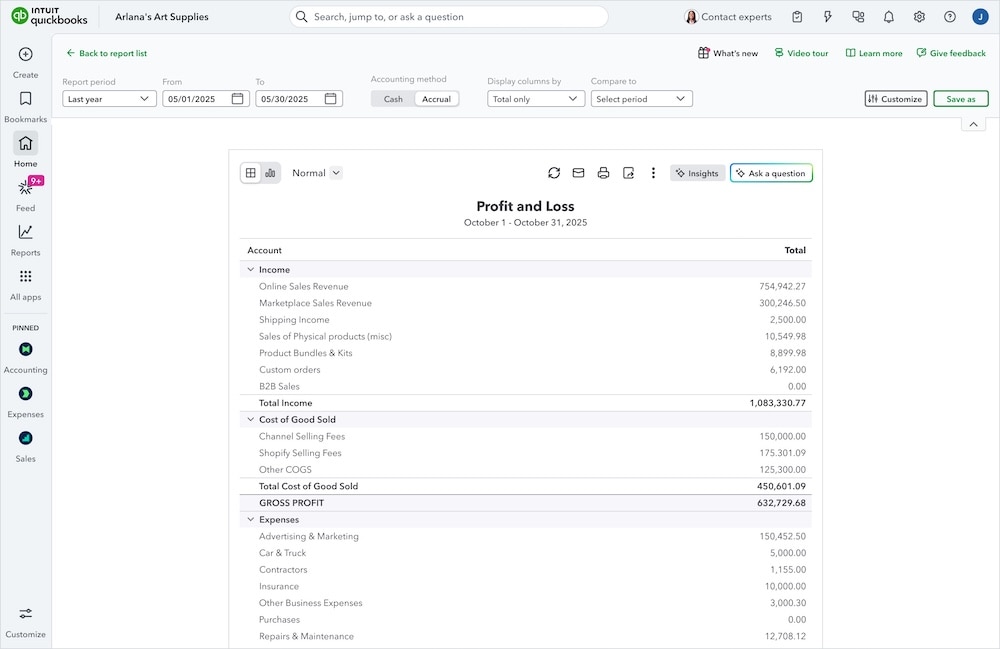
Get key details about the updated reporting experience.
Secure your bookings and get paid faster with invoice deposits
In a nutshell: Get paid upfront by collecting deposits right from the invoice.
Do you have clients with an event or appointment-based business? Do they have high upfront costs? Taking payments upfront can improve your clients’ cash flow and help avoid cancellations. If your client runs an event-based business, such as wedding photography or party planning, last-minute cancellations can be tough. When a customer doesn’t show, clients lose valuable time and money.
Now, your clients can get paid the moment they create an invoice with invoice deposits in QuickBooks. They can enter a customer’s card or ACH details and charge the deposit right away. They can secure cash flow, lock in client commitment, and stop leaving money on the table.
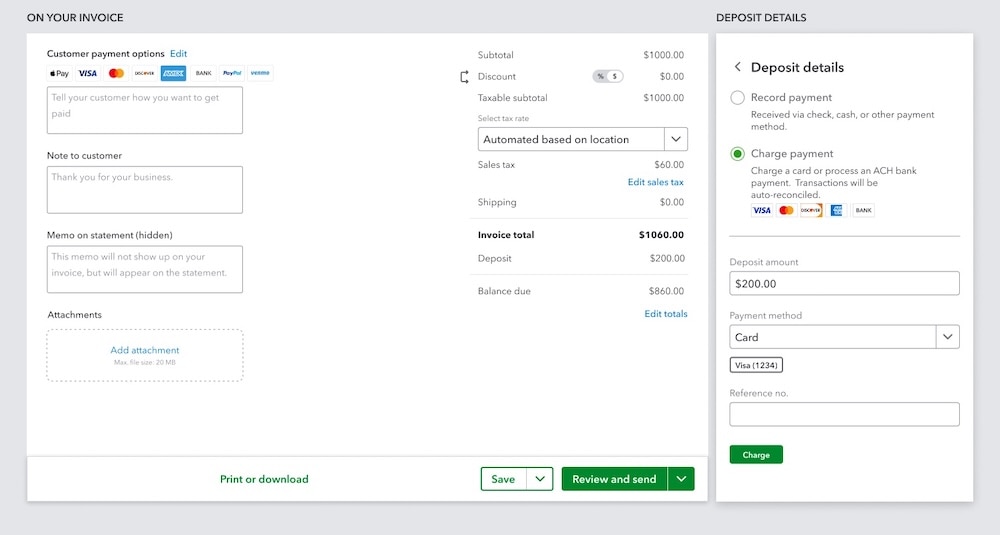
Learn how to take a deposit when creating an invoice in QuickBooks.
Important product and disclaimer information
Money movement services are provided by Intuit Payments Inc., licensed as a Money Transmitter by the New York State Department of Financial Services. For more information about Intuit Payments' money transmission licenses, please visit https://www.intuit.com/legal/licenses/payment-licenses/.
**Product Information
QuickBooks Payments: QuickBooks Payments account subject to eligibility criteria, credit, and application approval. Subscription to QuickBooks Online required. Not available in US territories or outside the US.
Make it easy for customers to pay multiple invoices quickly
In a nutshell: Your clients’ customers can now pay several invoices at once.
Do your clients have customers with more than one unpaid invoice? Paying multiple invoices just got easier.
Now, QuickBooks Payments lets customers pay multiple invoices at the checkout page. They can choose which invoices to pay and handle everything at once, with no need for customers to find and pay each invoice separately. When a client’s customer goes to pay an invoice online, they’ll see their unpaid invoices, specifically those already sent or past their invoice date, and can select any or all to pay in one go.
By selecting multiple invoices at checkout, these customers save time while your clients’ books update and reconcile automatically. It’s a faster way to get paid and a more streamlined experience for everyone involved.
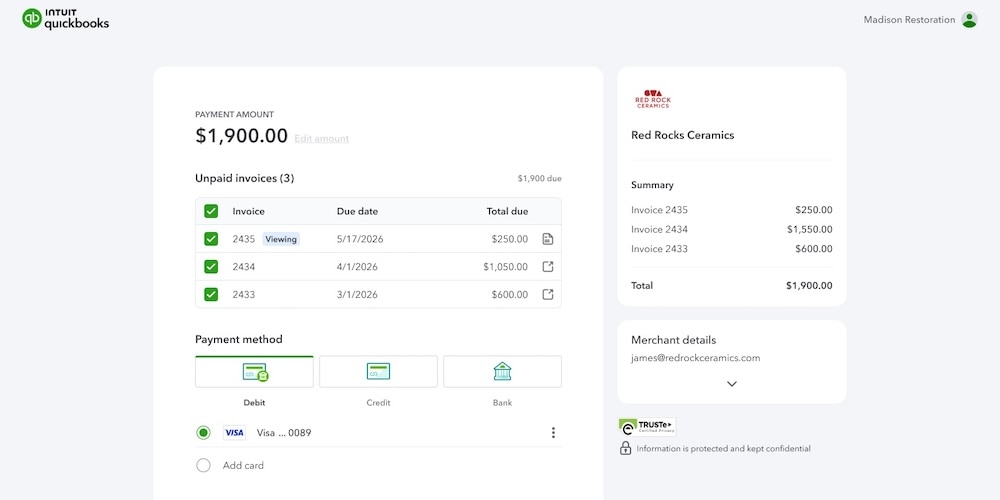
Multiple invoices can be paid in QuickBooks.
Important product and disclaimer information
Money movement services are provided by Intuit Payments Inc., licensed as a Money Transmitter by the New York State Department of Financial Services. For more information about Intuit Payments' money transmission licenses, please visit https://www.intuit.com/legal/licenses/payment-licenses/.
**Product Information
QuickBooks Payments: QuickBooks Payments account subject to eligibility criteria, credit, and application approval. Subscription to QuickBooks Online required. Not available in US territories or outside the US.
End-to-end garnishment tracking
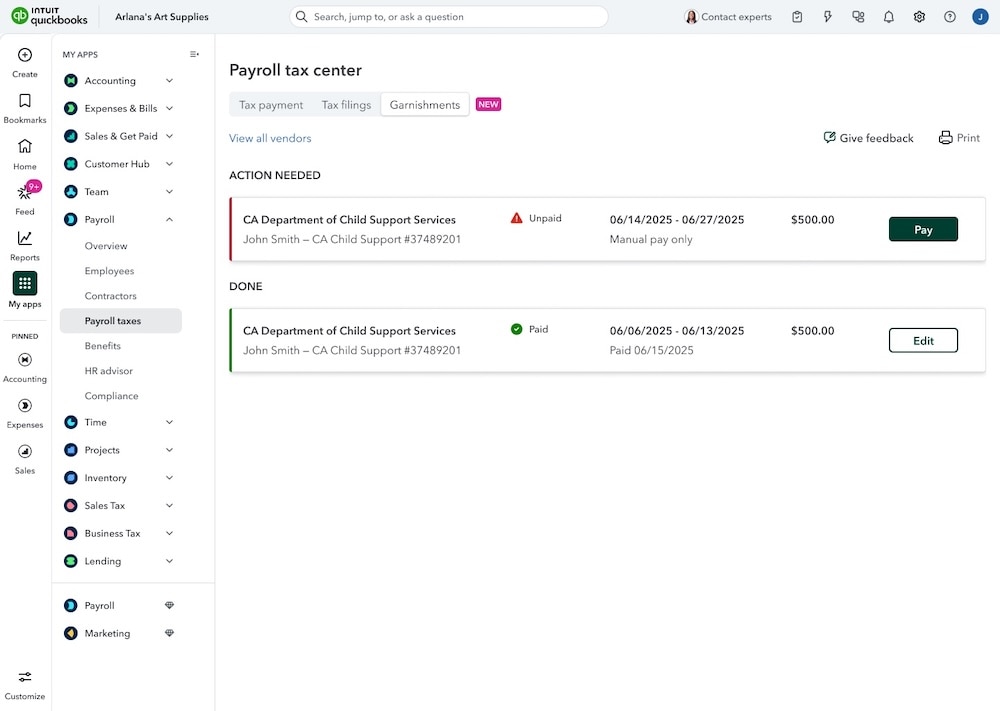
In a nutshell: QuickBooks Online Payroll customers can go to Garnishments in the Payroll tax center to set up, track, and record employees’ garnishment payments in one place.
QuickBooks Online Payroll now has a streamlined, end-to-end garnishment workflow to help you stay compliant and get more control, efficiency, and peace of mind.
While setting up garnishments, you can associate each one with the agency expecting it, so you can track the accrued amounts.
Tracking also goes beyond payroll, so your business can keep an eye on total garnishment payments due for each employee as well as the agency they’re payable to.
Important product and disclaimer information
Money movement services are provided by Intuit Payments Inc., licensed as a Money Transmitter by the New York State Department of Financial Services. For more information about Intuit Payments' money transmission licenses, please visit https://www.intuit.com/legal/licenses/payment-licenses/.
Intuit Enterprise Suite webinars for your firm and mid-market clients
In a nutshell: Intuit’s virtual webinars offer valuable knowledge to help drive your firm and clients’ businesses forward, from in-depth product education to big-picture industry trends.
You and your clients are invited to attend our next webinar for mid-market business leaders, From notebook to AI: The Humble House story, on Tuesday, April 21 at 11 AM PT. You’ll learn how Humble House Foods moved from the most basic of accounting systems to a complete transformation in 2025 with Intuit Enterprise Suite.
Also in our on-demand webinar hub, you can see the latest innovations in Intuit Enterprise Suite in action, including multi-entity capabilities, enhanced business intelligence, and next-gen AI. Explore the library of webinars to get familiar with the innovative functionality that will help firms deliver high-impact insights and drive strategic client growth with enterprise-grade efficiency.
Sign up for our next webinar, From notebook to AI: The Humble House story.
Larger batch payment maximum in QuickBooks Bill Pay Premium and Elite
In a nutshell: Starting March 9, Bill Pay Premium and Bill Pay Elite subscribers could make up to 50 payments in one batch, rather than the previous batch maximum of 20 payments.
Your clients using Bill Pay Premium and Bill Pay Elite can now go to Bills and select Unpaid in order to:
- Set up more payments in less time.
- Process up to 50 bills at once.
- Customize the type and speed for each payment.
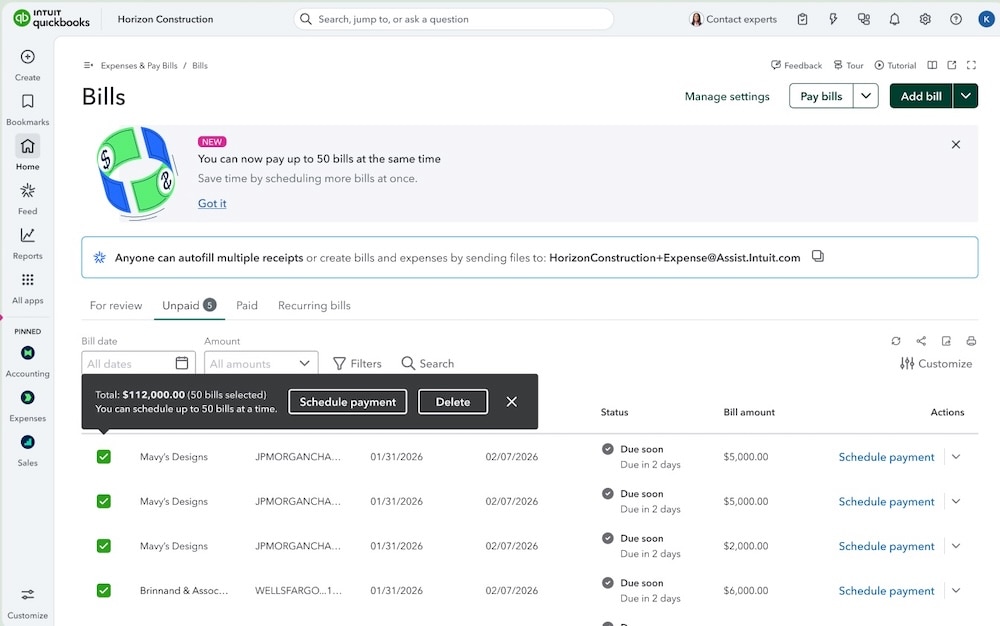
Pay multiple bills at once in QuickBooks Bill Pay.
Important product and disclaimer information
Money movement services are provided by Intuit Payments Inc., licensed as a Money Transmitter by the New York State Department of Financial Services. For more information about Intuit Payments' money transmission licenses, please visit https://www.intuit.com/legal/licenses/payment-licenses/.
One intelligent platform, all-in-one value
In a nutshell: Find out what’s coming soon to QuickBooks Online.
QuickBooks on the Intuit platform is now the only all-in-one solution powered by AI, human expertise, and connected data, available on demand to help fuel success for your firm and your clients.
Intuit Intelligence helps your clients’ businesses grow at every stage, from startup to scale-up. Starting this May, Intuit Experts can assist with many routine tasks. Plus, you’ll also be able to partner with these experts, who have on average over ten years of experience.** Here are a few highlights:
- Boost confidence with onboarding and AI-guided setup: During setup, businesses can instantly connect with an Intuit Expert or schedule an appointment, for confidence that books are set up correctly. Payroll AI will also include an AI Payroll Tax Companion for tax-related setups and analysis.
- Increase accuracy with bookkeeping and transaction categorization: Use Intuit Intelligence combined with credentialed Intuit Experts to review data for clean, up-to-date books.
- Get proactive tax estimates: Businesses can receive timely tax projections from Intuit Experts, helping them plan for payments and reducing the risk of penalties.
New tools for cash flow
You and your clients will soon be able to surface actionable capital insights exactly when they’re needed with the new Cash Flow Lending AI. Also coming soon is the Intuit Business Credit Card, which syncs transactions in real time to automate reconciliation with each swipe. And, to help clients get paid up to 4x faster,1 we’re also adding Buy Now, Pay Later via Affirm for invoices.
As always, our goal with these innovations is to honor your client relationships while providing a seamless extension of your team to help you focus on strategic growth and high-value advisory services.
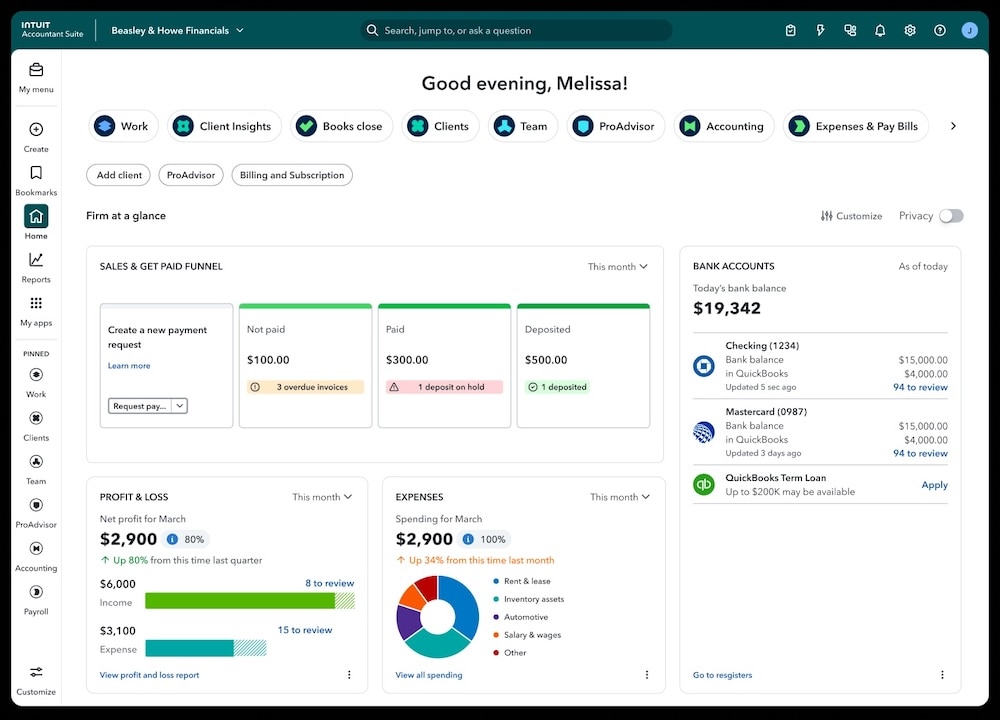
In case you missed them, catch up on all the innovations released from February.
Important product and disclaimer information
Money movement services are provided by Intuit Payments Inc., licensed as a Money Transmitter by the New York State Department of Financial Services. For more information about Intuit Payments' money transmission licenses, please visit https://www.intuit.com/legal/licenses/payment-licenses/.
**Features
Intuit Experts have on average over ten years of experience: Based on internal data, as of April 2025.
#Claims
- “Get paid up to 4x faster”: Based on QuickBooks user data
Table of contents
Table of contents
Recommended for you

Get the latest to your inbox
Get the latest product updates and certification news to help you grow your practice.
Looking for something else?
Call Sales: 1-844-435-1308





In a nutshell: Get an all-in-one view of 1099 filing status for all your clients, and save time filing through QuickBooks Online Accountant.