What’s changing and when
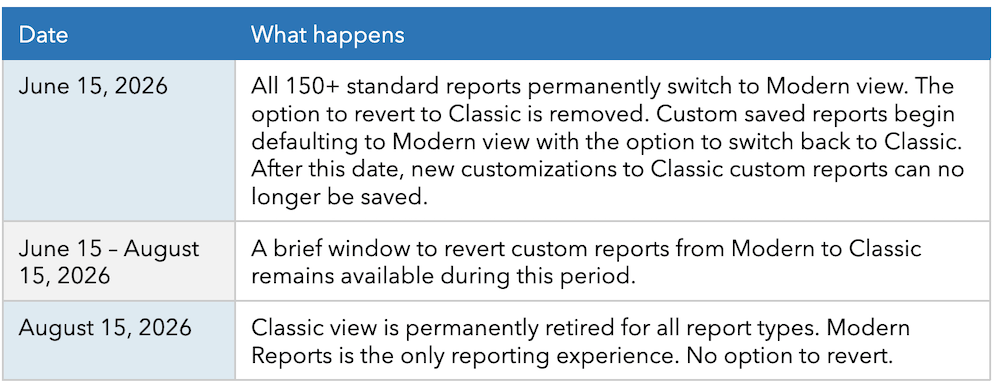
After June 15, 2026, the Classic view for all 150+ standard reports will no longer be available across QuickBooks Online, Intuit Accountant Suite, and Intuit Enterprise Suite. Modern view will become the exclusive reporting interface for standard reports on that date. Custom saved reports will follow on August 15, 2026, when Classic view is permanently retired for all report types.
Your data and saved reports are safe
All 150+ standard reports will open automatically in Modern view on June 15. Between June 15 and August 15, custom reports will default to Modern view, but retain the option to switch back to Classic. On August 15, that option will be removed permanently.
Your data, filters, favorite reports, report schedules, and customizations will carry over automatically. You will not need to recreate anything manually. You will know a report has transitioned when it opens in Modern view by default.
What to expect before June 15
Currently, you can still open reports in Classic view. However, you can no longer save new customizations in Classic. If you modify a Classic report and want to save it, QuickBooks, Intuit Accountant Suite, and Intuit Enterprise Suite will prompt you to switch to Modern view, first. Your filters and groupings will carry over automatically, so you won’t need to re-enter them.
What Modern Reports offer
Everything you rely on in Classic is still there, including reporting periods, filters, accounting methods, display options, comparisons, and toggles for active and zero-value rows. Modern view adds new capabilities on top of that foundation:
- Flexible columns: Add almost any attribute as a column in a report.
- New grouping and pivot options for deeper analysis.
- Chart views to visualize your data directly in QuickBooks.
- Visual formatting options, including banded rows, color-coded columns, and flexible gridlines. Note some options are available on QuickBooks Online Advanced and Enterprise plans.
- Better navigation: Scroll the full page instead of a small box; use Ctrl+F/Command+F to search within longer reports.
- Drill-downs that remember your settings: Go back from a transaction report without losing your customizations.
- Auto-refresh: If you drill down and edit a transaction, the report refreshes automatically.
- Standard accounting order: Reports such as GL and Trial Balance now follow the proper sequence: Assets, Liabilities, Equity, Income, and Expenses.
- Flexible financial views: Collapse or expand specific account sections to switch between a detailed breakdown and a high-level summary.
- Cleaner, more reliable reports: Reports are easier to read with clearer date labels, complete financial values, and smarter defaults that reduce clutter.
- No lost work on refresh: Your report customizations stay exactly as you left them, even if you reload the page.
Additional improvements to reports
See these additional improvements to reports:
- Faster report customization: Make all your changes in one go—filters, columns, or groupings—and then run the report once. No more waiting through multiple refreshes while setting things up.
- Cleaner print and PDF output: Reports print the way they should. Financial numbers are properly laid out, sections flow continuously without unnecessary page breaks, and what you see on screen is what you get on paper.
- Formulas that carry over to Excel: When you export a customized report to Excel, calculated rows and columns retain their formulas. Totals, subtotals, and calculated fields stay live and editable in the exported file.
- Company name where it belongs: Your company name now appears at the top of the report by default, just like it did in Classic Reports.
- Reports sort the way you expect. When you group a detailed report by customers, vendors, accounts, or any other attribute, results are sorted correctly and consistently.
- Cleaner detailed reports by default: Inactive and zero-balance accounts no longer clutter detailed reports, such as the GL. Only active accounts with relevant balances are shown by default.