Happy New Year to you, your teams, and your clients! Because your clients’ success is your success, we set our sights each year on enhancing capabilities across products. In reflecting on 2025, we’re excited to share all the innovations and improvements from 2025. Be sure to check out the newest updates this month.

Share these QuickBooks updates with your associates and clients on the latest innovations relevant to business owners and admins.
Stay In the Know

Learn about the most exciting innovations. Join us for a live webinar on Thursday, February 19 at 11 AM PT.
Visit the new Hub to check out the weekly episodes.
1099 dashboard for accountants
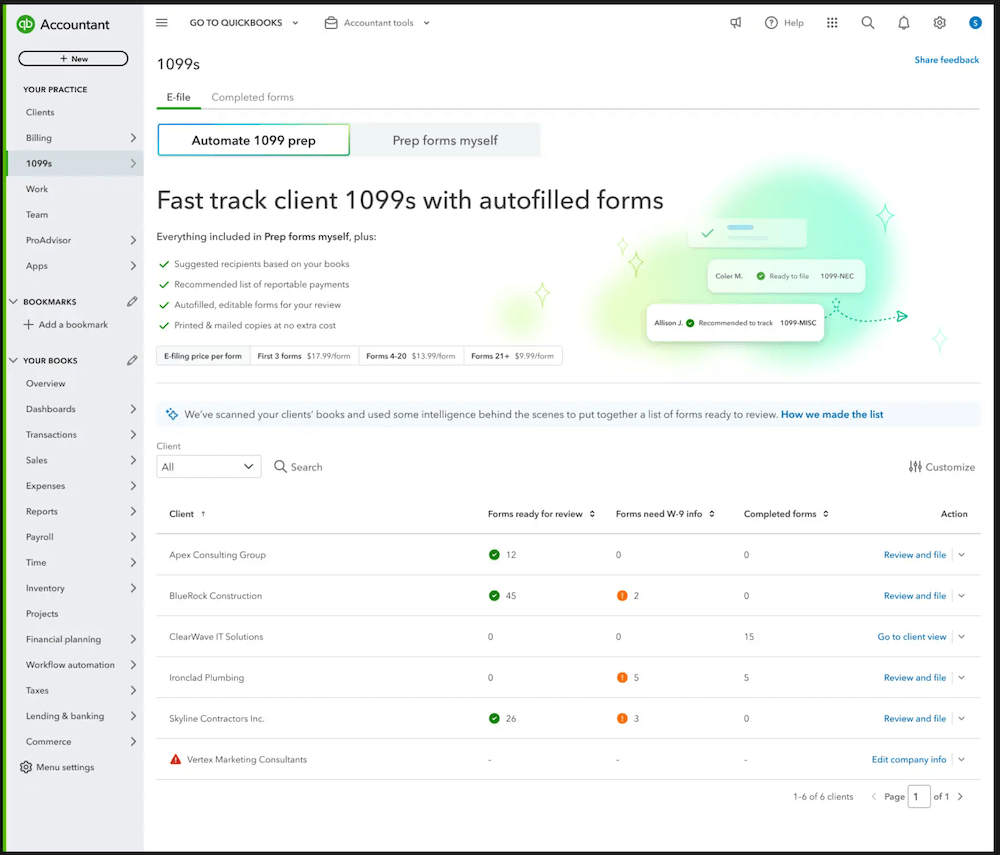
In a nutshell: Get an all-in-one view of 1099 filing status for all your clients, and save time filing through QuickBooks Online Accountant.
Thanks to new AI-powered automation, you can get a comprehensive overview into your clients’ 1099 status without having to switch between each QuickBooks Online account. From one dashboard, you’ll now see which clients need to file 1099s, which ones are ready to file, and which of your clients’ vendors are missing the required W-9 info.
On the same screen, you can proceed directly into the 1099 filing workflow and complete these filings on your clients’ behalf.
In QuickBooks Online Accountant under Your Practice, select 1099s, and choose e-file to see your 1099 dashboard.
Learn more about creating and filing 1099s.
Coming soon: Intuit Intelligence chat and more updates in QuickBooks Online
In a nutshell: Intuit Intelligence, Business Tax AI, and foundational improvements help create a smarter tax filing season.
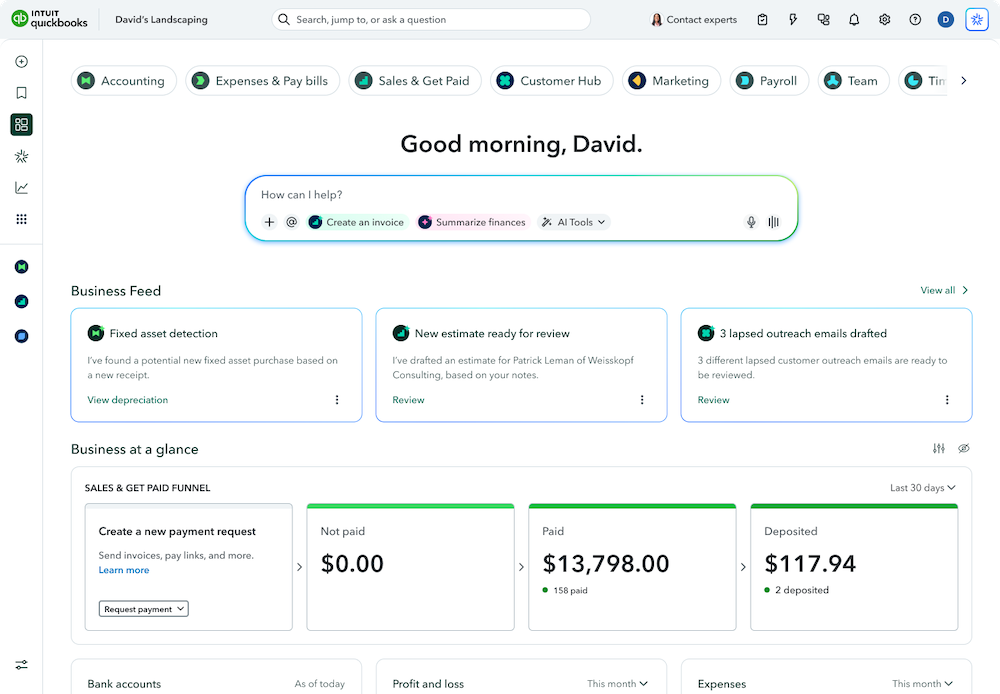
Intuit Intelligence chat (coming soon in beta**) helps you make better decisions for your firm and clients faster by turning questions into clarity and driving action for measurable growth. Intuit AI also helps you get more done faster so you can focus on moving your business forward with speed and accuracy.
With instant answers, trusted insights, and revolutionary intelligence, one intelligent system will now connect your accounting, payments, payroll, and bill pay data for your clients’ businesses. Intuit Intelligence learns from billions of data points across millions of businesses, and will help you spot trends, benchmark performance, and see what’s next.
For example, when you ask, “What are the top 5 things I need to know about this client’s books?,” you’ll get instant, contextual answers in plain language. Note: AI chat prompt limits vary by plan. QuickBooks Online Advanced users will have the highest limit, and QuickBooks Online Essentials users will have the lowest limit.
Business Tax AI (available soon in beta**) will find and suggest ways your clients can optimize tax savings year-round to help them stay compliant and get every deduction they deserve. Note: This feature will be available in QuickBooks Online Essentials, QuickBooks Online Plus, and QuickBooks Online Advanced.
Get a faster, smarter, and more reliable QuickBooks experience, with improved banking, stronger automation, and enhanced usability and performance to simplify work, save time, and keep businesses moving confidently.
Important product information
Money movement services are provided by Intuit Payments Inc., licensed as a Money Transmitter by the New York State Department of Financial Services. For more information about Intuit Payments' money transmission licenses, please visit https://www.intuit.com/legal/licenses/payment-licenses/.
**Features
Beta availability: This information is intended to outline our general product direction, but represents no obligation and should not be relied on in making a purchasing decision. Additional terms, conditions and fees may apply with certain features and functionality. Eligibility criteria may apply. Product offers, features, and functionality are subject to change without notice.
Check out November’s update on Intuit Intelligence in QuickBooks Online.
New inventory features
In a nutshell: Several inventory updates are now available in QuickBooks Online Plus, QuickBooks Online Advanced, and Intuit Enterprise Suite, as well as QuickBooks Online Simple Start and QuickBooks Online Essentials if your clients purchase the $40/month inventory add-on.
You’ll find four new sets of features related to inventory:
- Done-for-you inventory quantity adjustments: This capability reduces the manual data entry required for inventory quantity adjustments. Your client’s warehouse staff can upload a physical inventory worksheet after completing a cycle count, and the physical counts will be automatically extracted and prefilled in their Inventory Quantity Adjustment transaction form.
- Moving Average Cost (MAC) accounting method: For clients with non-perishable goods and/or stable turnover, MAC accounting helps smooth out price fluctuations. MAC accounting can also provide a more realistic reflection of current inventory values and market conditions to promote more accurate financial reporting and improved decision making.
- Item receipts: Support for item receipts helps your clients create a documented record of received goods, ensuring accurate quantity tracking, alignment with purchase orders, and reduced processing times.
- Sales order improvements: These enhancements give clients more flexibility and improved tracking for items promised to their customers. New capabilities within sales orders include custom fields, smart search functionality, adding attachments, support for bundles, and converting sales orders to POs.
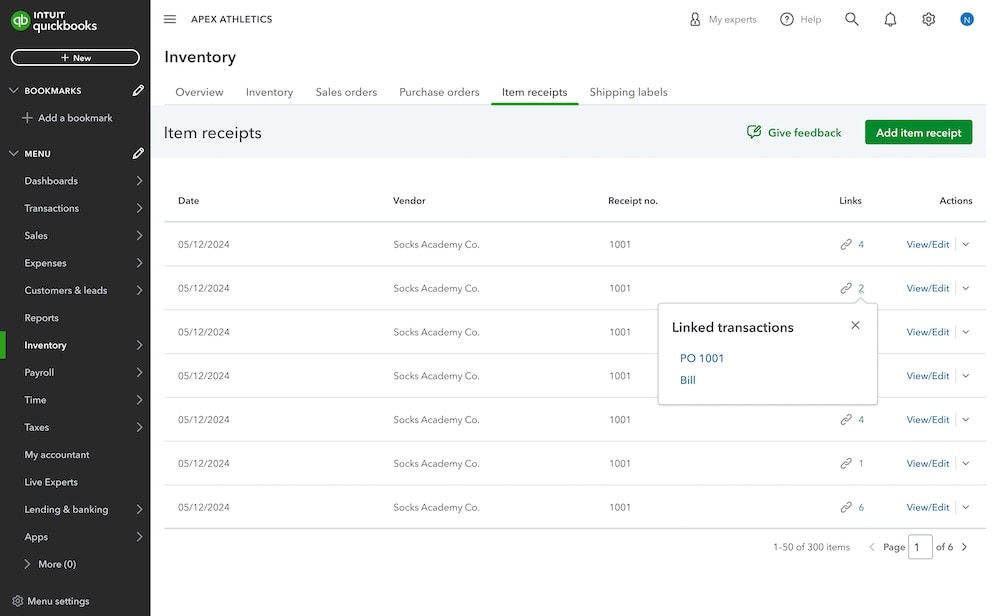
Check out the inventory tab in QuickBooks Online.
Table of contents
Table of contents
Recommended for you



Get the latest to your inbox
Get the latest product updates and certification news to help you grow your practice.
Thanks for subscribing.
Relevant resources to help start, run, and grow your business.
Looking for something else?
Call Sales: 1-844-435-1308





In a nutshell: Get an all-in-one view of 1099 filing status for all your clients, and save time filing through QuickBooks Online Accountant.