The month of March includes Paper Money Day on March 10. Did you know that in recent years, firms have been taking on more AR/AP tasks? That’s because more and more businesses are suffering from cash flow issues. Should your firm consider making the same shift? Find out why firms are owning the workflow around cash. Afterwards, be sure to read up on this month’s updates.

Share these QuickBooks updates with your associates and clients on the latest innovations relevant to business owners and admins.
Stay In the Know

Learn about the most exciting innovations. Join us for a live webinar on Thursday, March 19 at 11 AM PT, or visit the Hub to watch weekly videos.
Visit the new Hub to check out the weekly episodes.
Assign ProAdvisor training in Intuit Accountant Suite
In a nutshell: In Intuit Accountant Suite, you can now assign ProAdvisor Academy certifications and courses to your team members with just a few clicks—and track their progress every step of the way.
Designed to simplify training workflows, the ProAdvisor training manager in Intuit Accountant Suite empowers your team to stay on top and succeed. New options in Manage training allow you to assign and track your team’s progress, while giving you a bird’s eye view of your firm’s learning journey.
This one-stop training hub helps you identify opportunities for growth and develop a culture of continuous learning. With it, your firm can transform professional development from a checkbox into a firm-wide strategy.
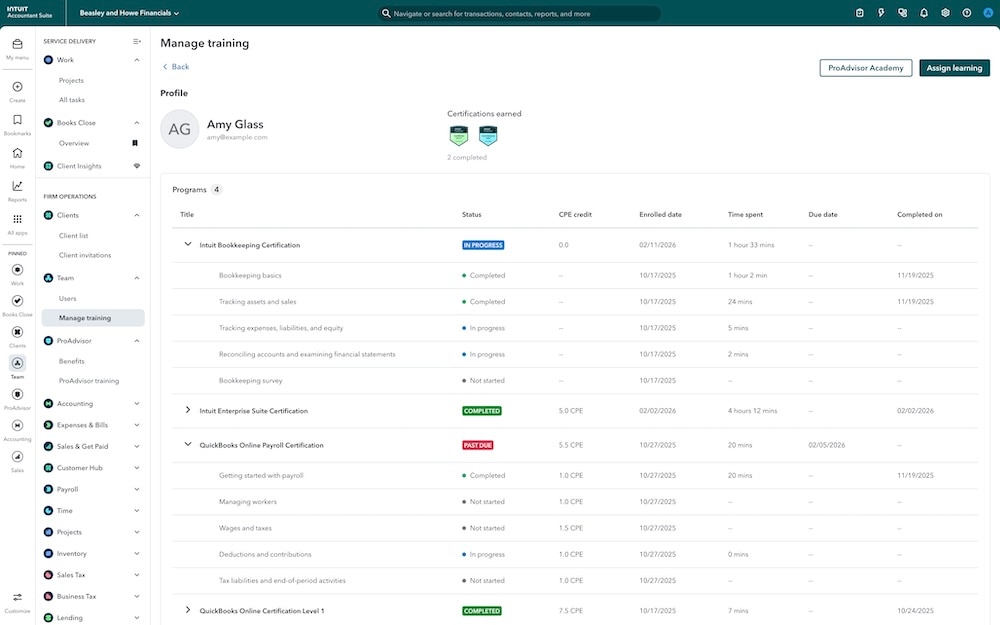
Manage your team’s ProAdvisor training in Intuit Accountant Suite.
Opt your clients into the improved AI-powered bank feed
In a nutshell: After months of improvement, the new AI-powered bank feed in QuickBooks Online will become the default experience on May 8.
This new experience includes a refreshed interface with inline editing to help QuickBooks Online customers and accountants speed their process of entering transactions. AI-powered category and match suggestions are served up more accurately, and you can add attachments with drag-and-drop simplicity. In QuickBooks Online Essentials, Plus, and Advanced, you can use context-gathering features and reference new AI explanations to simplify managing unfamiliar transactions.
And to help make the entire experience a delight to use, we added nearly 100 small improvements in response to accountant feedback, including performance improvements that make the page run over 50% faster.
If your clients previously opted out of the new AI-powered bank feed, be sure to let them know about the improved experience before it becomes the default in May.
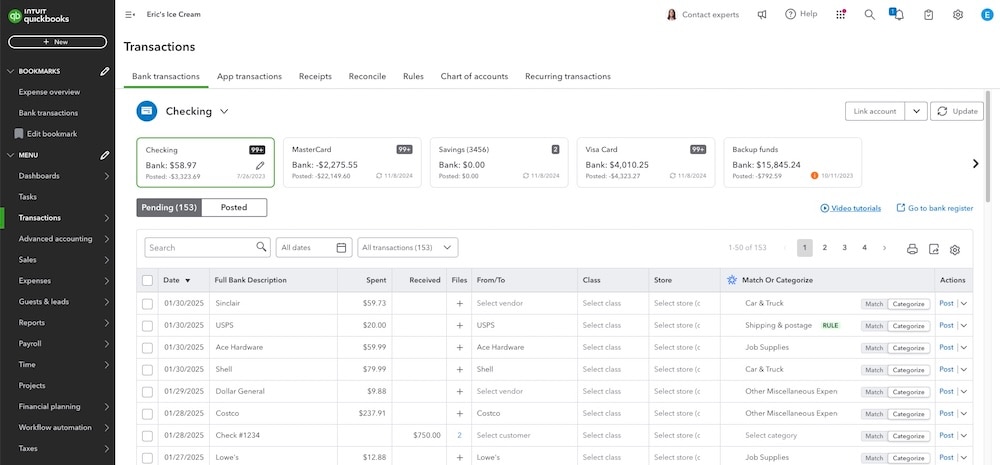
Improve your efficiency with the new AI-powered banking page.
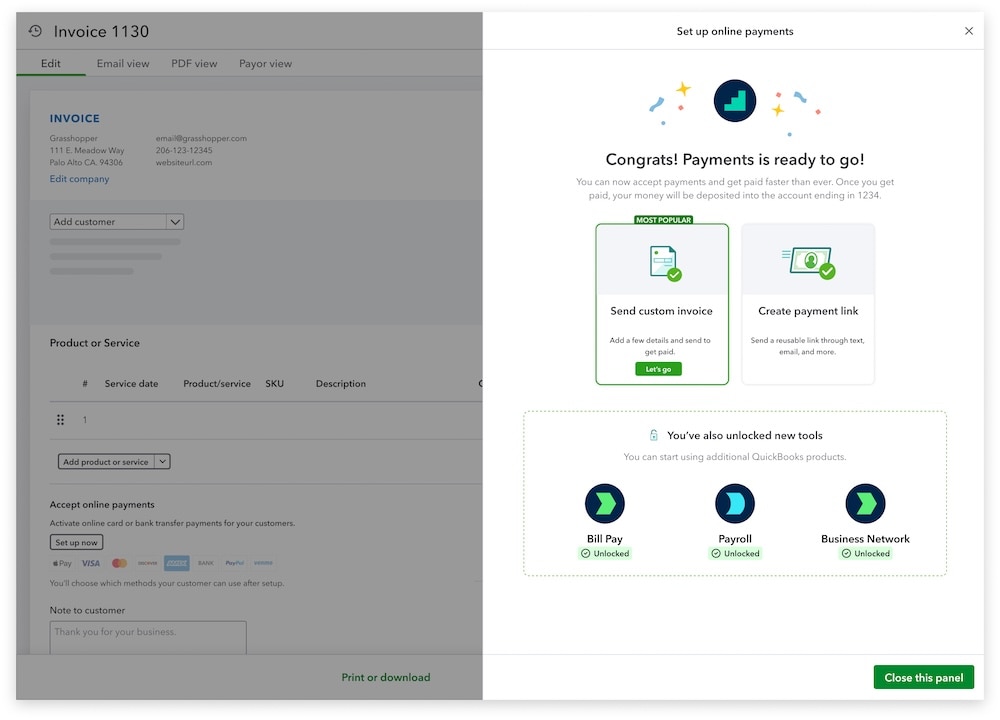
Streamlined setup for QuickBooks Bill Pay, Payments, Payroll
In a nutshell: Your clients can streamline more of their essential business tools on one platform by getting access to QuickBooks Payments, QuickBooks Bill Pay, and QuickBooks Payroll through one centralized application.
Your client no longer needs to enter the same information such as their EIN, SSN, or business address over and over again when they want to start using Payments, Bill Pay, or Payroll. Instead, they can proceed through one intelligent application flow and be simultaneously assessed for all eligible products.
Help your clients prepare to get paid and pay vendors in seconds, with one form.
Important product information
Money movement services are provided by Intuit Payments Inc., licensed as a Money Transmitter by the New York State Department of Financial Services. For more information about Intuit Payments' money transmission licenses, please visit https://www.intuit.com/legal/licenses/payment-licenses/.
A more powerful QuickBooks can evolve how you work, save time, and provide more strategic advisory services.
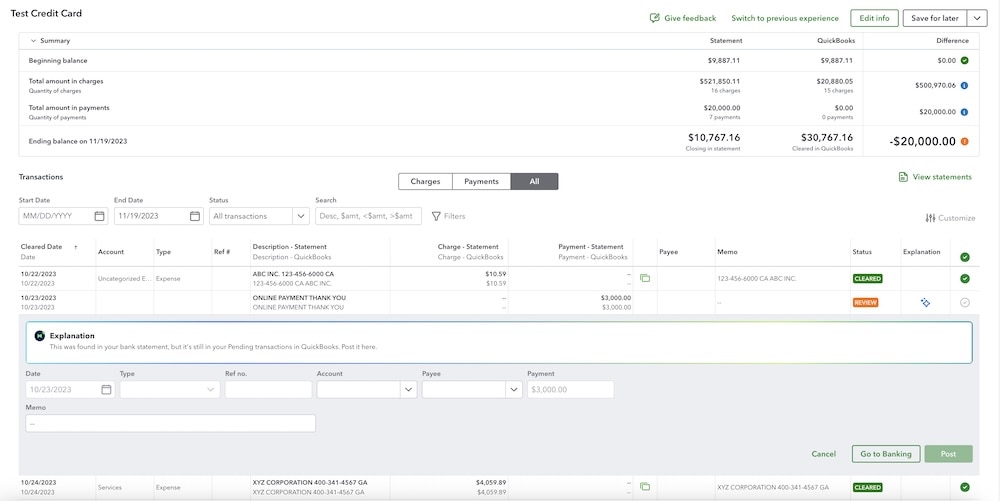
Updates to AI-powered reconciliation
Reconciling transactions can take up a lot of your team’s time. With AI-powered reconciliation, you can accelerate the process by nearly 3 times while retaining control over the work your firm produces.1
Previously, AI-powered reconciliation didn’t allow in-line editing—but now, you and your clients can directly edit their listed transactions. Not only that, they can directly post transactions, undo exclusions, or add new transactions into QuickBooks Online right from the list whenever the AI suggests these corrections.
Important product information
#Claims
1With AI-powered reconciliation, you can accelerate the process by nearly 3 times: Based on internal data as of November 2025, comparing customers opted into AI-powered reconciliation vs non-AI powered reconciliation.
Find out how Accounting AI features can streamline your work.
Accounting AI collaboration improvements
In a nutshell: Use Accounting AI to collaborate in new ways to add more efficiency to your work.
Now in QuickBooks, clients and accountants can assign one or more team members when requesting more info about a transaction. This will allow users replying to requests to see a secure filtered list of questions assigned to the correct person. You can also sort and filter the bank feed according to the status of existing transaction requests.
Rather than leave unassigned, ambiguous requests, you and your clients can clarify collaboration and get more done as a team.
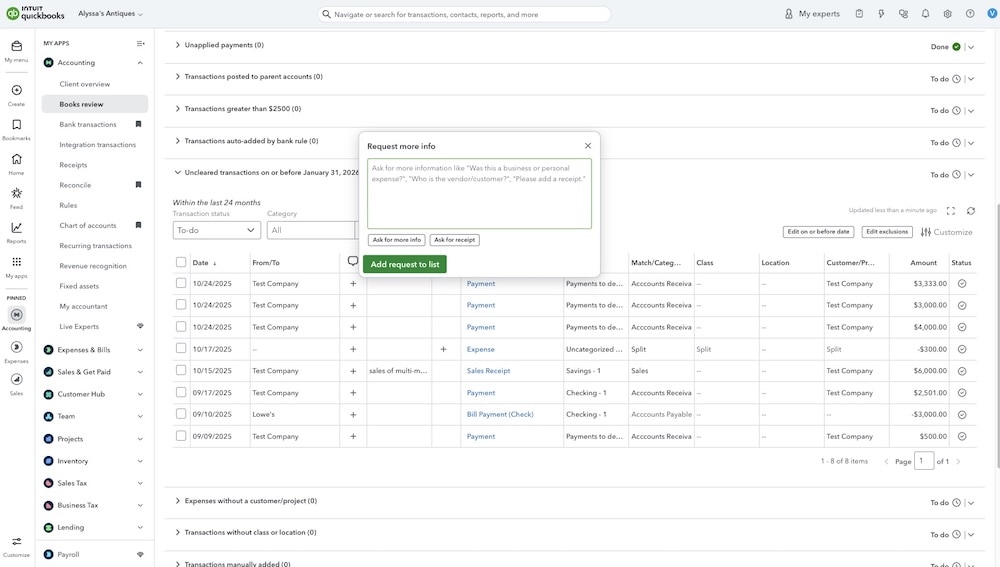
Learn how Accounting AI speeds your workflow.
Parallel approval for Bill Pay workflows
In a nutshell: Your clients using Bill Pay Elite can now create approval workflows that include up to 5 approvers in parallel.
You and your clients can now create workflows that better reflect the way they actually work. Rather than requiring sequential approvals, you can configure more flexible workflows that include a group of up to 5 parallel approvers. You can choose to require 1, 2, or all approvers from a group to approve. You’ll also get a detailed audit trail of approvals directly on the bill page, bill pay status page, and pending Bill Payments view.
This helps tailor the process to your clients’ needs and helps them maintain momentum in their day-to-day work.
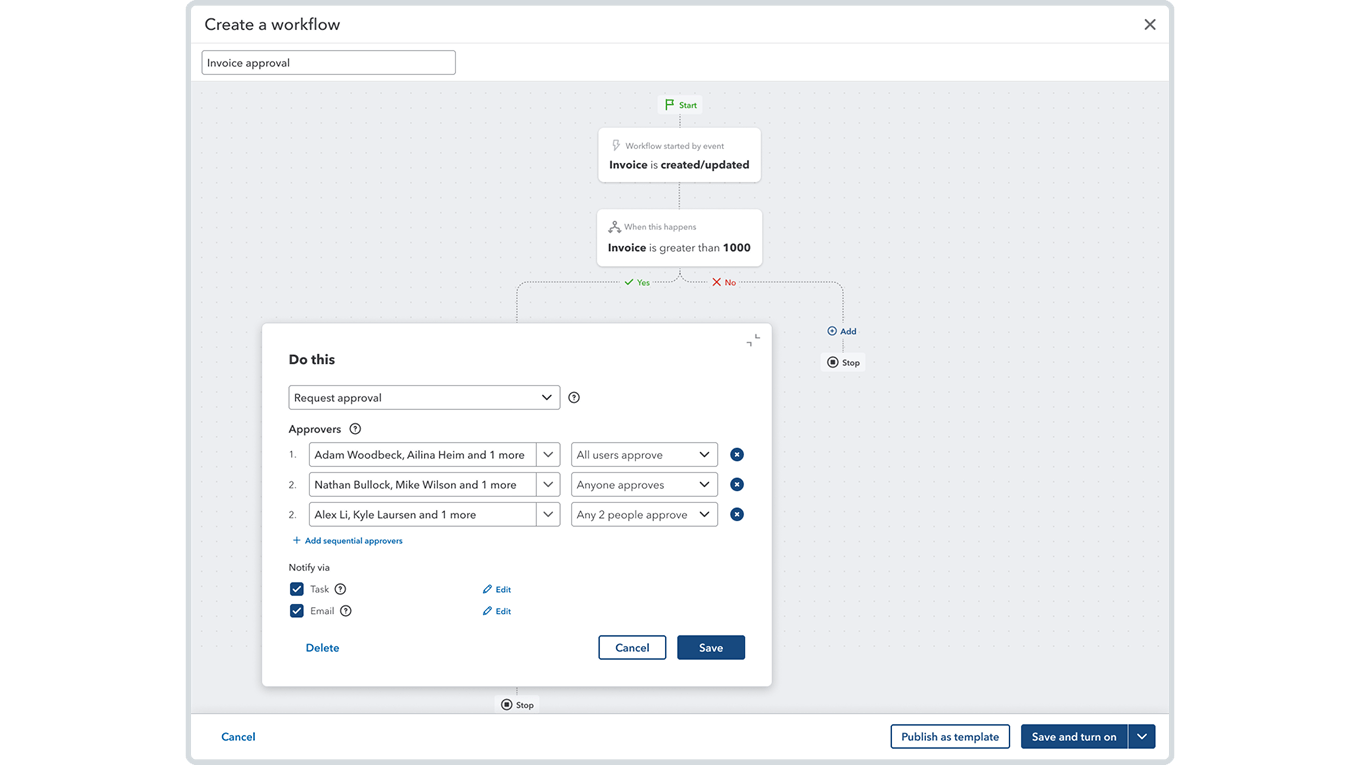
Find out how to set up parallel approvals in QuickBooks Bill Pay.
Expanding workforce features
In a nutshell: Clients using QuickBooks Online Payroll will soon be able to do much more to manage their teams directly in QuickBooks Online.
Soon, all your clients using QuickBooks Online Payroll Core will see a new employee list and updated profiles that provide better visibility into their team’s data.
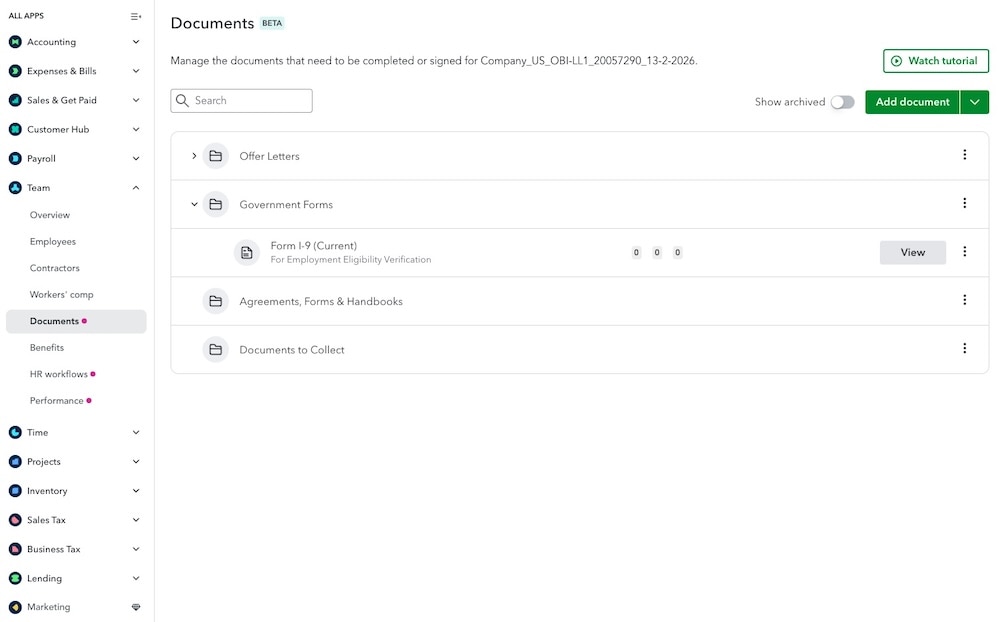
Starting this summer, QuickBooks Online Payroll Premium and Elite will include a robust suite of tools designed to help growing businesses manage the entire employee lifecycle. These enhancements will allow your clients to handle talent pipelines, new hire onboarding, time-off requests, performance management, HR workflows, health benefits, and more—all from one centralized hub in QuickBooks Online.*
By bringing these functions under one roof, you can eliminate disparate apps, streamline administrative tasks, and reduce the manual effort required to deliver a seamless employee experience from day one.
Important product information
*This information is intended to outline our general product direction, but represents no obligation and should not be relied on when making a purchasing decision. Availability of features and functionality varies by plan, which are subject to change without notice. Certain features will only be available on QuickBooks Payroll Premium or Elite plans. Additional terms, conditions, eligibility criteria, and fees may apply.
Discover how Workforce features can help your clients.
Table of contents
Table of contents
Recommended for you



Get the latest to your inbox
Get the latest product updates and certification news to help you grow your practice.
Thanks for subscribing.
Relevant resources to help start, run, and grow your business.
Looking for something else?
Call Sales: 1-844-435-1308





In a nutshell: Get an all-in-one view of 1099 filing status for all your clients, and save time filing through QuickBooks Online Accountant.