QuickBooks pricing changes and platform updates fueling growth for your clients and your firm.
product update

QuickBooks Online August pricing changes and product updates: Frequently Asked Questions

We've listened and your feedback has shaped what we're building. In this upcoming product release, we address some of the top friction points you've flagged, such as more reliable bank feeds, faster load times to accelerate your productivity, and improved usability to streamline the work you and your clients do every day. Also, we’re introducing new capabilities powered by Intuit Intelligence to automate the costly, routine work that eats up the day, to keep books up-to-date, surface insights, and answer important questions. And coming soon, in early 2027, you will have the option for Intuit’s experts to work alongside you, freeing your time to provide higher-value advisory, while you remain at the center of every client relationship.

We’re also expanding Intuit Accountant Suite, powered by Intuit Intelligence, to deliver additional benefits for you and your clients. Intuit Intelligence is the intelligence layer across QuickBooks and Intuit Enterprise Suite, so you get a clear view of your entire firm, not just one client at a time. Think of it as a brilliant control tower for you and your clients that is powered by rich data, our domain-specific models, and behaviors and insights drawn from 10M businesses. It can spot risks that would otherwise be difficult to see, and it doesn't just tell you what happened; it helps you understand what's happening now, what's likely to happen next, and the actions it can take on your behalf. And soon, Intuit Accountant Suite will serve as an agnostic intelligence layer that works across your other financial management and tax apps. You can close books faster, spot risks and opportunities before your clients even ask, and publish your own KPIs and dashboards straight into their experience. It automates the routine work that erodes your margins, delivers key data and insights, and frees you to grow your top line through advisory.

This is the power of a unified platform where businesses and accountants work together, and your role as the trusted advisor is built in, not bolted on.

Below you'll find answers to common questions about the upcoming QuickBooks Online pricing changes, what’s new, and what it means for your firm and your clients.
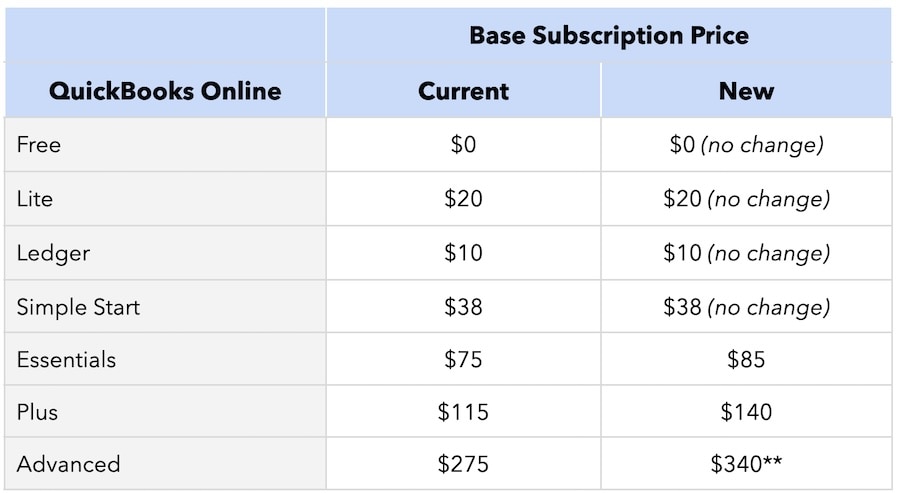
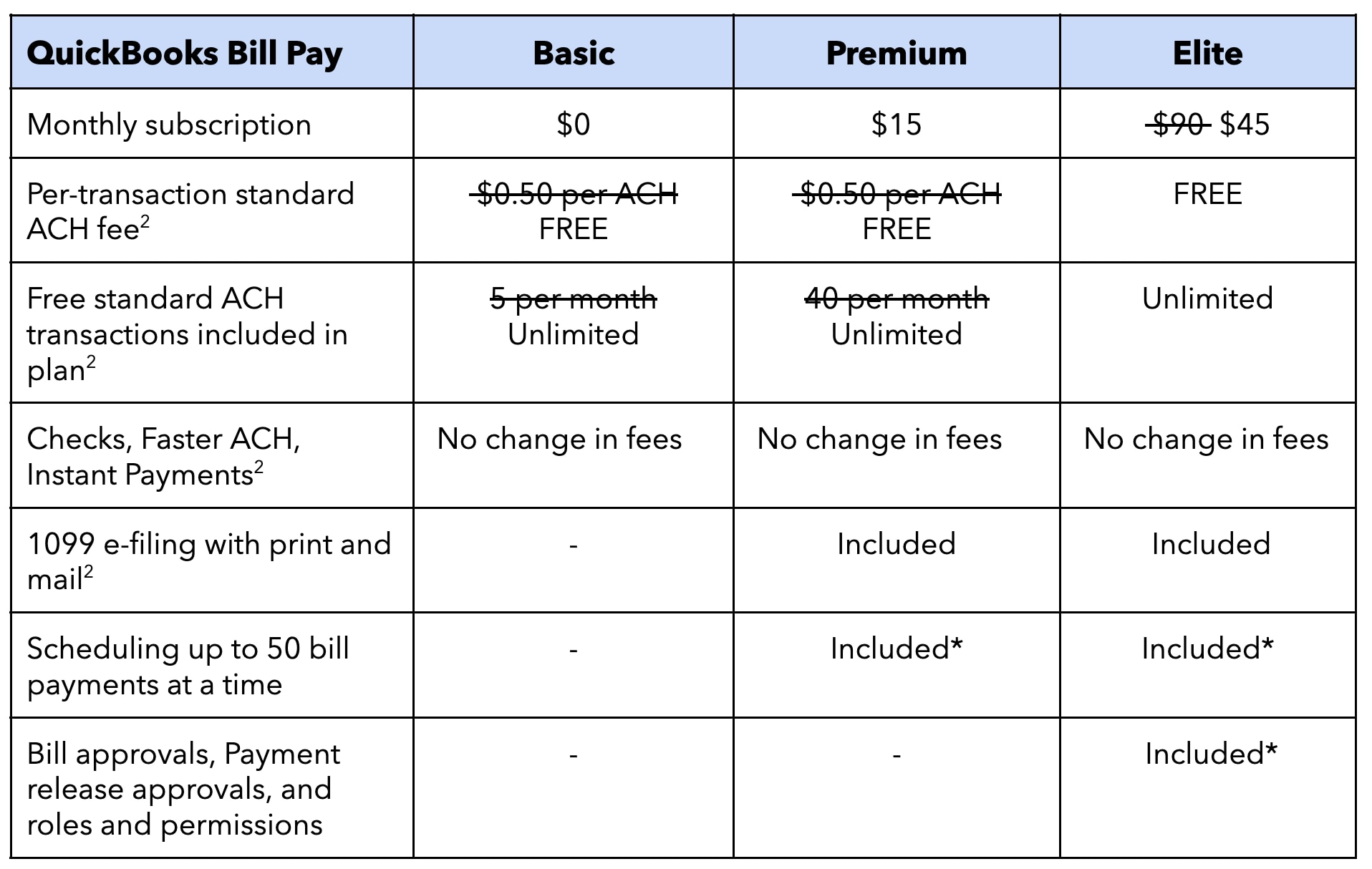
Table of contents

Table of contents

Core workflow improvements 

Bank Feeds

What's new with Bank Feeds in this release?

Bank Feeds have been redesigned for consistency and reliability, and the improvements go beyond a visual refresh. Batch controls and inline editing mean categorization and matching work the way you expect every time, and the AI-powered bank feed is now live in Test Drive so you can train your team risk-free before rolling it out to clients. Here's a closer look at what's changed and what it means for your day-to-day workflow:

  • Transaction categorization: QuickBooks has gotten smarter about learning your firm and your clients' unique needs, so categorization suggestions get more accurate over time and better reflect the way your firm works.
  • PayPal transaction matching: QuickBooks now recognizes when a bank deposit and a PayPal transaction represent the same sale, and handles the matching automatically once the transaction posts on either side, eliminating one of the most common sources of duplicate records.
  • Client document requests: Asking a client for more information used to mean leaving the feed, drafting an email, and waiting. Now you can send requests directly from the transaction and responses come back in the same place, resulting in fewer emails and less back-and-forth.
  • Customizable column views: The bank feed used to look the same for every firm and every client. Now you can customize which fields appear and in what order, add a class column in the Posted tab for at-a-glance class assignments, and reorder columns to focus on what matters, so your team moves through transactions the way your firm works best. 
  • Account locking: You can now block posting to accounts that shouldn't be touched, so the chart of accounts your firm built stays intact without anyone having to police it manually.

Invoicing on Autopilot 

What is Invoicing on Autopilot1 and how does it work?

Invoicing on Autopilot automates the most time-consuming parts of the invoice lifecycle, so your clients spend less time on administrative work and more time running their business. It’s currently in Beta, and as with all Beta features, functionality is subject to change. 

  • Invoices that write themselves: Drop in multiple documents; QuickBooks creates invoices in bulk. All are sent with your approval. The moment a payment lands, you're notified.
  • Conversational bulk edits: Clients can update invoices with a single conversational command—for example, "Update payment terms on all open invoices for Acme Corp to Net 30"—without opening each invoice individually.
  • Automated payment reminders: Clients set custom overdue criteria once, and Intuit Intelligence automatically drafts reminders for any qualifying unpaid invoices. Clients review and approve before anything is sent, so follow-up is automated with the client always in control.
  • Real-time payment notifications: Clients receive a push notification the moment a payment lands, giving them real-time visibility into cash flow.

Auto Categorization

What's new with Auto Categorization?

Intuit Experts validate accuracy in the background, so clients get correctly posted transactions without the back-and-forth, and your bookkeeping overhead stays low. For firm-billed clients, this service will be ready to turn on when you need it; for directly-billed clients, they'll be prompted to check in with their accountant first.

Reporting 

Where does the Modern Reports transition stand today?

Based on your feedback, we extended the transition timeline to ensure Modern Reports delivered on what matters most to your practice, including faster report customization, cleaner print and PDF output, sorting that works as expected, and cleaner detailed reports by default. The option to switch back to Classic View for standard reports ended on June 15. Custom reports have been given even more time, with the option to switch back to Classic View available until August 15. 

No action is required for the transition to Modern Reports. Report data, filters, favorites, schedules, and customizations will transfer automatically. Discover more about the change from Classic Reports to Modern Reports.

Business Intelligence

What new Business Intelligence capabilities are coming to QuickBooks this August?

QuickBooks is expanding its Business Intelligence capabilities this August, giving you and your clients more powerful tools to turn financial data into actionable insights and advisory opportunities.

  • Conversational Business Intelligence lets you and your clients ask questions, get instant business insights, run scenario comparisons, and plan next steps directly with Intuit Intelligence so you spend less time pulling reports and more time on strategic discussions with clients. Each account gets limited inquiries each month, depending on a client's QuickBooks plan.
  • KPIs and dashboards are now available for Essentials and Plus clients, with a KPI scorecard and pre-built dashboards for cash flow, P&L, and balance sheet health that give a clearer picture of their business at a glance. Advanced clients already have access to this feature today.

QuickBooks Online Advanced

What enhancements and new capabilities are coming to QuickBooks Advanced in August?

QuickBooks Advanced is getting a significant upgrade this August. In addition to the product enhancements above, here are new and expanded capabilities for QuickBooks Advanced across AI-powered bookkeeping, reporting, Bill Pay, and industry-specific solutions:

  • Reporting and analytics: Advanced now includes a full financial reporting suite built into the product, with custom management and industry-specific reports, self-serve analytics, and AI-powered forecasting.
  • Bill Pay2: Bill Pay Elite will be included in QuickBooks Advanced at no additional cost. Clients can pay vendors directly inside QuickBooks with free standard ACH, custom approval workflows, audit trail, 1099 e-filing, and auto-reconciliation. For clients that currently subscribe to Bill Pay Elite separately, this represents up to $540 in annual savings. See below for details on what this means for existing Bill Pay subscriptions. 
  • Industry solutions: New industry-specific solutions designed for construction and project-based businesses are also included, representing up to $900 in annual value.
  • Construction clients gain specific solutions to protect profit from bid to closeout, including structured budgets by phase, AIA-style billing, and change order management.
  • Consulting, architecture, creative, and other project-based firms gain tools to protect margins, including project budgets, costs vs. budget, and change order management.

Continuously Clean Books

What is Continuously Clean Books and how does it work?

For many firms, month-end means hours of manual categorization, back-and-forth with clients, and books that aren't clean enough to drive meaningful business insight. Continuously Clean Books changes that.

Continuously Clean Books works to keep your clients' records categorized, matched, and accurate throughout the month by utilizing AI and an expert-verified automated transaction and posting service. This approach moves beyond traditional month-end processing to provide ongoing financial clarity. An Intuit Expert quality checks the books regularly and is available to walk your client through AI-surfaced anomalies each quarter, so month-end becomes a conversation about growth rather than a scramble to get the books in order.

Continuously Clean Books is available for QuickBooks Advanced subscribers. For firm-billed clients, this service can be turned on when you need it. For directly-billed clients, they will be encouraged to check with you before activating.

How does Continuously Clean Books affect my role as an accountant?

Continuously Clean Books handles the ongoing categorization and matching between your touchpoints with your client. Rather than spending month-end catching up on a backlog of uncategorized transactions, your clients arrive at conversations with clean books in hand, ready to focus on insights, advisory, and the decisions that matter most to your client's business.

For firm-billed clients, this service will be ready to turn on when you need it; for directly-billed clients, they'll be prompted to check in with their accountant first so you stay in the loop no matter how your clients are set up.

Bill Pay Elite

My client currently pays for Bill Pay and my firm pays for their QuickBooks Advanced subscription. What happens to these subscriptions in August?

Bill Pay Elite will be included in QuickBooks Advanced at no additional cost this August, so clients on Advanced will no longer need a standalone Bill Pay subscription. For accountant-billed Advanced subscriptions, you have the option to continue having bill pay transaction fees billed directly to your client while the Advanced subscription remains accountant-billed. For non-embedded (standalone) Bill Pay in QuickBooks Online Simple Start, Essentials, or Plus, you can split transaction fees from subscription fees. For example, for a customer on QuickBooks Online Essentials ($85/mo) with Bill Pay Elite ($45/mo) and variable transaction fees, the firm can pay for Essentials ($85) and the client for Bill Pay ($45 and variable transaction fees), or the firm can pay for Essentials and the Bill Pay subscription ($130) while the client pays for the variable transaction fees.

Who are Intuit Experts?

What do Intuit Experts do?

Intuit Expert services are designed not to compete with you, but instead work alongside you to help set new clients up for success, and validate and ensure accuracy of AI-powered output in QuickBooks. During the onboarding of new customers, Intuit Experts are focused on ensuring they are set up correctly and can take advantage of all of the available capabilities such as Payments, Bill Pay, and Workforce, so that you spend less time on intake cleanup and your clients get the full benefits of the platform. Then, as they get up to speed on the platform and AI begins to handle the ongoing categorization and matching of your client's transactions in the background, month-round, Intuit Experts can review and validate the AI output. So, when you sit down with your client at month-end, the books are already in good shape and the conversation shifts from cleanup to strategic insights. 

When your clients use Intuit Expert support, you have transparency on the activity in your clients’ books this August, with more expansive controls in place early next year, giving you full line of sight and continued oversight.

How does the review and validation process work, and what is the role of Intuit Experts? 

It depends on how your client's QuickBooks subscription is billed.

  • If the QuickBooks subscription is firm-billed, your firm determines if and when these services are made available to your clients. Intuit Expert services are disabled by default for these clients and you can choose to enable them, giving your firm control over whether Expert services are introduced to the relationship.
  • If the QuickBooks subscription is client-billed, Intuit Expert services are also disabled by default for clients connected to your firm. You can enable them at any time from within each client's QuickBooks Online file and your client retains the ability to enable them as well. We recommend reviewing and aligning on these settings directly with your client.

Can I opt in to Intuit Expert services for my clients?

Yes. While Intuit Expert services are disabled by default for firm-billed clients, your firm can choose to enable them for any of your clients directly within each client's QuickBooks Online file beginning in August.

This gives your firm full flexibility. If you have the bandwidth and preference to handle all review and validation yourself, you can. If your client has specific needs and can benefit from the added support of Intuit Experts, you can opt-in on a client-by-client basis.

Features by plan

Which new features are included in each QuickBooks Online plan?

The table below highlights a selection of what's new this August 3. More features and capabilities will be announced in the coming months.

For accountant-attached clients, Intuit Expert services are disabled by default. Controls to enable are managed within each client's QuickBooks Online file.

QuickBooks pricing changes

QuickBooks Online

What QuickBooks Online prices are changing?

  • Monthly subscription prices for QuickBooks Online Essentials, Plus, and Advanced are increasing.
  • Pricing for QuickBooks Simple Start and QuickBooks Ledger remains unchanged.
QuickBooks Online subscription pricing comparison table.

We also now offer two plans for your smaller and earlier-stage clients. QuickBooks Free helps new businesses track income and expenses at no cost, while QuickBooks Lite gives self-employed businesses automated finances and built-in tax support.

When do the new prices take effect?

Beginning August 1, 2026, the updated pricing for both client-billed and accountant-billed QuickBooks Online Essentials, Plus, and Advanced subscriptions will be reflected on each subscription’s next billing date. 

Pricing displayed on the QuickBooks website will update on August 3, 2026.

Why aren’t QuickBooks Simple Start or Ledger prices changing?

We evaluate pricing by product tier and customer needs. At this time, there are no pricing changes for these products.

Are there pricing changes planned for Intuit Enterprise Suite?

Intuit Enterprise Suite pricing is customized and contract-based to meet each customer’s unique needs. Therefore, QuickBooks pricing changes are not applicable to Intuit Enterprise Suite customers.

Will Intuit notify my clients?

  • Client-billed subscriptions: Yes. Starting June 27, 2026, clients will receive an email from Intuit approximately 30 days before their next billing date when the new pricing goes into effect.
  • Accountant-billed subscriptions: No. These clients will not receive any communication from Intuit. 

How will new clients be impacted? 

New QuickBooks Online clients will receive a 6-month price protection period before the new rate takes effect. This applies to both client-billed and accountant-billed subscriptions. Price protection is based on the client’s product sign-up date (not when they are added to an accountant’s firm). The price change will be reflected in the sixth month of the subscription.

If the client signs up without a free trial:

Billing begins immediately, and the new price applies starting with the 7th invoice.

Example:

  • Sign-up date: May 1
  • Protected invoices (6): May, June, July, August, September, October
  • New price effective: November 1 (7th invoice)

If the client signs up with a 30-day free trial:

The client receives one free month, followed by 6 months of price-protected billing. The new price applies starting with the 7th paid invoice.

Example:

  • Sign-up date: May 1
  • Free trial: May (no charge)
  • Protected invoices (6): June, July, August, September, October, November
  • New price effective: December 1 (7th paid invoice)

What happens if I’m using promotional pricing?

Promotional discounts will continue through the full promotion period. Once the promotion ends, the subscription will renew at the updated price as reflected in the table above.

QuickBooks Bill Pay 

What QuickBooks Bill Pay prices are changing?

Three Bill Pay pricing updates take effect this summer:

  • The Bill Pay Elite subscription price decreased from $90 to $45 per month for new and renewing subscriptions on June 8, 2026, with the reduced price reflected on clients' next billing date.
  • In August, Bill Pay Elite will be included in QuickBooks Advanced at no additional cost, a potential $540 annual value.
  • All Bill Pay tiers now include standard ACH with $0 per-transaction fees and unlimited monthly transactions.7 
QuickBooks Bill Pay pricing comparison table,

Did Intuit notify my clients?

  • Client-billed subscriptions: Yes. Intuit notified QuickBooks Bill Pay Elite client-billed customers of this change on June 8, 2026. Customers will see the reduced price reflected on their next billing date. 
  • Accountant-billed subscriptions: No. Intuit did not notify accountant-billed subscription clients of these price changes.

ProAdvisor Preferred Pricing

How do these changes impact the ProAdvisor Preferred Pricing program (PAPP)?

There are no changes to ProAdvisor Preferred Pricing discount rates or revenue share percentages at this time. As subscription prices increase, revenue share amounts will increase proportionally. Please note that while Bill Pay Elite will be included in QuickBooks Advanced this August, Bill Pay transaction fees are not part of revenue share. 

Discount and revenue share percentages remain as follows:

  • Clients enrolled in revenue share/direct billed:
  • 30% revenue share on base subscription for QuickBooks Online for 12 months
  • 30% of the subscription price and 15% of per employee fees for Workforce for 12 months
  • Accountant-billed:
  • 30% ProAdvisor Preferred Pricing on base subscription for QuickBooks Online, Workforce, Time, and Bill Pay
  • Looking ahead, ProAdvisor Preferred Pricing and revenue share will be evolving as part of the transition to Intuit ProPartner Accountants, our new partner program launching in early 2027. Current discount rates and revenue share terms will remain in place for existing subscriptions through the transition. Visit the Intuit ProPartner Accountants website to see what's coming.

Intuit Accountant Suite

In addition to everything we are delivering in QuickBooks this August, we’re building a new intelligence layer designed specifically for accounting firms. Intuit Accountant Suite works across QuickBooks and Intuit Enterprise Suite, giving you a clear view of your entire firm, not just one client at a time. Close books faster, spot risks and opportunities before your clients ask, and publish your own KPIs and dashboards directly into their experience.

Intuit Accountant Suite is available in two plans. Core is free and available to all firms today. Accelerate is the paid plan with expanded capabilities, and is currently in beta at no cost through the end of the year, giving you time to explore everything it offers before pricing takes effect. Learn more about Intuit Accountant Suite or watch our In-the-Know to learn how to make the switch.


Join us on June 23 at our free Intuit Connect ON virtual event to learn more about these exciting new innovations in QuickBooks, Intuit Accountant Suite, and the new Intuit ProPartner Accountants.


Disclaimers:

  1. Invoicing on Autopilot will launch in Beta. Each account gets limited capacity each month. Beta features have limited availability and are subject to change. Bulk invoice creation requires a Google Drive account; clients without Google Drive will not be able to use this capability. 
  2. QuickBooks Bill Pay: Subject to eligibility criteria, credit, and approval prior to first payment. Subscription to QuickBooks Online required. Bill Pay Basic is included with QuickBooks Online when purchased directly from QuickBooks.com or QuickBooks Sales. Not available in US territories or outside the U.S. Limits may apply on total number and amount of payments. Transaction based fees apply based on usage. Bill Pay Elite is expected to be included in QuickBooks Advanced on August 1, 2026. Actual availability dates may vary and are not guaranteed.
  3. August feature release dates and availability will vary by product. Not all features will be available on August 1.
  4. Intuit Intelligence chat is only available to admin users at this time. Each account gets limited capacity each month. This feature is in Beta. Beta features have limited availability and are subject to change.
  5. QuickBooks Online Advanced subscription fees are not subject to modification based on user eligibility for QuickBooks Bill Pay. 
  6. Construction industry and enhanced project financials features not available outside the US.
  7. QuickBooks Online will only match bank withdrawals with transactions processed through QuickBooks Bill Pay. Not all transactions are eligible.

This information is intended to outline our general product direction, but represents no obligation and should not be relied on when making a purchasing decision.

The exact date of price change depends on the details of the individual subscription. Intuit will honor any promotional pricing through the duration of the applicable promotion. Once the promotion ends, the relevant price increase will go into effect as of the applicable subscription date.

Money movement services are provided by Intuit Payments Inc. pursuant to IPI's licenses (NMLS #1098819, https://www.intuit.com/legal/licenses/payment-licenses).

Additional terms, conditions and fees may apply with certain features and functionality. Eligibility criteria may apply. Product offers, features, and functionality are subject to change without notice.


Recommended for you

Get the latest to your inbox

Get the latest product updates and certification news to help you grow your practice.

Looking for something else?

Get QuickBooks

Smart features made for your business. We've got you covered.

Tax Pro Center

Expert advice and resources for today’s accounting professionals.

QuickBooks Support

Get help with QuickBooks. Find articles, video tutorials, and more.

How can we help?
Talk to sales 1-800-497-1712

Monday - Friday, 5 AM to 6 PM PT

Get product support