
The summer release helps strengthen the platform across the board—enterprise-grade tools, AI-native intelligence, industry-specific workflows, and built-in workforce solutions that keep more of your client’s business running on one system.
Note: This release includes beta features rolling out until October. Be the first to try out new capabilities by joining our early access program, and help shape where they go next.
Report the way your client’s business operates
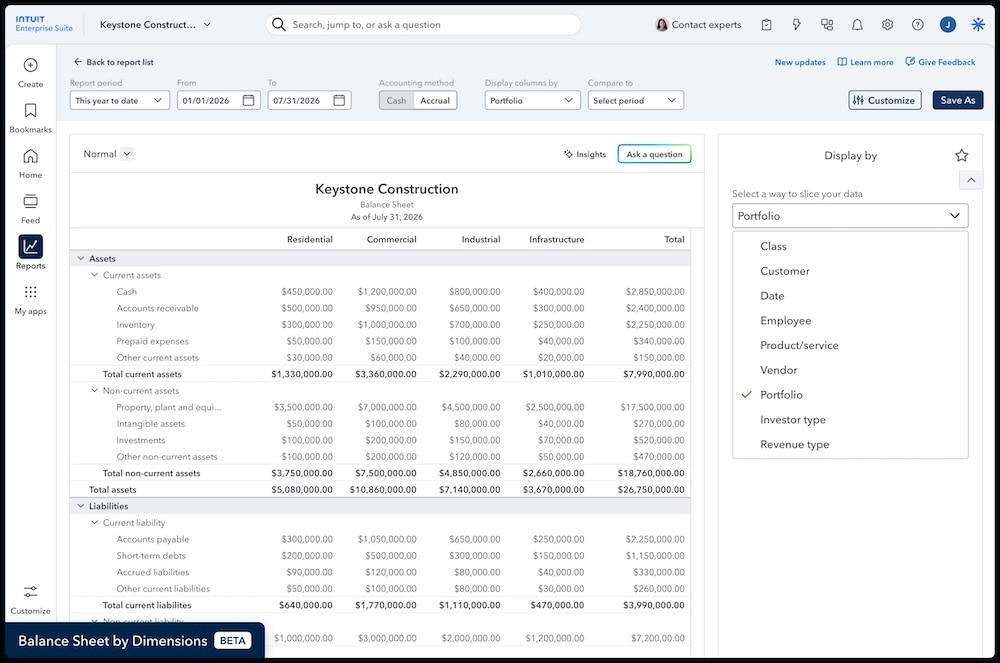
Dimensions give you the flexibility to tag a client’s transactions with multiple attributes, to better match their reporting to their business. As of this release, dimensions work everywhere classes do, across reports and transactions.
Updates include:
- Adding dimensions to Time, billable expenses, and recurring payment transactions
- Assigning dimensions at the header level of invoices
- Running balance sheet by dimension reports for a single entity
- 8 new projects reports by dimension, including cost to complete and WIP
- Reparenting dimensions as reporting needs evolve
Generate reports without workarounds. Use dimensions to transform financial reporting from a flat summary into a multidimensional view of your client’s business in a single, real-time report. Dimensions power budgeting and forecasting, allowing teams to set targets, track actuals, and identify variances at the level of granularity your business runs on.
Intuit Enterprise Suite customers are saying
"With Intuit Enterprise Suite, [dimensions] allows us to drill down. Ownership can see a better snapshot of how the company in total is doing, providing the visibility needed to see truly profitable primary business lines versus R&D expenditures."
—Brandon Webster, PULSEROLLER
Close faster across every entity
Intuit Enterprise Suite takes on more of the heavy lifting in your multi-entity accounting by surfacing recommendations for:
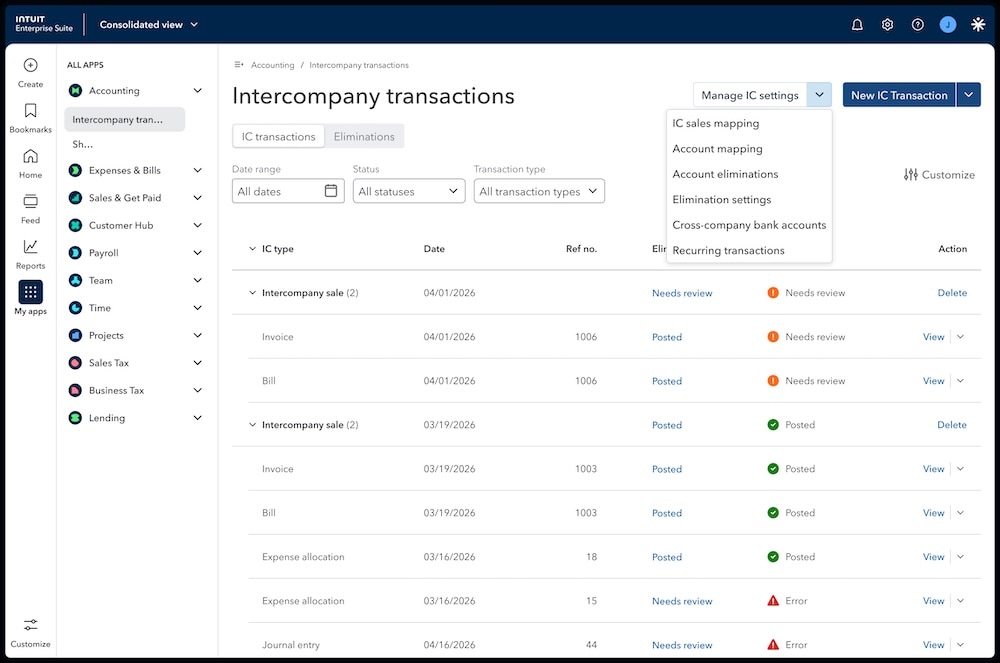
- Completing and balancing intercompany journal entries
- Posting mapped intercompany bills
- Turning recurring transactions into reusable templates
These tasks will not be done automatically unless you or your client turns on automation.
- Intercompany journal entry smart complete balances entries, determines the right due to and due from accounts, and selects entities automatically based on the lines you complete. Enter the business intent, and the platform handles the accounting structure—so entries balance accurately and consistently across entities.
- Recurring templates let you and your client turn intercompany journal entries and dynamic allocations into reusable templates you can schedule to run automatically each period—so the same work doesn’t land on your team’s plate again and again.
- Auto-post with custom mappings allows you to define mapping that ties a selling company, a product or service, and a buying company to a category that automatically posts matching bills when auto-post is turned on. This allows you and your clients to skip the draft-and-accept step of bills in the same category. Plus, AI suggests mappings based on past transactions that you can approve for use.
Intuit Enterprise Suite customers are saying
"We’re saving at least 10 to 15 hours a month per account manager thanks to multi-entity automation. That efficiency is what allows us to scale."
—Ryan Handel, FIXE
Improve multi-entity operations
These updates help make your cross-entity operations more efficient and introduce a new multi-currency solution.
- Cross-company bill payment allows businesses to record a bill payment in one entity using a bank account from another, and automatically handles the intercompany accounting.
- Multi-level entity hierarchies (beta) now extend beyond consolidated reporting to your KPIs and dashboards, for more convenient access to top metrics right where you and your clients get work done.
- Multi-currency (beta) now manages exchange rates in a single, protected table. In addition, transactions now show clearer exchange rate impacts, and reports apply end-date exchange rates automatically—with autocalculated unrealized gains and losses.**
Projects with improved reporting & permissions
For project-based businesses, you now have access to better reporting and permission controls.
- New project reports include Open Purchase Orders by Project and Project Costs by Vendor and Project Detail to help you manage project profitability with confidence.
- Projects have been updated based on your feedback to allow you and your clients to apply dimension value filtering on project reports—and see project associations on project transaction pages. In addition, ship-to addresses on purchase orders now automatically default to the project site address, and you can split payroll by project.
- Project-specific user permissions (beta) allow businesses to limit a Project Manager user’s view to only their assigned projects. Businesses with multiple project managers and projects will get project assignment AI suggestions to reduce manual effort.
Inventory & manufacturing depth
For businesses operating with strong inventory needs, Intuit Enterprise Suite continues to deepen its inventory and manufacturing depth.
- Units of measure allow businesses to order, receive, and sell goods in the quantities that make sense at each stage, such as crates, packs, or individual items.
- Invoices with multiple shipping addresses lets you and your clients add multiple addresses per customer and select one from an invoice dropdown, to eliminate manual work.
Increase efficiency with Intuit Intelligence
Intuit Intelligence helps make finance teams more efficient while keeping users in the loop for total confidence. Features in beta improve the onboarding experience and introduce a new Intuit Intelligence chat interface to help make the AI easier to use.
- Intuit Intelligence chat (beta) has been iterated on and enhanced. Now coming to Intuit Enterprise Suite, it allows users to ask questions and generate prompts in natural language to get insights (once you enable it) and take actions across entities.
- Dimensions backfill enhancements (beta) now let customers upgrading from QuickBooks Online or QuickBooks Desktop migrate from locations or custom fields to dimensions. Intuit Intelligence will suggest options from prior transactions and show the proposed reclassifications, and the journal entries they'd create, for your review before anything posts.
- Chart of accounts (CoA) standardization enhancements (beta) now allow customers to select standard CoAs for subsets of entities instead of applying them to all entities. Additionally, the platform now offers industry-specific CoAs.
More powerful business intelligence
Business intelligence capabilities get more powerful with additional filters, drill downs, and report customizations so you can access the insights you need—without spreadsheets.
- The KPI scorecard has been enhanced with filters for class and dimension, drill-down capabilities for any KPI, and additional usability improvements.
- Management reports in consolidated view now offer AI-generated executive summaries and smart chips, so metrics and time periods update automatically when you create new management reports or update underlying data.
- Multilevel grouping allows you and your clients to include up to 6 different dimensions in nested rows of your reports, drag and drop them to reorder, add subtotals, and expand or collapse groupings for deeper report customization.
- Multidimension display-by reports (beta) support up to 3 nested display-by dimensions, with collapsible column groups and a pinned total column.
- Multidimensional pivots (beta) are available on eligible detail reports, allowing you and your clients to group rows and columns by multiple dimensions at the same time for deeper analysis without manual workarounds.
Better workforce reporting: payroll & time tracking
Reporting for payroll and time data is now richer with custom reports and dimensions.
- Dimensions integration with Time and Payroll (beta) enables payroll admins to review, edit, and split paychecks across multiple dimension values for more complete reporting.
- Custom report builder for Payroll (beta) allows you to tailor and save reports with the employee and paycheck details that matter most to your client’s business.
Better account management & security
Single sign-on functionality allows clients to use their existing corporate identity tool (Google, Okta, or EntraID) to provision and manage account access for their Intuit Enterprise Suite users.
Intuit Enterprise Suite updates: spring 2026
This release leverages AI-native automation and multi-entity financial governance within your clients’ books to help your firm transform efficiency, scale your capacity, and enable a powerful multi-engine firm model.
Secure firm growth and confidence
Help your firm and clients strengthen financial governance and audit readiness. Automated multi-entity processes strengthen internal controls to create the scalable, auditable reporting necessary to attract and serve complex, enterprise-level clients.
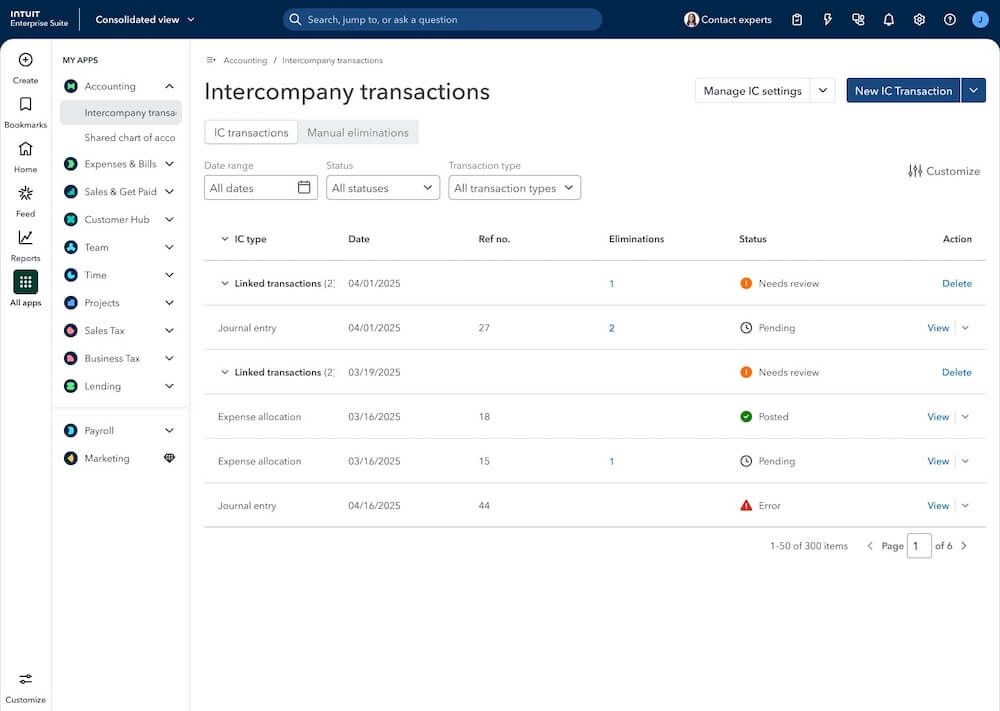
- Transaction-level eliminations add traceability, create more accurate consolidated reporting, and help you close faster by shifting your clients’ eliminations to the source transaction.
- Import intercompany journal entries by uploading a CSV to draft them, improving efficiency while maintaining control.
- Enterprise settings for consolidated reports allow configuration of reporting preferences from the Consolidated view to be applied to all consolidated reports.
Transform firm efficiency
Free up team capacity for high-value advisory and empower advisors to lead more impactful strategic discussions by automating repetitive tasks in your clients’ books.
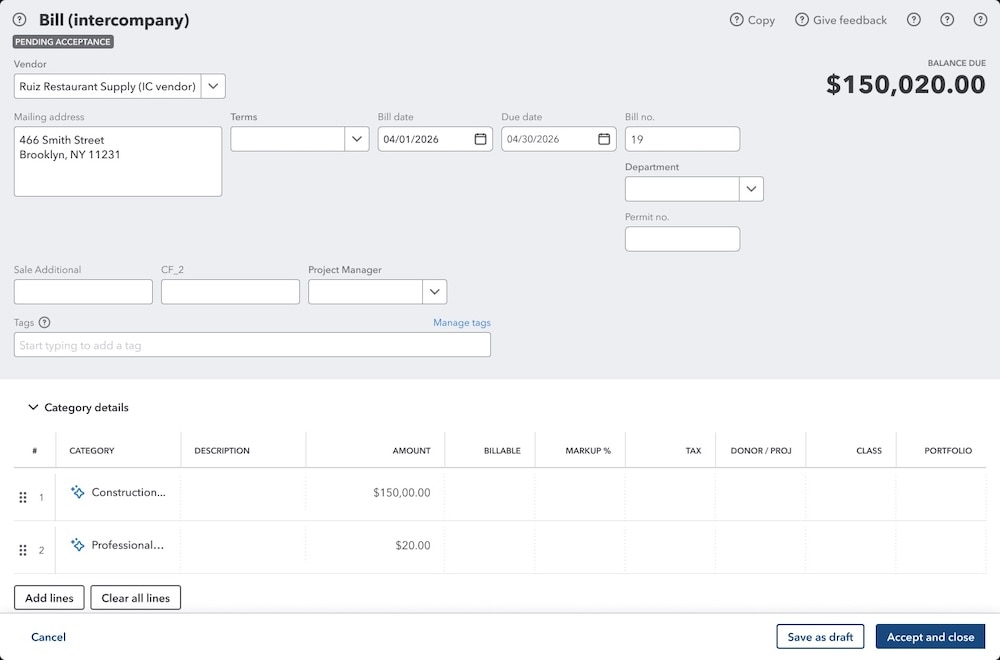
- Auto-categorize bills for intercompany sales using AI-powered suggestions you can approve or adjust that are based on historical categorization patterns.
- Project Management AI-powered cost allocations drafted for your review help speed up expense allocation, reduce errors, and protect margins. (open beta**)
- Autopay recurring bills to help clients avoid missed or late payments, and check payment status anytime to stay organized.
- Get direct approvals through email to reduce bottlenecks and help ensure your clients’ critical transactions are processed on time.
- Purchase order enhancements help reduce manual effort and improve accuracy and visibility with easier customization, automation, and scaling of workflows.
- Sales order enhancements help clients create accurate sales orders faster with built-in discounts, shipping, and autofill to reduce manual entry and fulfillment errors.
Expand market position and firm value
For firms diversifying beyond compliance, the platform supports higher-value advisory across more segments. With certified payroll reports, it also removes a compliance gap for firms already serving construction clients, creating a natural entry point for federal contract strategy advisory.
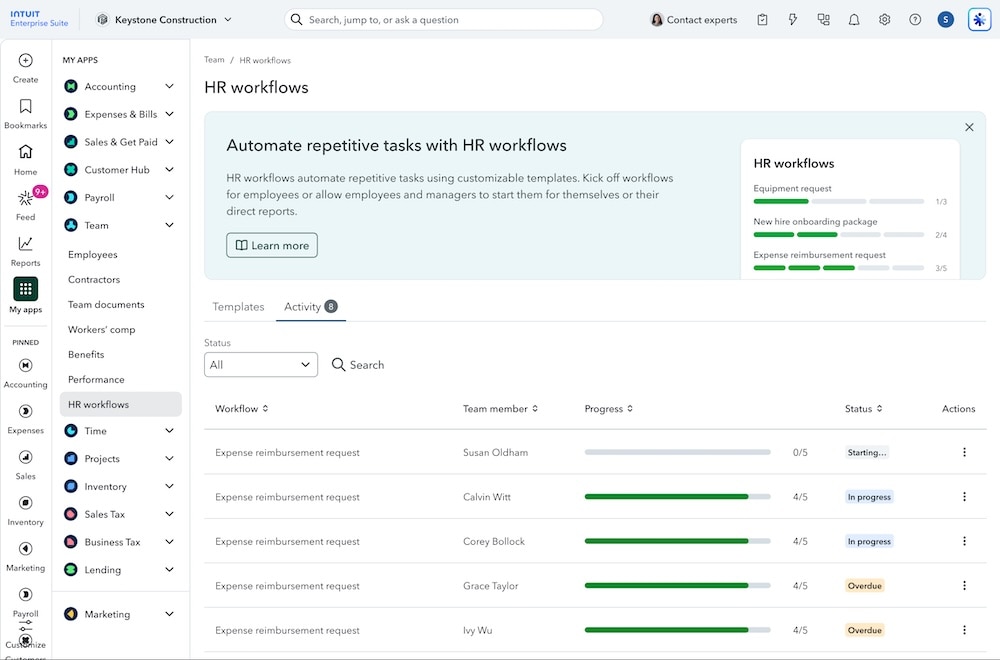
Intuit QuickBooks Workforce Elite is a new expansion of HCM functions to support how your clients’ HR teams hire, onboard, manage, and retain employees, integrating the data with your clients’ books along the way.
- Hire and onboard with features that include recruiting, background check via Checkr,** and new hire setup.
- Manage the team with features that include HR workflows, documents, performance management, time off, and offboarding.
- Use payroll enhancements that include Payroll hub, certified payroll reports, and expedited amendments for submission in as few as 7 days. Note: Expedited amendments are currently only available for California customers filing amendments for Form 941 and Form DE9.
Grow advisory revenue
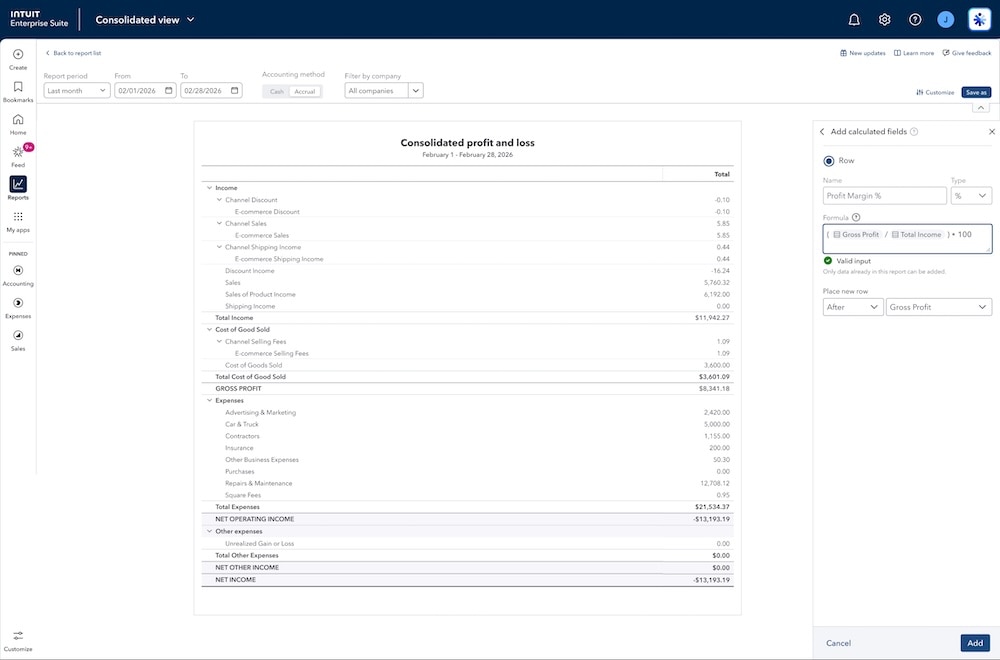
Drive high-value enterprise strategy by moving beyond compliance. Leverage calculated fields in consolidated reports to deliver sharper insights into pricing, margin, and labor. Get the visibility you need to give proactive guidance on client profitability at every stage.
- Create calculated fields in multi-entity reports rather than exporting to spreadsheets to manually calculate custom formulas.
- Use flexible project costing to move from basic costing to a more detailed approach as projects move from bid to execution. (open beta**)
- Get Project Management AI cost and price insights for budgets drawn from historical data help reduce the risk of gaps between a client’s estimates and actuals. (open beta**)
- Generate enhanced WIP Reports that provide more real-time financial insights to manage cash flow and monitor profitability.
- New management reports help prepare for analysis and presentation with more available reports to add, custom date ranges, and the option to choose landscape mode per section.
Intuit Enterprise Suite updates: winter 2026
Features in this release offer scalable and compliant AI-driven automation, centralized financial management, and decision-grade reporting—and a new construction edition expands on industry-specific functionality.
Modernized business intelligence
New tools and flexibility for reports, app integrations, KPIs, and dashboards deliver the business insights and analysis you and your clients need with real-time performance tracking all in one place.
- Improved modern report view speeds access to insights with streamlined reporting, more accessible customization, and Modern view that provides automatic refresh, ordering that aligns with GAAP reporting standards, and more.
- Calculated fields let you create custom formulas and perform calculations on top of existing report data to yield the views your clients need without data exports and spreadsheet calculations.
- Management reports simplify customizing and sharing company-level and multi-entity management reports with more KPIs and custom metrics to fit your clients’ goals.
- Use more app integrations in one place to analyze key business and financial metrics from multiple systems and see how everything fits together, without manual work.
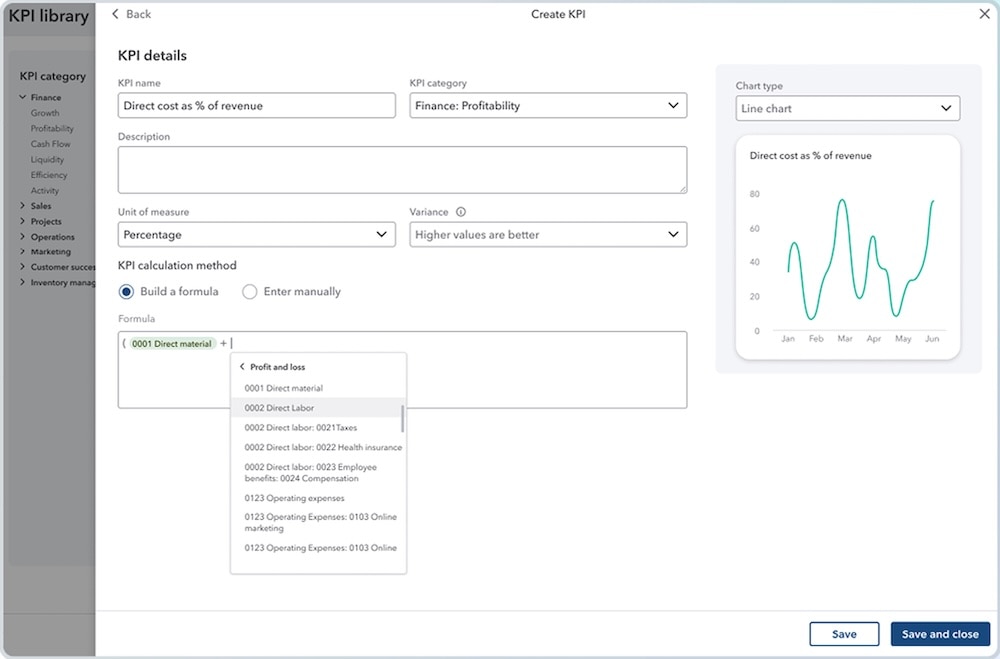
- Expanded KPIs and dashboards let you and your clients track metrics using accounts from their chart of accounts as variables, specify a time period for each metric, pull in variables from third-party data, and more.
Intuit Intelligence
- For your mid-market clients, Intuit Intelligence delivers AI-powered insights embedded into core business workflows, helping teams better understand and act on their data, reduce manual analysis, and enable faster, more confident decisions.
- For businesses with greater scale and complexity using Intuit Enterprise Suite, Intuit Intelligence extends these capabilities with deeper, cross-entity visibility and enterprise-grade insights to help clients understand cost drivers, evaluate profitability at scale, and maintain control as business grows.
Dimension enhancements
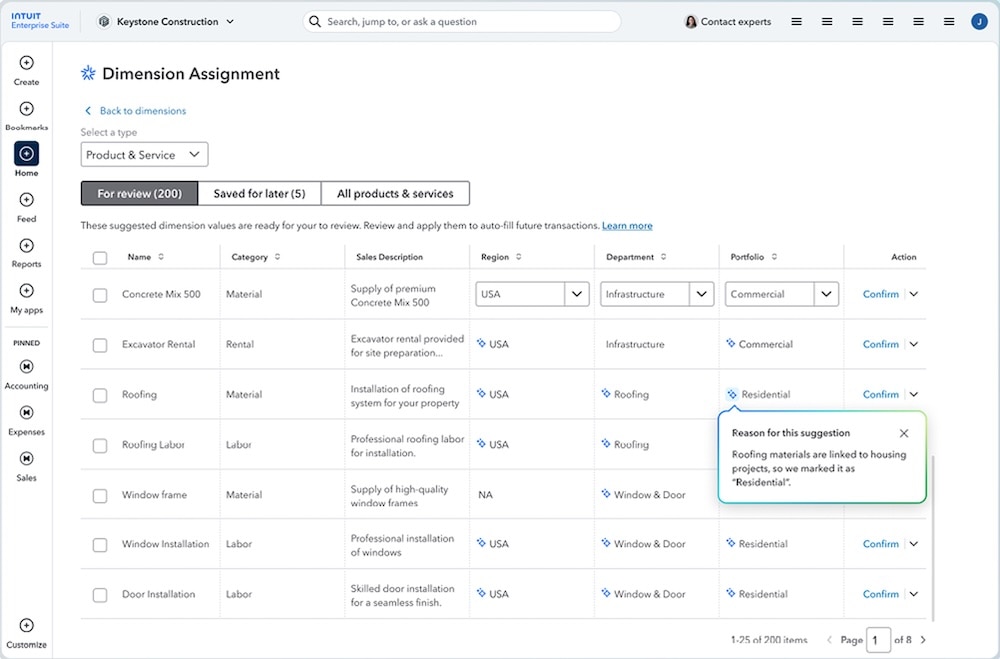
Assign dimensions faster and with more flexibility to help streamline financial workflows. You and your clients can access dimension assignment from the Fixed assets and Business feed pages, assign dimensions in bulk to all items, and move transactions to Save it for later to delay assignment.
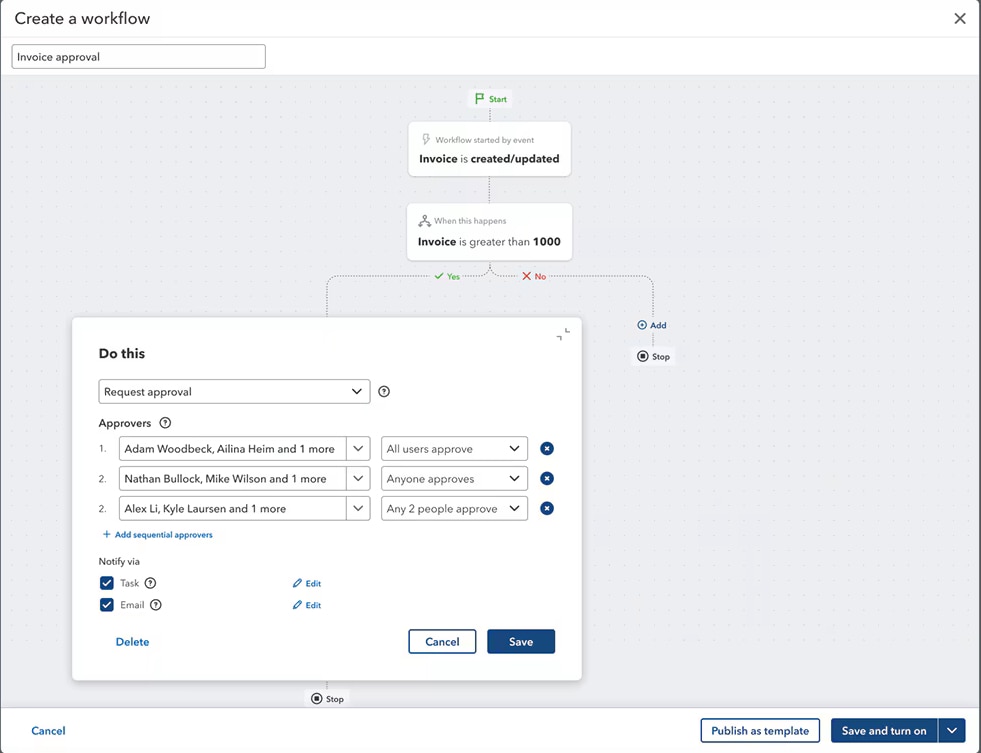
Workflow automation enhancements
Help your client scale workflows across their organization while following established controls and policies.
- Include parallel approvals with up to 5 approvers to create complex approval workflows that meet your clients’ business needs.
- Detailed audit trails for transaction forms approved through clients’ workflows help keep their businesses audit-ready.
- Set dimension-based conditions to make automated approval, reminder, and task workflows more efficient by more closely aligning them with your client’s business structure and financial reporting requirements.
Intuit Enterprise Suite construction edition (beta)
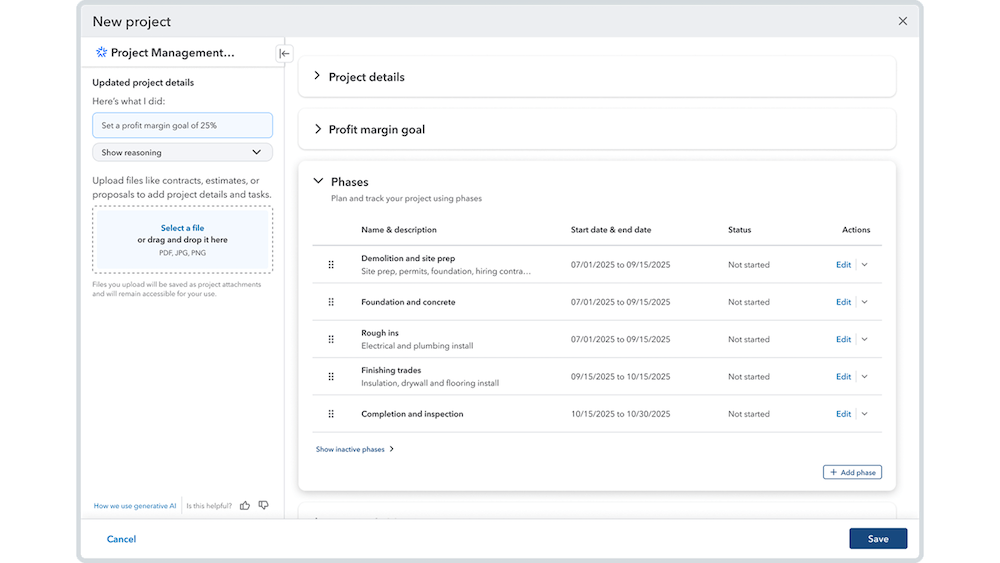
Your construction clients can now use Intuit Enterprise Suite to help manage projects end-to-end—from winning bids, through project planning and execution, to project close—all with AI automating steps along the way. In-platform, they can:
- Use project phases when tracking budget and progress to help stay on top of cash flow, profitability, and effective project management in one place.
- Designate cost groups in their list of products and services to plan and track project costs for better job costing and project profitability tracking across budgets, expenses, POs, and bills.
- Create proposals from estimates or vice versa, or build a customized proposal document with integrated e-signatures using a proposal document builder. Clients’ customers can visit a dedicated portal to sign documents, make deposits, and review project scope and approved costs.
- Handle negative change orders to better account for price adjustments and scope reductions and help protect their margins.
- Provide AIA-style invoicing to track the total contract value on estimate, invoiced to date, invoice amount, and remaining balance at the phase level. This new invoice format helps clients build trust with their customers through detailed information and transparency.
- Plus, project budgets enhancements include tracking by phase, real-time insights on budget overruns in the project summary dashboard, exporting and printing budgets, and comparing budget versions across all project cost reports. These enhancements help control costs, keep projects on track, and protect margins.
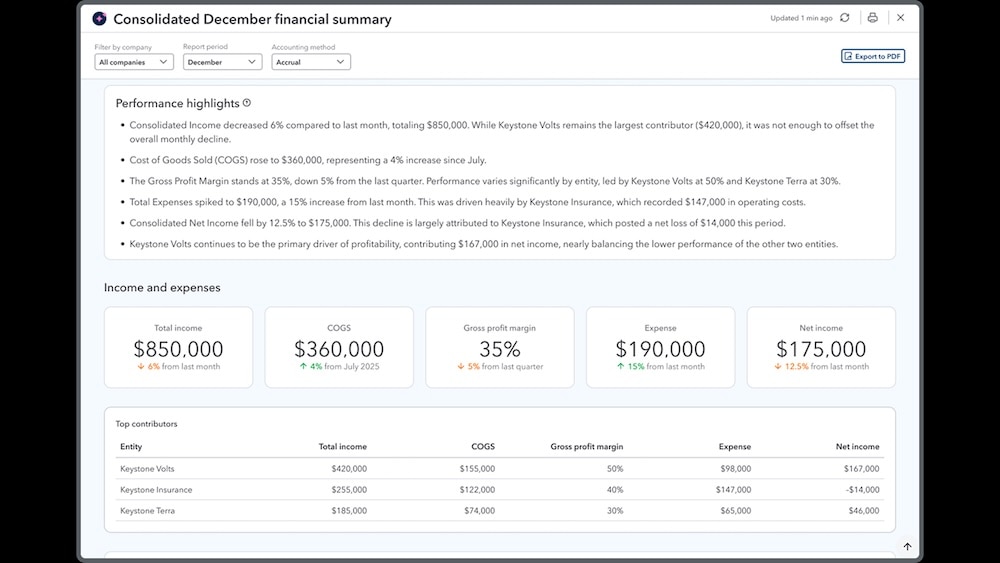
Multi-entity financial management
New consolidated reports provide additional visibility on cross-entity financial data:
- Invoice list
- Transaction list by date
- Transaction detail by account
- Deposit detail
- Check detail
Intuit AI enhancements
Enhanced automation helps you and your clients maintain control over work to be done while proactively handling routine financial tasks and unlocking critical insights.
- Early access availability of Sales Tax AI now also includes a filing pre-check tool that automatically scans for mismatches between Profit & Loss (P&L) and Sales Tax Liability (STL) reports.
- Finance AI allows you and your client to customize the monthly performance summary and recommendations and drill down from parent-level to individual entities for a clear and timely view of multi-entity financial performance.
- Accounting AI scans and analyzes incoming bank feed transactions, matches transaction data like vendors and categories, and groups matches for review to help you and your client post transactions more efficiently.
Inventory and order management
Strengthen your clients’ inventory and order management workflows with enhancements and features that help prevent rework, boost accuracy, and connect sales, inventory, and accounting.
- An item receipt is now the official record of physical goods received, which means you and your clients can use Intuit Enterprise Suite for an efficient, modern inventory receive-to-pay workflow with inventory and financial accuracy, operational efficiency, and supplier accountability.
- Your client can use their existing Moving Average Cost valuations instead of switching to FIFO when migrating from QuickBooks Desktop to Intuit Enterprise Suite. This can help them maintain the accuracy of their inventory valuations and COGS.
- Sales order enhancements include more detailed audit logs, sales order reports that include more data, and connections to POs, estimates, and invoices—to better fit workflows and help data remain consistent throughout the order-to-cash process.
Workforce management
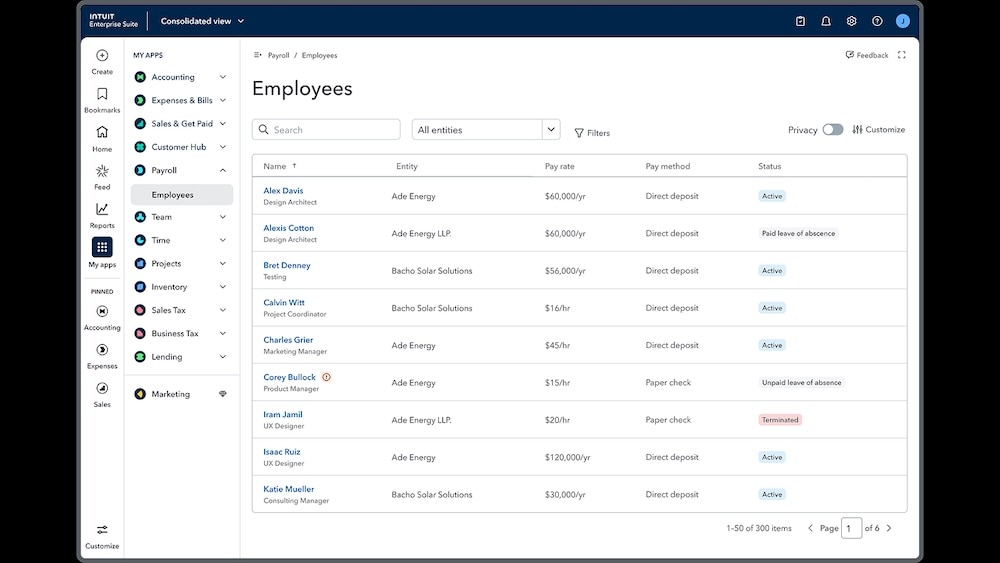
Enhanced features help your clients simplify work assignments, manage paychecks, and get unified visibility of all W-2 and multi-entity employee information.
- Handle garnishments’ full lifecycle in QuickBooks Payroll, with richer context and automated bookkeeping. Plus, associate each garnishment with its agency and track garnishment liabilities by employee.
- The consolidated employee list in QuickBooks Payroll Elite helps streamline workforce management and eliminate repetitive tasks across accounts, with unified visibility of all W-2 and multi-entity employee information.
- Managing assignments in QuickBooks Time help businesses using Payroll Premium and Elite to reduce confusion, errors, and rework while improving overall payroll and job-costing accuracy.
Intuit Enterprise Suite updates: fall 2025
This update offers improved business intelligence, new and enhanced Intuit AI, and multi-entity and dimension capabilities—all in a modernized platform experience delivering greater efficiency with enterprise-grade power.
Multi-entity financial management
Even when managing hundreds of entities on one platform, you and your clients can strengthen controls, improve collaboration, and give multi-entity finance teams more flexibility, with one place to find reports and intercompany tasks. Plus, enhanced reporting and allocation tools help speed up closes.
- Get a consolidated view in one dashboard for multi-entity data, and safely extend access beyond admins to simplify sharing multi-entity work, strengthening controls, and boosting productivity as your client grows. Assign team members access to multi-entity capabilities such as consolidated reporting, the shared chart of accounts, and intercompany account mapping.
- Use multi-entity reporting enhancements to get deeper insights and improve collaboration with richer details in reports, expanded drill-down into consolidated reports, visibility into intercompany activity, and broader team access.
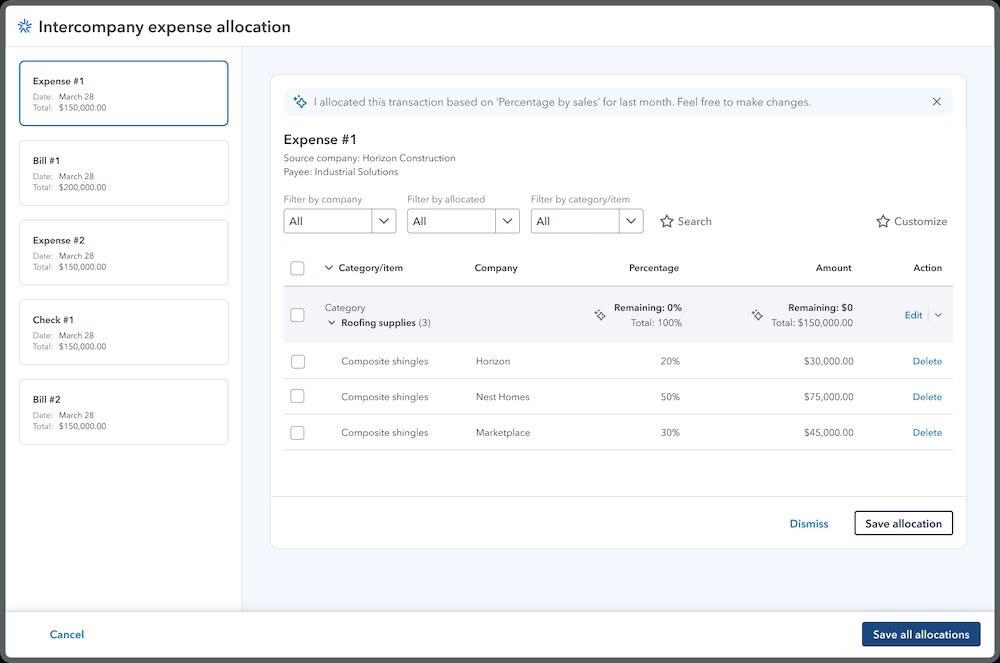
- Allocate intercompany expenses for refunds and with more account types give your client more flexibility and control. Plus, your client team can save time by adding reference info and filtering transactions by allocation status.
- Use dynamic allocations to sum a client’s balances and allocate them in one step, to speed up month-end processes and boost productivity. Note: Intercompany account mapping must be set up before your client can use allocation capabilities.
New and improved Intuit AI
Intuit AI helps guide the strategic decisions you make with your client, while streamlining operations and optimizing cash flow, turning hours-long processes into minutes by proactively handling tasks and unlocking critical insights.
- Customer AI sources leads from your client’s Gmail inbox, drafts personalized responses, and tracks customer opportunities in their sales cycle so clients can focus on high-value opportunities and win more deals.
- Payroll AI works with employees and admins to provide updates, insights, and payroll drafts—even on mobile to help clients complete payroll with less of the prep, but all the control and accuracy. It also notifies those completing payroll of any anomalies before they revise and approve the draft for processing.
- Accounting AI enhancements include automatically extracting transactions from a client’s PDF statements, comparing them to data in Intuit Enterprise Suite, while identifying errors and suggesting how to resolve them. It also helps pinpoint transactions that need more context and gathers more information from other users. To help save time at month end, it also requests pictures of client’s Mastercard credit card receipts in real time.
- Finance AI enhancements include time period customization, editable AI-generated text in summary highlights and insights, and PDF capability for saved reports. These help manage finances more efficiently, optimize month-end close, and speed analysis.
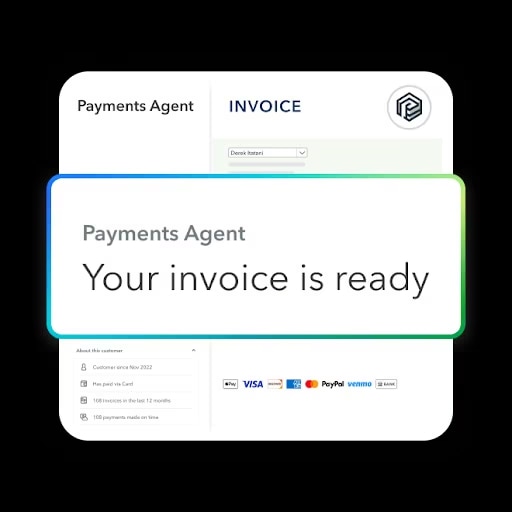
- Payments AI enhancements include autofilling estimates based on a client’s leads content in Gmail and proactively drafting recurring invoices for clients to send to customers, for more efficiency and better money outcomes.
- Project Management AI enhancements include converting signed contracts from the Customer Hub into projects, creating budgets from spreadsheets, converting estimates into budgets, and providing summaries with a view of total cost, total income, and key factors causing deviations—all helping to boost your clients’ overall productivity and profitability.
Business intelligence
With new tools for reporting, KPIs, and dashboards, your client now gets deeper insights, polished management reports, and real-time performance tracking—all in one place.
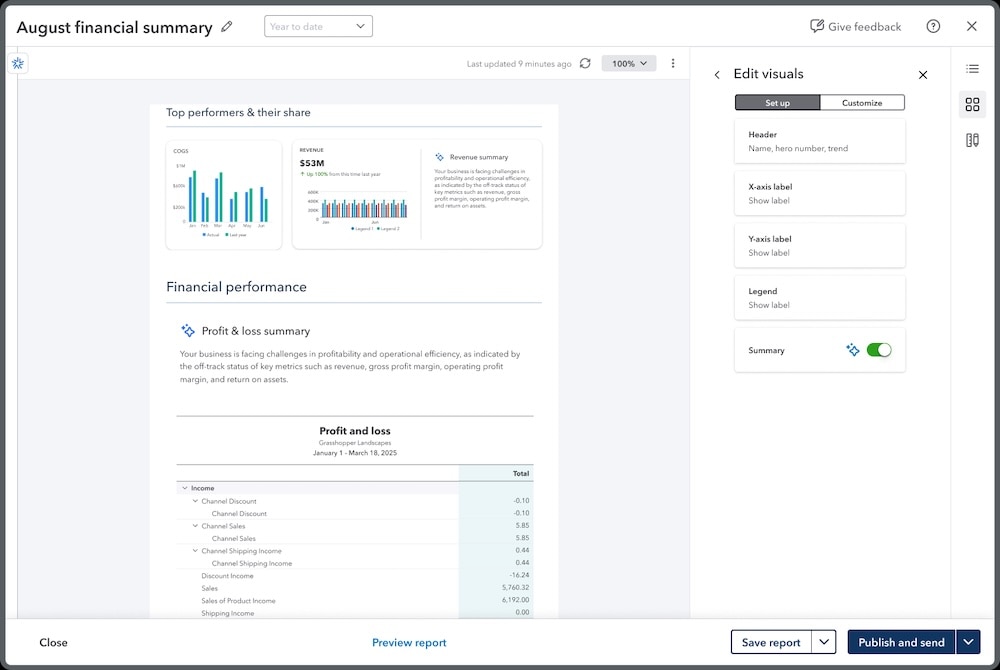
- Enhanced reporting helps you and your clients streamline data analysis, build polished packages, and share insights to help save time, cut costs, and deliver clear, board-ready reporting.
- The KPI scorecard gives clients a centralized, real-time view of their business performance through an expanded catalog of nearly 100 pre-defined KPIs or custom KPIs. Track select KPIs at the consolidated level, and include them in dashboards and reports.
- Dashboards help you and your clients track top metrics in one view, using prebuilt dashboards like Profitability or Cash flow—or building your own. Select dashboards provide consolidated views, with multi-entity support for entity-level views.
- Management reports turn standard financials into branded, presentation-ready packages that combine financial reports, KPIs, charts, and written insights into professional, ready-to-share packages.
Dimension enhancements
Setting up and managing dimensions has been simplified.
- Creating and updating dimensions in Spreadsheet sync for multiple transactions at a time—and seamlessly integrating the data with Intuit Enterprise Suite—allows clients to boost team efficiency and help ensure accurate financial reporting.
- AI-powered dimension recommendations for products, services, and fixed assets help minimize manual effort and improve dimensional reporting accuracy, allowing your client’s team to focus on higher-priority tasks.
Bill pay and payroll enhancements
Strengthen bill payment controls, speed up vendor payments, and improve payroll and W-2 processing.
- Automated bill payment release approvals, customizable with specific criteria and a designated final approver, help your client prevent errors, improve compliance, and get a better handle on their cash flow and A/P process. Note: This feature currently supports single-entity approvals only.
- Instant bill payments help clients pay eligible vendors within minutes, to help manage cash flow more precisely, avoid costly late fees, and strengthen supplier relationships. Note: The 1% fee for instant payments has a minimum $10 and maximum of $100. Payments scheduled outside business hours will run at the next available business time.
- W-2 scalability lets organizations with 100+ employees access and print W-2 employee copies instantly.
- Run payroll processing improvements save time with enhanced load times and a more reliable experience for companies with up to 200 employees.
- Paycheck corrections improvements allow your client to track multiple corrections from open or closed quarters in a single ticket.
Experience enhancements
Platform enhancements deliver enterprise power through an intuitive and modern user interface to help clients’ businesses streamline workflows and scale faster.
- New navigation and visual updates and integrated navigation experience including page bookmarks, app pins, and an expanded library of widgets help your client manage their work more efficiently.
- Customer and vendor data compatibility enhancements to customer shipping addresses, vendor transactions, and vendor detail notes ensure a seamless transition from QuickBooks Desktop.
Disclaimers:
Important product and disclaimer information
Money movement services are provided by Intuit Payments Inc., licensed as a Money Transmitter by the New York State Department of Financial Services. For more information about Intuit Payments' money transmission licenses, please visit https://www.intuit.com/legal/licenses/payment-licenses/.
**Features
Background checks: Checkr's terms and additional fees apply.
Summer 2026 beta features are available to Early Access program participants. Join the Early Access Program here.
Beta features are subject to change or discontinue at any time, and Intuit may introduce fees or other pricing requirements for such features in the future.
This information is intended to outline our general product direction but represents no obligation and should not be relied on in making a purchasing decision. Additional terms, conditions and fees may apply with certain features and functionality. Eligibility criteria may apply. Product offers, features, and functionality are subject to change without notice.
Automatically calculated unrealized gains and losses: Available today for US-dollar functional currency organizations; international functional currencies arriving this fall.
Terms, conditions, pricing, special features, and service and support options subject to change without notice.
Recommended for you



Get the latest to your inbox
Get the latest product updates and certification news to help you grow your practice.
Looking for something else?
Call Sales: 1-844-435-1308




