Close up of a focused woman looking at laptop screen.
product update

You asked, we listened: What we improved in QuickBooks Online for the August 2026 release

This year, we've been innovating fast: Introducing new AI-powered capabilities like Payments AI, Intuit Intelligence, and other new innovations. But building new things is only half the job. The other half is listening. Over the past several months, we sat down with the feedback you have shared about where QuickBooks Online could be better, and we got to work on the everyday workflows you rely on most: matching transactions, reconciling accounts, working in bank feeds, and helping to keep books categorized and accurate. 

This article is about those improvements—the fixes and refinements we made because you asked for them—plus a look at where we're headed next. Here's what's better, workflow by workflow, and how each change saves you time.

Jump to:

Smarter bank transaction matching

QuickBooks now finds and completes more matches automatically, with fewer "no results found" dead ends.

  • Match suggestions are now ranked by confidence, so the most likely match appears first instead of requiring you to scan a list.
  • A new loading indicator now confirms when matching is in progress, preventing unnecessary manual entries by clearly distinguishing between a search that is still running and a situation where no match is found.
  • Duplicate warnings appear before you post a transaction, not after.
  • The automatic date-range search window is wider when no nearby match is found, reducing false negatives on delayed deposits or batched payouts.

More reliable bank connections

We understand that bank connection errors can be frustrating, and we are working hard to improve your experience. This QuickBooks release includes targeted fixes for common connection issues, including giving advanced warning before a connection expires, with more enhancements planned for the coming months. We are committed to making your bank connections smoother and more reliable, and we will continue to share updates as we make these improvements.

  • Fixes target the specific error codes that generate the most support tickets and client confusion.
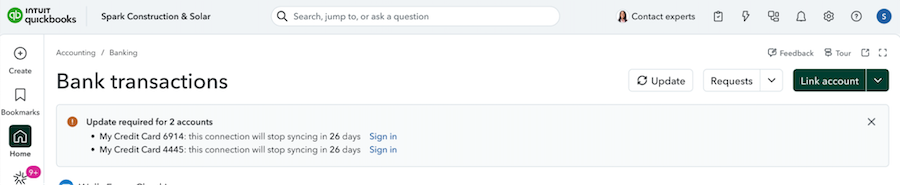
  • Proactive alerts will now notify you before a bank connection expires, rather than after a disruption has already stopped transaction flows. This changes an emergency client call into a planned re-authorization.
  • A redesigned account-mapping flow is now available to streamline the process when you are setting up new clients or adding accounts mid-year.

If your firm manages connections across many client banks, there are still going to be moments where you need to reconnect bank connections, but this release addresses the highest-volume error codes first with continued work planned on the underlying authorization handoff with banks.

QuickBooks online dashboard showing bank transactions

A more trustworthy reconciliation experience

Reconciliation is now protected against the most common causes of a broken beginning balance. Common reconciliation failures like a client or staff member editing or deleting a cleared transaction after the fact, are now harder to do by accident.

  • New guardrails prevent deleted or edited transactions from silently corrupting your books with new triggering warnings for changes to previously reconciled transactions. This avoids throwing off a beginning balance or allowing discrepancies to surface later.
  • Undo Reconcile is now available to any Primary Admin, which means that if you manage staff access across client files, review your firm's internal permissions policy to account for the change in who can correct a reconciliation without escalating it.

Categorization that learns from you

QuickBooks' categorization now updates its suggestions as it learns your preferences, and gives you more control.

  • Once a transaction is categorized in a particular way, similar transactions will be updated with an accurate, suggested category sooner, which makes moving through a batch of vendor transactions in one sitting much more efficient.
  • Clearer transfer and credit-card payment handling reduces the double-counting and misclassification issues that can show up during month-end review.
  • The rules engine now flags when two rules would compete for the same transaction, instead of applying whichever rule fires first. If you manage rule sets across multiple clients, this will surface conflicts you may not have known existed.

Improved vendor management

You told us vendors were buried and hard to tell apart from contractors and customers. We've fixed the classification confusion and surfaced the list.

  • Improved classification ensures vendors, contractors, and customers are always easy to distinguish.
  • The vendor list is easier to find. Vendor details stay consistent when a bill is updated from review.

Receipt capture improvements

QuickBooks improved receipt-capture so your receipts land where they should, with the right numbers.

  • Accurate amounts are reflected when you save receipts. 
  • Forwarded receipts now show up consistently.
  • More accurate data is reflected on captured receipts.

Simpler, secure sign-in

Signing into QuickBooks now requires less repetitive verification.

  • Longer-lasting sessions on trusted devices allow you to verify less often, which reduces repeated verification when you are moving between client files throughout the day.
  • Account recovery is now easier and more secure, which is particularly helpful when you are supporting staff or client logins in addition to your own.

Faster bill payments and fewer wasted clicks

Paying bills now takes fewer steps, and QuickBooks now accurately reflects the type of payment, and with more accurate categorization, and we're cutting avoidable re-entry.

  • Payments no longer default to check. This reflects how bills are actually paid today.
  • Bill Pay Elite is now included with Advanced1. No upgrade or add-on required.
  • Check printing is more reliable. We've improved alignment and cut false "duplicate check number" errors.
  • Filter unpaid bills by status to find what needs paying to triage what needs attention without scrolling a full list.
  • A safeguard warns before clearing all lines on a form. This helps prevent accidental data loss on entries you've partially completed.

Faster, more reliable experiences on every device

The QuickBooks homepage and mobile app are now easier to simplify, customize, and more stable, with fixes to app stability, log-in experiences, and everyday tools.

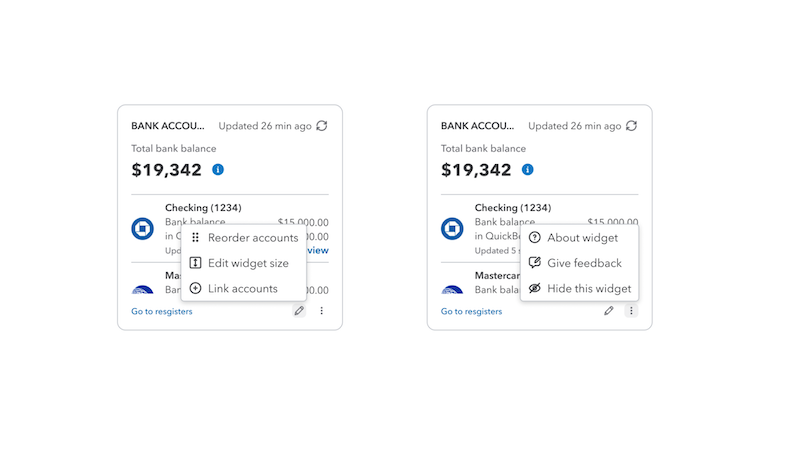
  • The dashboard is now cleaner and more customizable, allowing you to resize and reorder widgets to fit your personal workflow.
  • The homepage now provides faster load times and minimized layout shift as pages load.
  • Mobile app stability fixes (fewer crashes and unexpected logouts) and more reliable mileage tracking and receipt capture.
An example of resizable widgets available on the QuickBooks Online home page

Desktop to online migration

For firms managing Desktop-to-Online client migrations, this workflow often represents a major point of friction. It frequently introduces a series of challenges, including reports that require manual rebuilding instead of transferring seamlessly, chart of accounts mapping discrepancies between the two platforms, and bank rules that may fail to carry over entirely. This release addresses some of these issue:

  • Continued bug fixes to the migration tool itself, aimed at the discrepancy pain points that can show up during the migration process.
  • Groundwork toward bringing over categorization history from Desktop, so a migrated client's transactions show up with some of the original categorization. Additional work to fully address is still in development.

It is our priority to set clear expectations upfront to avoid unexpected challenges during your project. For practices where migration is routine, we recommend continuing to incorporate a manual review of reports and bank rules post-migration as we roll out additional improvements in the future.

Built on your feedback

Every improvement in this article started the same way: with accountants telling us what was slowing them down. The changes to matching, reconciliation, bill payments, categorization, and the rest didn't come from a roadmap drawn up in isolation. They came from the calls, surveys, and conversations you had with us. Foundational improvements are an ongoing commitment to making the core of QuickBooks Online faster, more accurate, and more dependable for you.

Why we focused here

Intuit is investing heavily in new innovation across the software platform. We have made a deliberate choice to put significant engineering effort into the everyday workflows that power your daily tasks, because getting the fundamentals right is essential to the success of your business and your clients. 

What's coming next

We're continuing to invest in the same core workflows, with more improvements already in progress for the months ahead, including smarter matching for deposits that don't line up exactly (like batched payouts from payment processors, with fees taken out), the ability for customers moving from QuickBooks Desktop to bring their categorization history with them, and continued work to make bank connections and reconciliation even more resilient. 

We'll keep listening, keep prioritizing the feedback you share, and keep sharing what we are working on. If there's something you'd like to see improved, your voice is still the most important input we have.

Frequently asked questions 

Will I have to verify my identity every time I switch between client files?

We're working on longer-lasting sessions on trusted devices, so you'll eventually verify less often when moving between client files. Intuit Accountant Suite allows accountants to see all of their client files without switching between them. 

What if I get locked out of my QuickBooks account?

We're also improving account recovery to make it more straightforward if you get locked out. 

Can I control which staff can undo a reconciliation?

Undo Reconcile is now available to any Primary Admin on a company file. If your firm assigns different access levels to staff, review your admin role assignments to confirm this matches your internal controls.

What actually prevents a reconciliation from breaking after it's done?

New guardrails flag edits or deletions to previously reconciled transactions before they're saved, rather than allowing silent changes that surface later as an unexplained discrepancy.

Does QuickBooks Online flag conflicting categorization rules across a client's transactions?

Yes, the rules engine now detects when two rules would apply to the same transaction and flags the conflict instead of applying one silently.

Will migrating a client from QuickBooks Desktop bring over their categorization history?

Not yet, but groundwork toward it is underway. Full support for categorization history transfer in Desktop-to-Online migrations is one of the top priorities on the roadmap, not something shipping in this release.

What breaks when you migrate a client from QuickBooks Desktop to Online in 2026?

Reports and bank rules are the two things to plan around. Reports often need to be rebuilt rather than transferring as-is, and some bank rules don't carry over—budget time for a manual review of both after migrating. It's an active area of investment, not yet a clean one-click process.

How does the new bank matching logic work?

Matches are ranked by confidence so the likeliest match surfaces first, the search window widens automatically when no nearby match is found, and duplicate warnings appear before a transaction is posted. 

Why did bill payments stop defaulting to check?

Roughly 90% of payments processed aren't check payments, so the previous default required extra correction on nearly every bill. Payment type now reflects how bills are actually being paid.

Is bank connection reliability actually fixed now?

Not entirely—this release targets the highest-volume error codes and adds earlier expiration warnings, but the underlying disconnect/reconnect cycle with some banks is a multi-quarter effort. If you manage connections across many client banks, expect continued incremental improvement rather than a single fix.

What should I watch for immediately after this release?

Review Primary Admin assignments in light of the Undo Reconcile change, and check any rule sets you've built across multiple clients for newly surfaced conflicts—both are behavior changes that affect existing setups, not just new features.

Disclaimers

Money movement services are provided by Intuit Payments Inc. pursuant to IPI's licenses (NMLS #1098819, https://www.intuit.com/legal/licenses/payment-licenses).

August feature release dates and availability will vary by product. Not all features will be available on August 1.

This information is intended to outline our general product direction, but represents no obligation and should not be relied on when making a purchasing decision. Additional terms, conditions, and fees may apply with certain features and functionality. Eligibility criteria may apply. Product offers, features, and functionality are subject to change without notice.

“Intuit Intelligence” and “Conversational Business Intelligence" are currently available as beta releases. Features, availability, and capacity are subject to change. Intuit Intelligence chat is only available to admin users at this time. Capacity is limited. This feature is in Beta. Beta features have limited availability and are subject to change.

Intuit Intelligence chat is only available to admin users at this time. Capacity is limited. This feature is in Beta. Beta features have limited availability and are subject to change.

Bill Pay Elite pricing and feature availability may vary based on your specific subscription plan and date of renewal. Please check your account settings for the most accurate details regarding your subscription tier. 

QuickBooks Bill Pay: subject to eligibility, credit, and approval prior to first payment. Subscription to QuickBooks Online required. Bill Pay is included with QuickBooks Online when purchased directly from QuickBooks.com or QuickBooks Sales. Not available in U.S. territories or outside the U.S. Limits may apply on total number and amount of payments. 

Bill Pay Elite is expected to be included in QuickBooks Advanced on August 1, 2026; actual availability dates may vary and are not guaranteed. Additional terms, conditions, and fees may apply.


Recommended for you

Get the latest to your inbox

Get the latest product updates and certification news to help you grow your practice.

Looking for something else?

Get QuickBooks

Smart features made for your business. We've got you covered.

Tax Pro Center

Expert advice and resources for today’s accounting professionals.

QuickBooks Support

Get help with QuickBooks. Find articles, video tutorials, and more.

How can we help?
Talk to sales 1-800-497-1712

Monday - Friday, 5 AM to 6 PM PT

Get product support