QuickBooks Online Accountant will be discontinued on December 31, 2026, making now the critical time to transition to Intuit Accountant Suite, a unified platform for managing your firm, clients, and team. By making the switch now, you can utilize premium features such as Accelerate and Books Close at no cost during the beta window (through January 19, 2027)1. Here is a downloadable guide to Intuit Accountant Suite.
Intuit Connect, the premier event for accounting firms, is back,
Oct. 26-28 in Las Vegas!


Use this checklist to ensure your firm's seamless transition.
Initial steps
Opt-in to Intuit Accountant Suite
- In QuickBooks Online Accountant, go to Settings and select the option to switch to Intuit Accountant Suite.
- Complete the first-time use experience. Onboarding tours and contextual reminders are built in to help your team get up to speed quickly.
- On the left navigation, bookmark the ProAdvisor training resources and schedule team training sessions. Webinars, demos, and in-product tours are available.

Consolidate consoles
Intuit Accountant Suite works best when your entire firm operates from a single console, previously called a realm. Use the client transfer and consolidation tools to centralize before billing starts.
- If your firm uses multiple QuickBooks Online Accountant accounts, identify your target primary console.
- Use the improved client transfer tool to move all client files into your target console.
- Verify all client files are visible and accessible under one sign-in.
Here is a guide to help with console consolidation.
Try the free beta features
Premium Intuit Accountant Suite features are free through January 19, 2027. Activate them now to explore the full platform before billing begins. The core Intuit Accountant Suite product will remain free.
- Accelerate tier (free Beta through January 19, 2027)
- Activate from the Subscription Summary in Intuit Accountant Suite Settings.
- Unlocks: Client Insights with AI anomaly detection, User Groups, and Portfolio-level Insights (coming soon).
- Books Close add-on (free Beta through January 19, 2027 for onboarded clients)
- Any primary admin can activate from Settings.
- Unlocks: Customized close workflows, AI anomaly detection, template-level settings, client and team collaboration, and bulk task updates (coming soon).
- Billing will apply only to clients onboarded to Books Close when billing starts January 20, 2027.
Organize your team and client information
Set up role-based access (Accelerate)
- Use User Groups to bulk-assign staff to client portfolios with role-based access controls.
- Configure permissions for services such as AP, AR, payroll, and payments.
- Assign team members to Books Close engagements without granting access to your firm’s books.
Update and organize your client list
- Assign unique client numbers to each client to streamline searching, tracking, and billing.
- Add custom fields such as industry, region, office, and service tier so you can filter and segment your client list in Client Insights.
- Connect client files to Intuit Accountant Suite so bank feed alerts and KPI monitoring are active from day one.
Train your team
- Access the ProAdvisor Training Manager dashboard built into Intuit Accountant Suite.
- Assign onboarding coursework, send reminders, and track your team’s progress.
- Have at least one team member take the ProAdvisor certification for Intuit Accountant Suite.
- Review this checklist for tips on how to help your team transition.
Review pricing, billing and subscription information
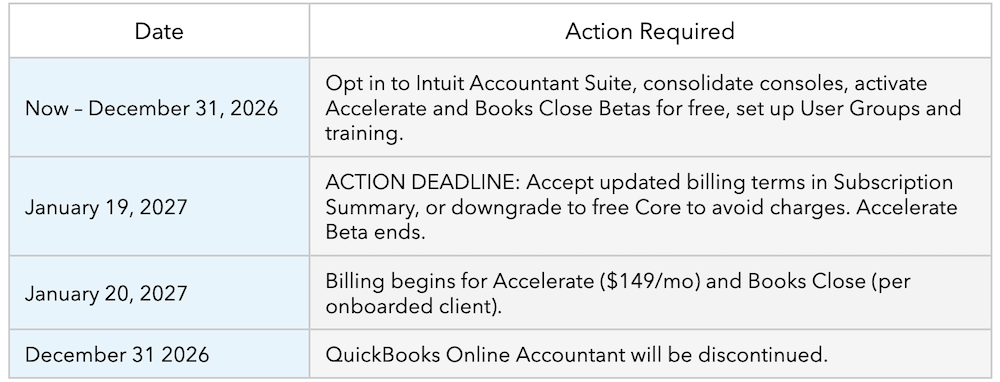
Important deadline: If you are currently on a premium Beta (Accelerate or Books Close) and take no action by January 19, 2027, your firm will automatically be switched to the free Core version of Intuit Accountant Suite. Your data comes with you and no data loss occurs.
Review pricing
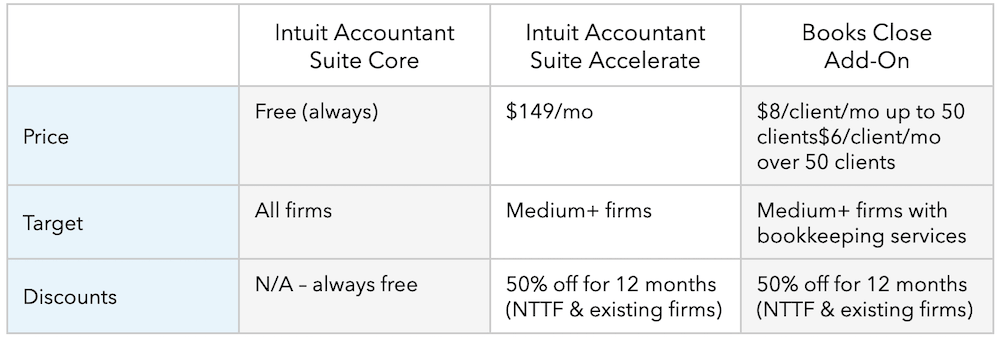
Billing begins January 20, 2027. The Intuit Accountant Suite lineup is:
Provide billing consent
- Watch for the 60-day notice from Intuit with billing details (sent to primary admins).
- Log in to Intuit Accountant Suite and go to Subscription Summary to accept the updated billing terms.
- Primary admins are the only users who can change firm subscriptions.
- If you choose not to continue with a paid plan, downgrade to Core before January 19, 2027. Your data stays intact.
Key dates and actions
Resources to help your team learn more
Disclaimers
1You will not be charged during the beta program which runs through January 19, 2027. Beginning January 20, 2027, we will start charging for Books Close. You have the opportunity to continue to use Books Close for a fee, or cancel your subscription prior to that date to avoid charges. Pricing will be based on the number of clients onboarded to Books Close. Firms will choose which clients they onboard to Books Close. Charges will be based on the number of clients onboarded at the beginning of their billing month on their billing date.
Firms with 50 clients or fewer onboarded, will pay $8/client/month.
Firms with more than 50 clients onboarded, will pay $6/client/month.
These charges will begin on your firm’s bill on or following January 20, 2027.
Recommended for you



Get the latest to your inbox
Get the latest product updates and certification news to help you grow your practice.
Looking for something else?
Call Sales: 1-844-435-1308




