Long-term efficiency gains
Beyond fixing today’s bottlenecks, ERPs also build compounding value over time.
Automation and productivity
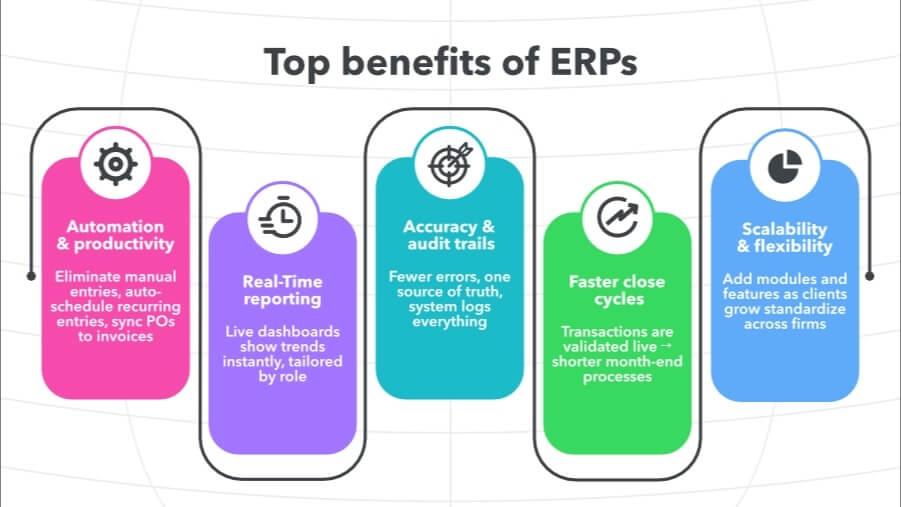
ERP systems eliminate the most time-consuming, error-prone parts of accounting: manual data entry and duplicate work. Instead of posting the same transaction in multiple systems, an ERP captures it once and propagates it everywhere it needs to go, including GL, AP/AR, and payroll. Invoices can auto-generate from approved POs, payroll runs can sync directly to the ledger, and recurring entries can be scheduled and reconciled without intervention. This means fewer hours spent cleaning up data and more bandwidth for analysis, advisory, and tax strategy.
Scalable, flexible systems
ERP systems are modular and configurable, meaning you can add functionality, such as multi-entity consolidations, industry-specific reporting, and advanced forecasting, for example, as clients grow, without ripping out the system and starting over. That scalability also benefits your firm: you can standardize workflows across multiple clients while still tailoring dashboards, permissions, and reports for each client’s specific needs.
Cost savings and ROI
ERP is as much a financial decision as it is an operational one. Understanding where the savings come from (and who benefits) helps you advise clients on implementation and articulate the return for your firm.
Lower software and IT overhead
Because ERP systems consolidate payroll, inventory, reporting, and more into a single platform, they replace the need for various software, logins, backups, and support contracts.
For clients, that means fewer licenses to renew and less budget tied up in maintaining a patchwork of systems. For your firm, this standardization reduces time spent juggling different tech stacks across clients and eliminates the hidden “IT tax” of troubleshooting disconnected tools.
Operational efficiency that pays off
ERP automation transforms traditionally manual processes into streamlined, nearly touchless workflows. Invoices generate automatically from approved POs, payroll entries sync directly to the ledger, and consolidations run without intervention.
For clients, the payoff is leaner staffing and faster cycles. For your firm, it unlocks capacity, allowing you to manage more complex portfolios or devote more time to high-value, revenue-generating advisory work.
Security, compliance, and controls
Beyond optimizing workflows, ERP systems provide infrastructure that safeguards client data and supports compliance obligations, including the following:
Centralized access and role permissions
ERP consolidates permissions into a single environment and introduces granular, role-based access. For example, payroll visibility can be restricted to HR. You can also control who can approve, edit, or post transactions without managing security across a half-dozen systems.
Built-in audit trails
Every journal entry, approval, and change is logged automatically and timestamped. For clients that may require audits, that creates a defensible record for regulators; for your firm, it means less scrambling to assemble documentation and more confidence when fielding audit questions.
Reduced risk of data drift
When everything flows through one system of record, version conflicts disappear. Clients stop circulating outdated statements, and your team stops reconciling which spreadsheet has the “real” numbers since there’s a singular source of truth.
AI and future-proofing
Modern systems already embed AI capabilities that reshape what firms can offer, and adopting ERP now sets you and your CFO clients up to leverage what’s coming next.
Predictive forecasting and anomaly detection
AI models analyze years of historical data to project cash flow and revenue, as well as flag irregular transactions automatically. Clients get early warnings such as spotting a cash crunch months before payroll is at risk, and your firm can deliver forward-looking guidance instead of reactive reports.
Conversational data access
Natural language queries and chatbots are making ERP systems more intuitive. You or your CFO clients can type, “Show margin by product line,” and get an instant answer. Meanwhile, your staff can spend less time running ad hoc reports and more time interpreting and actioning results. And it goes without saying, but always double check and apply your best judgement to the outputs you get from GPTs.
ERP implementation tips for accountants
Implementing an ERP system is rarely just a software switch. It reshapes how you handle reconciliations, approvals, and reporting, and how you prepare will determine how smooth the transition feels.
- Scrutinize integrations: Look closely at how the ERP connects to payroll, CRM, and accounting software like QuickBooks. Real-time syncing, transaction-level detail, and error handling all matter.
- Clean before you migrate: Treat migration like an audit: clear duplicate vendors, reconcile open balances, and decide what historical data truly needs to move.
- Secure stakeholder buy-in early: Your role is to guide the client through this process and make sure everyone on their side is aligned, from AP clerks to CFOs. Help them see where processes will shift, gather input from each team, and surface concerns before they become roadblocks. When you lead those conversations, the implementation unfolds smoothly and clients feel supported every step of the way.
- Map the workflow changes: ERPs often alter approval chains, posting logic, or reconciliation timing. Walk through AP, AR, and payroll processes in advance so you can update documentation and retrain staff before go-live.
- Prepare clients for what they’ll see: If you manage client books, explain why invoices look different or reports change. Set expectations on how to read and use those reports so the rollout feels like a service upgrade that immediately upgrades, not disrupts, workflows.
Next steps: Reaping the benefits of ERP
An ERP system can transform how you manage client books, close the month, and deliver insights. With thoughtful preparation—clean data, mapped workflows, and early stakeholder alignment—you create a foundation for efficiency that lasts.
If you’re ready to explore what an ERP-level solution could mean for your firm and your clients, Intuit Enterprise Suite is a smart place to start. It delivers the integrations, automation, and real-time visibility you expect from an ERP, without the heavy lift and complexity that make many systems feel overwhelming. For accountants advising clients—or managing their own growth—it’s a way to get the clarity and control of a true ERP, in a package designed to be implemented and adopted with ease.