Essential practices for smooth transitions
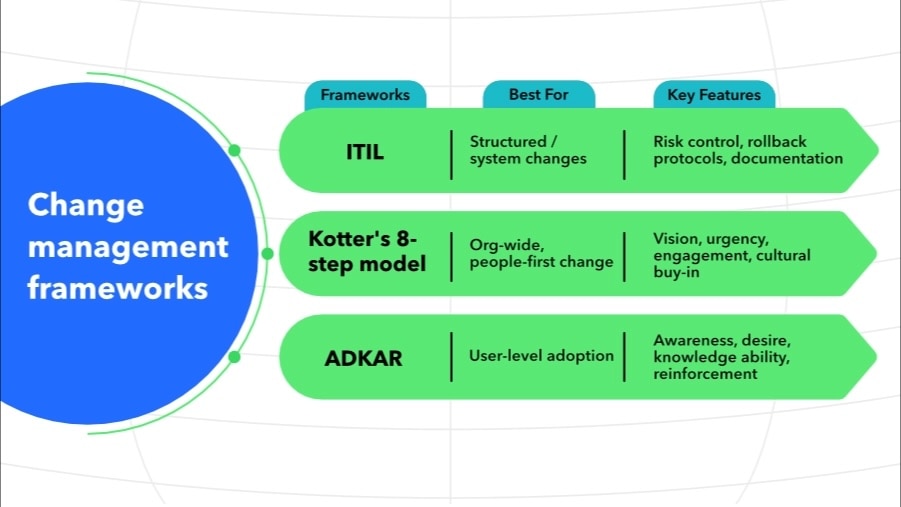
Beyond selecting a framework, accountants can guide clients through six core practices that minimize disruption and maximize adoption. These practices apply regardless of which framework you choose, helping ensure changes are well-documented, properly tested, and successfully embedded into daily operations.
1. Start with clear documentation and purpose
Every change should begin with a well-defined request capturing business rationale, scope, affected systems, and expected outcomes. This creates a foundation for informed decision-making and maintains a strong audit trail.
2. Assess risks holistically
Software changes ripple through financial reporting, compliance, and daily operations. Advise clients to involve representatives from finance, IT, and operations early to uncover blind spots, align expectations, and build buy-in before major shifts occur.
3. Secure leadership alignment
Formal approval processes—whether through a department lead, executive sponsor, or change advisory board—ensure stakeholders understand scope and implications. Help clients frame proposals that connect technical details to strategic priorities.
4. Plan thoughtfully
Guide clients to map out timelines, responsibilities, and success metrics, while accounting for peak business periods and resource availability. Identify opportunities for early wins to sustain momentum throughout the rollout.
5. Test, train, and communicate
Testing in sandbox environments catches regressions before go-live. Parallel to testing, plan role-based training that helps users understand not just how to use the software, but why the change matters. Effective communication keeps teams engaged and reduces resistance.
6. Monitor and learn
Post-implementation, track adoption through usage data, feedback, and performance metrics. Regular reviews of data integrity, system reliability, and user satisfaction help strengthen future change initiatives and embed continuous improvement.
Tools and technologies to support software change management
Several categories of tools help streamline software transitions and maintain oversight:
- Version control systems (Git, SVN): Track changes to configurations or scripts used during migration.
- Change request systems (Jira, ServiceNow, Freshservice): Log, approve, and monitor changes through a structured workflow.
- CI/CD tools (Jenkins, GitLab): Automate testing and deployment for tech-forward teams, minimizing human error during rollout.
Modern platforms often embed change tracking directly into their interface, making it easier to monitor workflows and enforce controls across departments.
Common challenges in software transitions
When clients move to a new financial system, the biggest risks often aren’t in the technology; they are in the handoff between people, processes, and data. To keep the transition smooth, accountants and CAS advisors should plan for challenges that may not surface until it’s too late:
- Change fatigue within finance teams: Teams under constant reporting pressure can view system changes as just another disruption. Avoid burnout by mapping the implementation against critical business cycles, including month-end, quarter-end, tax season, and building in “quiet periods” for stabilization. Involve senior staff early so they can model adoption and coach their peers.
- Workflow blind spots: New systems don’t always replicate existing workflows exactly, which can break downstream processes like consolidations or recurring journal entries. Run shadow closes in the new environment for at least one reporting cycle, then compare outputs line-by-line to spot and fix discrepancies before going live.
- Data migration and reconciliation gaps: Even clean migrations can introduce rounding errors, missing transaction history, or misaligned chart-of-accounts structures. Layer in a reconciliation phase after migration but before full adoption, where you match trial balances, AP/AR aging reports, and key management reports to the old system to validate integrity.
- Training that fails to translate: Standard software training from the vendor often explains how the system works, but not necessarily how it fits into the client’s specific financial workflows. As an advisor, you can help bridge that gap by developing role-specific guidance for your client’s team, then running scenario-based sessions—for example, “Process an expense reimbursement” or “Close the month,” to ensure the new system supports their day-to-day operations.
The goal isn’t just to avoid downtime; it is to make the transition invisible to the client’s day-to-day operations, while ensuring the new system is accurate, compliant, and fully adopted from day one.
Successful change management in practice
The true test of any change management approach is how it holds up in the real world. While frameworks and best practices set the foundation, successful change ultimately depends on how organizations translate these best practices into action.
The following examples highlight how two very different companies—one scaling fast, another restructuring for sustainability—applied strong change management principles during their transition to Intuit Enterprise Suite. Their experiences show that when teams pair the right systems with clear communication and planning, technology becomes a catalyst for efficiency and growth.
Case study: Four Points RV Resorts
When Four Points RV Resorts grew from one property to eight, its accounting processes couldn’t keep pace. Managing multiple entities meant juggling separate systems, duplicate data entry, and delayed reporting. Leadership recognized that without a more unified approach, growth would continue to create friction and inefficiency.
By taking a structured, well-documented approach to their software transition, the team was able to consolidate reporting across all entities and eliminate the need for costly outsourced support. The change dramatically improved visibility into real-time data, strengthened internal controls, and reduced manual reconciliation time from hours to minutes.
What stands out about this example isn’t just the technology upgrade; it is how leadership approached the transition itself. They identified pain points early, set clear goals, and ensured buy-in across the organization before making the shift. The result was a system that scaled with their growth and gave leadership confidence in every financial decision.
Case study: FEFA Financial
FEFA Financial, a financial planning and retirement strategy company serving clients nationwide, faced a familiar challenge as it grew: managing complex dimensional reporting across five separate entities, while keeping a lean finance team of just three people. CFO Keaton Trager needed a solution that could consolidate financial data for high-level decision-making while maintaining regulatory separation between businesses.
By switching to Intuit Enterprise Suite, Trager's team experienced what he calls a seamless transition. Rather than the lengthy, complex migration he'd anticipated, the switch felt effortless. The multi-entity journal entry functionality delivered immediate time savings, and the team quickly uncovered efficiency improvements alongside better financial data for strategic decisions.
What stands out about FEFA's experience is how change extended beyond the finance department. The sales team embraced dimensional reporting, which gamified performance tracking and gave them clearer goals to pursue. Marketing benefited from integrated Mailchimp tools that improved client communication and lead nurturing. By choosing a platform that didn't require extensive retraining or disrupt daily operations, FEFA turned what could have been a daunting change into a catalyst for cross-functional growth and continued efficiency.