ERP implementation: A strategic guide for accounting leaders.
Enterprise

ERP implementation: A strategic guide for accounting leaders

ERP systems connect financial transactions to operational processes across sales, inventory, payroll, and beyond, creating a unified, real-time view that eliminates blind spots and transforms month-end closes from weeks-long exercises into streamlined, automated workflows. For accountants advising mid-size businesses, ERPs mean the difference between reactive reporting and proactive strategic insight, shifting finance teams from data gathering to high-value advisory work, while maintaining year-round audit readiness.

But strategy is one thing, and execution is another. In this guide, we'll walk through the typical ERP implementation cycle, key challenges to anticipate, and how to measure real ROI—so your clients get to value quickly rather than getting stuck in the throes of a nightmarish implementation.

The ERP implementation cycle

ERP implementation success depends on treating it as an operational transformation, not just a software installation. Each phase sets up the foundation for how finance teams will operate for years, making early decisions disproportionately important to long-term outcomes. You, the accountant, were probably instrumental in helping your client identify the right ERP for their needs. Now, you can help guide them through ERP implementation; not just setting up the software for the first time, but also helping your client with resources on software change management and how to ensure their team ramps up quickly. This way, they avoid disruptions and they can start to see value sooner.

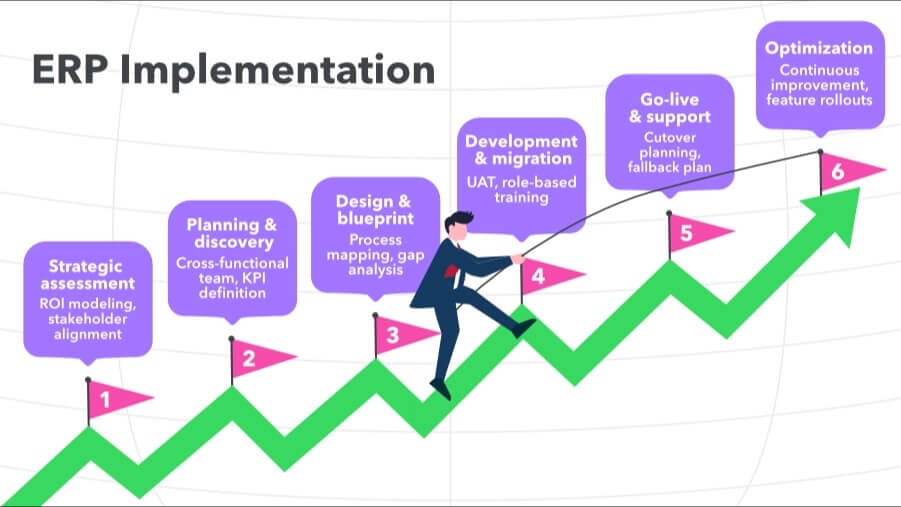
Phase 0: Strategic assessment

The groundwork laid here determines whether the project delivers measurable value or just a new system. Vague efficiency goals don't survive contact with a real implementation, so before anything else, get specific.

  • Needs analysis: Document process inefficiencies and quantify their cost—billable hours lost to manual data assembly, delayed reporting that reduces your advisory value, and compliance risks that increase liability.
  • ROI modeling: Tie projected gains to specific operational changes: time saved from automated consolidations, error reduction from integrated controls, and advisory capacity unlocked by real-time data access.
  • Stakeholder alignment: Secure leadership buy-in for budget, timeline, and process changes before the project starts. This is harder to retrofit mid-stream than it sounds.

Strategic assessment in action: When Cornerstone Development CEO Chad Shaules could no longer quantify the cost of managing five entities in a fragmented system, he knew the firm wasn't in a strong position to grow. The leadership team estimated they were spending 20-plus hours a month on manual data integration just to see a complete picture of the enterprise: a concrete, finance-led KPI that made the case for change undeniable.

What to keep in mind:

  • If a client can't articulate what's costing them, they're not ready to commit.
  • Anchor the project to finance-led KPIs from the start—forecast variance under 5%, consolidated group reporting without offline spreadsheets, and a zero-day month-end close. These hold up when timelines slip or budgets get questioned. 
  • Misaligned expectations at this stage, not technical problems, are what cause implementations to stall.

Phase 1: Planning and discovery

This phase sets the scope and assembles the right team. Scope drift is the most common implementation killer, and it almost always starts here.

  • Cross-functional team: Include finance leadership, operations, compliance, and IT. For multi-entity rollouts—the kind where Intuit Enterprise Suite tends to shine—have each entity represented from the start.
  • Scope definition: Decide which processes to replicate, which to redesign, and the sequence for rollout. Operational features can easily crowd out financial reporting priorities if the scope isn't defended early.
  • KPI transfer: Carry goals from Phase 0 into concrete project KPIs. "Reduce month-end close from 12 days to 6 days" is useful. "Improve efficiency" is not.
  • Deployment architecture: Align cloud vs. on-premise decisions with data residency needs, integration requirements, and scalability goals. For most growing businesses, cloud-based systems offer a better long-term tradeoff, with lower upfront cost, automatic updates, and the flexibility to scale without a migration.

Planning and discovery in action: When CFO Keaton Trager began scoping a more robust solution for the five entities of FEFA Financial, he quickly ruled out NetSuite and Sage Intacct. He knew those platforms would require an expensive consultant and lengthy implementation, and would leave his team without an internal expert. Trager ultimately turned to Intuit Enterprise Suite, a configurable AI-powered business platform, and his team, already fans of Intuit products, found the transition seamless. Knowing what the team could and couldn't absorb in terms of change management shaped every scoping decision from the start.

What to keep in mind:

  • Actively defend financial reporting priorities throughout scope definition. Operational features have a way of crowding them out, and the finance team pays for it later.
  • Make sure every relevant stakeholder is in the room for key decisions. Gaps here get relitigated at higher cost.

Phase 2: Design and blueprint

This is where requirements become a configuration plan. The goal is to minimize customization—every custom build is future maintenance debt.

  • Process mapping: Redesign workflows and standardize where possible. This is also the moment to push for chart of accounts harmonization and vendor/customer master cleanup—not after you go live.
  • Gap analysis: Distinguish critical requirements from nice-to-haves, and surface integration gaps—payroll, point of sale, banking—before they become shadow systems in Phase 3.
  • Controls framework: Embed segregation of duties, approval hierarchies, and audit trails directly into workflows now. For example, Intuit Enterprise Suite enforces role-based permissions and compliance logic at the transaction level, reducing the need for manual controls post-go-live.

Design and blueprint in action: At design time, Cornerstone Development prioritized embedding compliance logic directly into its workflows rather than retrofitting controls after going live with Intuit Enterprise Suite.

The firm standardized five entities with a shared chart of accounts and automated intercompany transactions, eliminating manual processes while unifying QuickBooks Payroll (now included in QuickBooks Workforce), QuickBooks Time, and QuickBooks Bill Pay to ensure that six figures worth of payroll moved seamlessly from a mobile clock-in to employees' bank accounts. That upfront rigor turned what had been an error-prone back office into a proactive strategic hub.

What to keep in mind:

  • Require chart of accounts harmonization, vendor/customer master cleanup, and historic transaction mapping before migration. Misaligned entity structures make consolidated reporting a manual exercise indefinitely.
  • Enforce role-based permissions and separation of duties at build, not after go-live. Retrofitting controls once the system is live is expensive and often incomplete.
  • For multi-entity clients, map intercompany eliminations and foreign currency rules explicitly at this stage. Gaps here surface as consolidated reporting errors that are hard to trace back to their source. 

Phase 3: Development and data migration

The technical heavy lifting happens here. Data quality is the variable that will define how useful the system is from day 1.

  • Configuration strategy: Prioritize out-of-the-box functionality. The more a system is customized at build, the harder it becomes to take advantage of new features and updates down the road.
  • Integration planning: Map and test data flows with existing systems early, building in error handling for peak periods. Intuit Enterprise Suite connects to 850+ integrations across 20+ industries, which reduces custom integration work for most mid-market configurations.
  • Data migration: Clean and validate data before moving it. Run parallel trial balances in both systems to catch discrepancies.
  • Iterative builds: Start module-specific testing before development is fully complete—issues caught early are significantly cheaper to fix than ones surfaced during user acceptance testing.

Development and data migration in action: For Boulder, Colorado-based Elton R Construction, a clean migration off of QuickBooks Desktop proved that prioritizing out-of-the-box functionality over customization pays immediate dividends.

Migrating to Intuit Enterprise Suite took two days, and by leaning on the platform's native project budgeting and labor rate calculations, Vice President of Finance Rhiannon Pettit eliminated the complex spreadsheets and manual data carryover that had consumed her team for years.

What to keep in mind:

  • Prioritize platforms that enforce compliance logic at the transaction level and produce standardized, drill-down-ready data. This reduces the need for manual adjustments long after going live. 
  • Resolve integration gaps around payroll, banking, and point-of-sale before build. Left unaddressed, they create shadow systems that make reconciliations slower and reports incomplete.

Phase 4: Testing and training

A system that works technically, but isn't adopted, is a failed implementation. Both sides of that equation need attention here.

  • User acceptance testing: Run full business cycles—month-end close, intercompany postings, consolidations—in the new system while the legacy system stays live. Stress-test controls, approval workflows, and posting rules before cutover, or the final transition phase.
  • Deployment strategy: Choose between a big bang or phased rollout based on complexity and risk tolerance. For multi-entity clients, a phased approach by entity or module tends to reduce risk without meaningfully extending the timeline. Intuit Enterprise Suite, for example, supports phased rollouts and has averaged implementation times of under two months for mid-market clients.
  • Role-specific training: Pair vendor training with workflow-specific examples the team will actually encounter. A super-user network reduces dependence on vendor support and accelerates adoption faster than any training program on its own.

Testing and training in action: Four Points RV Resorts CTO Matt Van Der Molen stress-tested intercompany workflows and role-based permissions before going live with Intuit Enterprise Suite, and the results validated the investment. Intercompany journal entries that previously required more than 90 minutes to book are now completed in 30 minutes, and consolidated multi-entity reports that once cost $600 a month to outsource now take Van Der Molen seconds to generate himself. The firm's low-disruption adoption experience, which Van Der Molen described as "free of stress" around data integrity and training, underscores what thorough pre-launch testing makes possible.

What to keep in mind:

  • Stress-test transaction controls, approvals, and posting rules before launch. Compliance that relies on manual checks after go-live is a gap that tends to surface at the worst possible time.

Phase 5: Go-live and support

Cutover is high-stakes and time-sensitive. The decisions made in the weeks around go-live set the tone for adoption.

  • Cutover planning: Avoid go-lives around quarterly closes, year-end, or other high-volume periods. Disruptions during these windows distort year-over-year comparisons and can delay required filings.
  • Stabilization period: Expect a short-term productivity dip and communicate it to clients upfront. A team that's surprised by it loses confidence in the system faster than one that was prepared.
  • Support structure: Use a tiered model where superusers handle common issues, vendor resources stay reserved for advanced troubleshooting. This keeps resolution times short and builds internal competency faster.

Go-live and support in action: Lallier Construction credits a well-structured go-live and support model, including dedicated Intuit Enterprise Suite team guidance on complex payroll rollovers and API questions, with enabling a rapid reallocation of finance team time. During busy season, the time required for matching transactions and month-end reconciliation dropped from a high of 20 hours to just two to four hours per week, an 80% to 90% efficiency gain. That kind of stabilization in the weeks after cutover is what sets the tone for long-term adoption of the AI-native ERP.

What to keep in mind:

  • Have a fallback plan ready before cutover. The ability to temporarily revert if something critical breaks is worth the preparation cost.

Phase 6: Optimization and maintenance

Go-live is not the finish line. The businesses that get the most from ERP treat it as an evolving system, not a completed project.

  • Continuous improvement: Review workflows quarterly to find automation opportunities and address adoption gaps. Schedule structured optimization reviews at 60–90 days post-go-live, then annually. These are also the right moments to incorporate regulatory changes into system logic.
  • Change management: Maintain onboarding processes for new hires and document business-specific procedures. Institutional knowledge that lives in people's heads rather than the system.
  • System evolution: Evaluate and roll out new features strategically, avoiding major changes during peak business cycles. For AI-native platforms like Intuit Enterprise Suite, capabilities around anomaly detection, forecasting, and workflow automation are expanding regularly. A structured review process ensures clients capture that value without introducing instability.

Optimization and maintenance in action: Humble House Foods treats Intuit Enterprise Suite as an evolving system, not a completed project. After migrating from QuickBooks Online, the company was able to measure the needs and successes of its three different business entities, expand its sales goals while reducing stress, and make plans for significant future growth. These gains weren't all immediately realized at go-live; rather, they accumulated through ongoing integration with third-party tools and regular use of real-time reporting to guide decisions.

What to keep in mind:

  • Build post-go-live reviews into the engagement upfront, 60-90 days out, then annually. Without a structured cadence, reporting gaps and workflow inefficiencies accumulate quietly.
  • Budget time for optimization, not just maintenance. The difference between firms that get compounding value from ERP and those that plateau is usually whether they treat it as a living system.
Step-by-step ERP implementation process visualized as an ascending path: strategic assessment, planning and discovery, design and blueprint, development and migration, go-live and support, and optimization

ERP implementation timelines

Mid-market ERP implementations typically span 3–9 months from project initiation to full optimization, though timelines can extend to 6–18 months for larger, more complex deployments with significant customization or multi-entity consolidation. That said, cloud-based or AI-native ERP platforms can shorten these cycles significantly.

One example: for QuickBooks users, the AI-native Intuit Enterprise Suite is intuitive and familiar, designed to help finance teams get up and running in days with fewer disruptions and improved efficiency from day 1.

Strategic benefits of ERP for accounting firms

For accounting firms, ERP advantages translate directly to recoverable hours at month-end, streamlined multi-entity consolidations, and audit-ready documentation. These benefits address the operational realities that define modern practice.

Data centralization and process automation

ERP houses all entities, currencies, and chart structures within a unified architecture, enabling real-time intercompany postings with automated eliminations. Recurring processes such as accrual reversals, depreciation calculations, and allocation entries execute without intervention, creating continuous audit trails that replace manual reconciliation work.

This automation doesn't just accelerate close cycles; it eliminates the reconciliation gymnastics that consume advisory capacity during peak periods.

Real-time financial intelligence

Integrated operational data lets firms spot problems early, while there is still time to fix them. Exception dashboards can flag margin erosion, cash flow issues that could strain vendor terms, or revenue recognition gaps before they become end-of-month surprises.

This real-time view shifts advisory work from explaining past results to shaping future outcomes, positioning accountants as true operational partners.

With an AI-native ERP, AI agents take this even further by working alongside your business. Agents can surface insights, deliver quicker cash conversion, and improve visibility. This means fewer hours spent cleaning up data and more bandwidth for analysis, advisory, and tax strategy.

Enhanced compliance and reporting

Compliance shifts from a periodic task to an always-on workflow. Segregation of duties, approval hierarchies, and field-level audit logs capture evidence automatically. When regulations change, whether they are GAAP updates or jurisdiction-specific tax rules, adjustments often require simple configuration changes, not process overhauls. The payoff: Perpetual audit readiness and controls that scale with complexity without adding heavy compliance overhead.

Improved client service delivery

With current, reconciled financials, firms can answer strategic questions the same day they are asked. Cash flow projections, scenario analyses, and performance reviews reflect real-time conditions, making advice more relevant and actionable. This speed and precision strengthen client relationships and open the door to premium advisory models that justify higher fees.

Operational scalability

A well-designed ERP supports growth without matching headcount increases. Adding entities, entering new markets, or expanding services can happen within the same infrastructure. Standardized processes and centralized reporting preserve quality across a growing portfolio, enabling firms to take on more complex work without overloading the back office.

Best practices, common challenges, and pitfalls

When clients implement ERP systems, the quality of your future financial oversight and advisory work is shaped in those first months. The right guidance can prevent years of inefficient reporting, reconciliation headaches, and compliance risk.

Best practices for ERP implementation

These measures help ensure the ERP consistently delivers accurate, audit-ready data you can work with and eliminates the structural issues that compromise insight.

  • Anchor goals in financial outcomes: Tie the project to measurable, finance-led KPIs; for example, achieving a zero-day month-end close goal with AI-native ERP, improving forecast variance to <5%, or enabling consolidated group reporting without offline spreadsheets.
  • Recommend for data quality, not just features: Favor platforms that produce standardized, drill-down-ready data sets and enforce compliance logic at the transaction level, reducing the need for manual adjustments later.
  • Time cutovers around reporting cycles: Advise go-lives in low-volume periods, and avoid quarterly and year-end deadlines when disruptions throw off year-over-year comparisons and push back required financial filings.
  • Pre-migration data governance: Push for chart of accounts harmonization, vendor/customer master cleanup, and historic transaction mapping before migration to prevent recurring reconciliation breaks.
  • Embed post-go-live reviews: Schedule structured optimization phases (60–90 days, then annually) to address reporting gaps, refine workflows, and incorporate regulatory changes into system logic.

Common challenges surrounding ERP implementation

These are the three issues most likely to erode the ERP's usefulness to you as an advisor, and where proactive oversight pays off:

  1. Inconsistent data mapping: Misaligned charts of accounts or entity structures lead to constant manual consolidation, and make it harder to compare results over time.
  2. Scope drift into non-financial priorities: Operational features can dominate the roadmap at the expense of financial reporting accuracy, so it's important to keep core finance deliverables front and center.
  3. Integration breakpoints: Gaps in payroll, point of sale, or banking integrations create shadow systems that slow reconciliations and leave reports incomplete.

Pitfalls to avoid

These bumps often go unnoticed until they have long-term consequences for financial governance and compliance:

  1. Weak role-based permissions: Without clear separation of duties from day one, audit trails can be compromised, and fixing issues later gets expensive.
  2. Underestimating multi-entity complexity: Overlooking intercompany eliminations or foreign currency rules results in errors in consolidated reports.
  3. Skipping stress testing of controls: If transaction controls, approvals, and posting rules aren't tested before launch, compliance ends up relying on manual checks.

Measuring ROI after ERP implementation

A well-planned ERP implementation—one that starts with clear objectives, aligns with business cycles, and builds in a disciplined measurement plan—sets the stage for faster, more tangible returns for clients. And those returns can come quickly: according to Panorama Consulting's 2024 ERP Report, 68% of organizations saw measurable ROI within the first year of going live.

Here are a few of the areas where a strong ERP implementation will pay off the most:

  • Close cycle reduction: Track days saved in month-end and quarter-end processes, but distinguish between speed gains and sustainable improvements. Meaningful reduction maintains reconciliation accuracy, while freeing capacity for advisory work. Monitor whether improvements persist beyond the initial implementation honeymoon period.
  • Forecast accuracy: Compare the forecast variance before and after implementation. Tighter variance indicates that projections reflect operational reality rather than historical assumptions. This translates to improved cash flow planning and resource allocation for clients, reducing surprise shortfalls that damage stakeholder confidence.
  • Audit findings: Measure the quantity and severity of audit exceptions, plus documentation preparation time. Effective implementations transform evidence compilation from reactive scrambling to systematic documentation, reducing audit disruption while strengthening compliance posture.
  • User adoption: Monitor participation across all departments touching financial data, not just finance teams. Incomplete adoption creates data gaps that undermine reporting accuracy and analytical value. Track usage patterns to identify resistance points that could compromise long-term ROI.
```html

FORRESTER STUDY

ROI on Intuit Enterprise Suite

A Forrester Total Economic Impact™ study, based on interviews with eight customers and a survey of 150 QuickBooks Online users, modeled the three-year impact of deploying Intuit Enterprise Suite at a mid-range level in a composite mid-market company. The findings: a projected 299% ROI and $446,824 in net present value savings, driven by faster decision-making from consolidated data, streamlined operations like invoicing and payroll, and reduced technology costs.

Read the full report

```

ERP deployment model comparison

There are three main ERP deployment models: on-premise, cloud, and hybrid. Each offers different trade-offs in cost, control, scalability, and complexity, making it important to match the model to a client's operational needs, compliance requirements, and IT capacity.

On-premise ERP is installed locally on a company's own servers and managed by internal IT teams. This approach gives firms complete control over data security, customization, and system performance, which can be critical in highly regulated industries or when workflows require heavy tailoring. However, an on-premise system comes with higher upfront costs for hardware and infrastructure, longer implementation timelines, and ongoing maintenance responsibilities that demand dedicated IT resources.

Cloud ERP is hosted remotely by the vendor and accessed via the internet. This model typically has lower upfront costs, faster implementation, and automatic updates, with scalability that supports growth without additional infrastructure. Cloud ERP also enables real-time access to financial data from anywhere, which can be a game-changer for distributed teams and multi-entity organizations. The trade-off is less direct control over data storage and reliance on the vendor's security and uptime guarantees.

Hybrid ERP combines elements of on-premise and cloud ERP, allowing businesses to keep sensitive data or certain modules on-premise, while leveraging the cloud for flexibility and innovation. This approach can reduce disruption by enabling gradual modernization, but it adds complexity in managing integrations and maintaining consistent controls across environments.

ROI implications by deployment model

Deployment choice directly influences how quickly firms see measurable returns:

  • On-premise often has a longer payback period because of a heavier upfront investment and extended implementation timelines. ROI gains are realized later, but can be substantial when deep customization is critical to competitive advantage.
  • Cloud typically accelerates ROI by shortening time-to-go-live and reducing infrastructure costs, allowing process improvements to start delivering value faster. Lower maintenance overhead also means ongoing ROI is less eroded by IT expenses. AI-native ERPs are a type of cloud ERP.
  • Hybrid can balance short- and long-term ROI. Hybrid may deliver early wins in cloud-enabled areas, while preserving on-premise investments. However, added integration complexity can delay full realization of benefits if not managed proactively.

Ready to explore an AI-native ERP that gives clients enterprise-grade power and intelligence with a low-interruption implementation for faster time-to-value? Intuit Enterprise Suite brings enterprise-grade financial management to mid-market businesses without legacy ERP trade-offs. From multi-entity consolidation and automated intercompany operations to continuous reconciliation and real-time reporting, firms get the control they need and the speed they want—compressing implementation timelines and accelerating ROI for their clients.

FAQs

What is ERP and how does it apply to accounting firms?

ERP systems integrate accounting with operations such as sales, inventory, and payroll, giving firms a unified, real-time view of financial performance. For accountants, this means faster closes, fewer manual reconciliations, and the ability to shift from historical reporting to forward-looking advisory with AI.

How is ERP different from traditional accounting software?

Traditional accounting tools record transactions, while ERP connects those transactions to the wider business—automating intercompany entries, consolidations, and compliance reporting. This eliminates data silos, reduces manual work, and creates a single source of truth for financial and operational decision-making. AI-native platforms like Intuit Enterprise Suite also help shift the work away from past reporting and make it more about strategic, forward-looking planning.

Is cloud-based ERP better for accounting firms than on-premise solutions?

Cloud ERP often wins on speed, flexibility, and lower upfront costs, with anywhere-access that benefits distributed teams. On-premise offers more control and customization but requires larger investments in infrastructure and IT. Generally, best choice depends on compliance needs, IT capacity, and how quickly ROI is expected. That said, cloud-based and AI-native systems are advancing quickly. Choosing one now may be the stronger long-term call, avoiding a costly migration a few years down the road.

Can you integrate ERP systems with accounting software?

Yes. Modern ERPs often connect with existing accounting tools, CRMs, payroll, and other specialized systems. Strong integrations allow firms to centralize data without abandoning effective tools, protect long-term scalability, and reduce duplicate data entry that can cause errors.

What should accounting firms consider when choosing an ERP vendor?

The right ERP should grow with the firm, not overwhelm it. Look for scalability, industry-specific features that reduce customization, and strong integration with existing tools to avoid disruption. Cloud-based solutions such as Intuit Enterprise Suite can be a sweet spot, offering ERP-level capabilities, including multi-level as multi-entity reporting, project financials, and advanced forecasting, while keeping implementation fast and manageable. Vendor AI capabilities (or roadmap) matter, too. These are firms that are actively embedding AI into core workflows, rather than bolting it on as a feature, are better positioned to deliver compounding value as the technology matures.


Recommended for you

Get the latest to your inbox

Get the latest product updates and certification news to help you grow your practice.

Looking for something else?

Get QuickBooks

Smart features made for your business. We've got you covered.

Tax Pro Center

Expert advice and resources for today’s accounting professionals.

QuickBooks Support

Get help with QuickBooks. Find articles, video tutorials, and more.

How can we help?
Talk to sales 1-800-497-1712

Monday - Friday, 5 AM to 6 PM PT

Get product support