We hope your June is off to a good start. Did you know National Higher Education Day took place on June 6? For you and your team, pursuing additional education can accelerate career development. You can gather goal-setting ideas using resources like Climbing the accounting career ladder: How to advance and secure your next promotion. In addition, be sure to catch up with this month’s updates.
Intuit Connect, the premier event for accounting firms, is back,
Oct. 26-28 in Las Vegas!

Share these QuickBooks updates with your associates and clients on the latest innovations relevant to business owners and admins.
Stay In the Know

Learn about the most exciting innovations ... visit the Hub to watch weekly videos.
Visit the new Hub to check out the weekly episodes.
New courses about Intuit Accountant Suite
In a nutshell: Take advantage of new courses that help you discover how to manage firm operations and team workflows in Intuit Accountant Suite—and get CPE credit.**
In Using Intuit Accountant Suite for client insights, learn how to get the most out of Intuit Intelligence within the accountants-only platform. Use it to collect firm-wide insights, manage workflows more efficiently, boost productivity, make more informed decisions, and see important trends and anomalies across your clients’ financial data.
With Managing your firm and team operations in Intuit Accountant Suite, find out how the Manage training dashboard helps ensure everyone stays on pace and fully trained by allowing you to assign courses and monitor your team’s progress. In addition, learn how the Work section of Intuit Accountant Suite helps you manage and track projects and tasks across your firm—and use audit logs for visibility into your team’s activity among client accounts and Intuit Intelligence.
Each of these courses offers .5 CPE credit to support professional certifications.**

Courses for Intuit Accountant Suite are ideal for training and knowledge.
Important product and disclaimer information
Intuit (Sponsor ID# 103311) is registered with the National Association of State Boards of Accountancy (NASBA) as a sponsor of continuing professional education on the National Registry of CPE Sponsors. State boards of accountancy have final authority on the acceptance of individual courses for CPE credit. Complaints regarding registered sponsors may be submitted to the National Registry of CPE Sponsors through its website: www.nasbaregistry.org.
Expanded support hours for accountants
In a nutshell: You can now reach a QuickBooks expert earlier in the morning, later in the evening, and on weekends.
Through feedback from accountants, we’ve learned that accounting and the need for support goes beyond 9-5. Starting this month, we’re expanding the availability of your QuickBooks accountant support team.
Support hours for Silver ProAdvisors:
- 1 hour earlier, M-F, 5 AM to 6 PM PT
- All-new Saturday hours, 6 AM to 3 PM PT
Support hours for Gold, Platinum, and Elite ProAdvisors:
- M-F, 4 AM to 8 PM PT
- Saturday, 6 AM to 3 PM PT
- All-new Sunday hours, 8 AM to 2 PM PT
How to reach your dedicated experts: To guarantee our system recognizes your firm and routes you correctly, please use only the following two methods:
1. Your dedicated phone line:
- Dial our direct firm line at 888-333-3451.
- When prompted by the system, select no.
- Enter the phone number associated with your firm’s Intuit Accountant Suite/QuickBooks Online Accountant account. To confirm the phone number used, go to Settings ⚙ and choose Company settings.
2. Through in-product support:
Select Help (?) in the upper right corner of your top navigation banner, and select Contact Us.
Expanding support availability is one of many improvements to come with the 2027 launch of Intuit ProPartner Accountants, our global partner program that’s been transformed for today’s modern accounting firms. Look out for more details in the coming months.
Learn more about Intuit ProPartner Accountants in a new On the Books podcast.
Review signals in the AI-powered bank feed
In a nutshell: Your client’s bank feed now helps further simplify your work, making it easier to see which AI-powered categorizations and vendor suggestions need your review.
When you or your client are working in their QuickBooks bank feed, you may notice a few key updates that will help improve efficiency and accuracy:
- Improved AI-powered category and vendor suggestions.
- Color-coded review signals that show you which suggestions are more in need of your attention.
- The ability to edit transactions in-line for more efficient posting.

Learn about the latest bank feed updates.
Create certified payroll reports in QuickBooks Workforce
In a nutshell: You and your clients can use QuickBooks Workforce Elite to create certified payroll reports.
Certified payroll reports are commonly used to report weekly payroll during government contracts. Rather than rely on manual workarounds to create them—increasing compliance risk—your construction clients can use QuickBooks Workforce Elite to draft their weekly Form WH-347. This form will automatically include key information. Your client simply needs to complete the form and submit it each week.
Creating certified payroll reports in QuickBooks Workforce helps make it easier to stay compliant with federal regulations, bid on federally funded projects, and win new contracts.
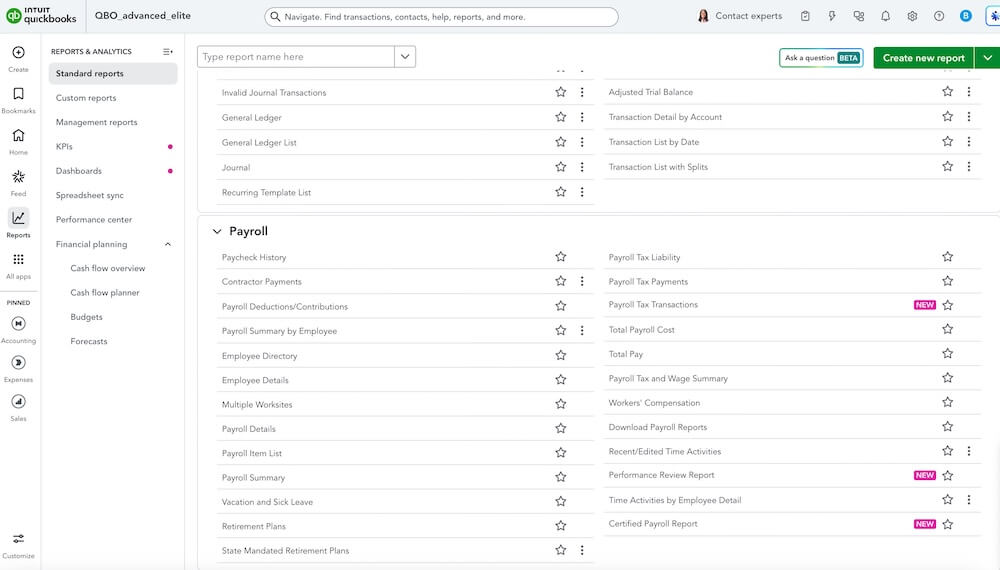
Learn more about creating certified payroll reports.
Use QuickBooks Workforce for expedited amendments
In a nutshell: Use QuickBooks Workforce to have IRS payroll tax amendments submitted in as little as 7 days—not the typical several weeks.
As soon as you complete any needed corrections in the Payroll flow, you’ll get the choice to submit your amendments through Workforce or separately.
If you choose to submit them using Workforce, you’ll see information about what’s being filed and when. You’ll also get real-time visibility into the status of every amendment along the way. Track the amendment’s status in the Resolution Center and find the forms in the Payroll Tax Center.
Note: Expedited amendments are currently only available for California customers filing amendments for Form 941, Employer’s Quarterly Federal Tax Return, and Form DE9, California Quarterly Contribution Return and Report of Wages.
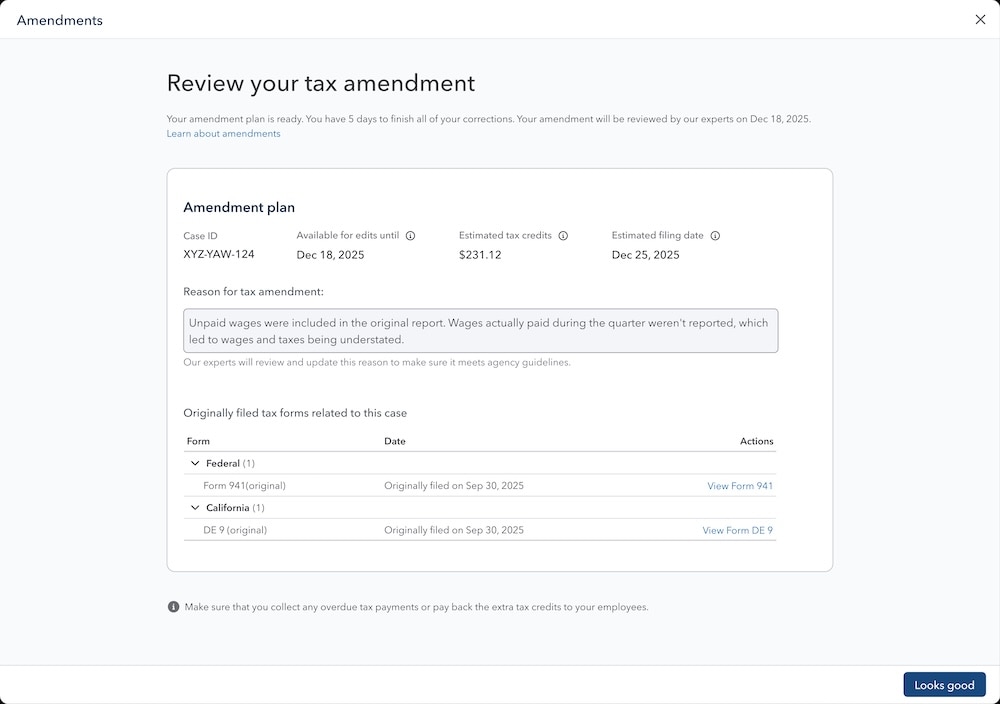
Discover how to request a payroll amendment.
Free ACH payments in Bill Pay
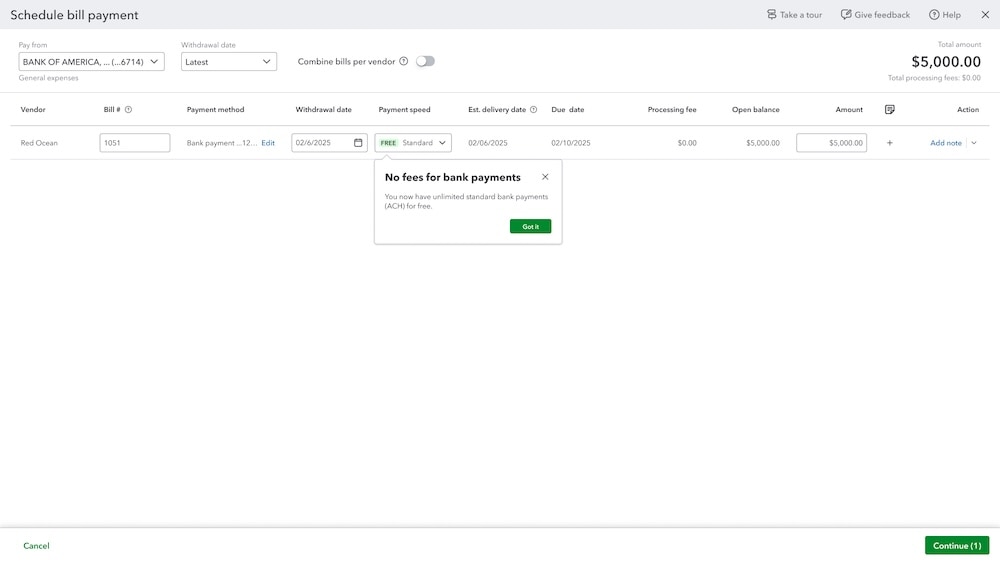
In a nutshell: In QuickBooks Bill Pay, your clients can take advantage of unlimited free standard ACH to pay their bills.*
Rather than having to visit their bank’s app or website to pay bills, your client can now pay any number of bills through QuickBooks using standard ACH at no added cost.* Manage accounts payable, schedule or pay bills, reconcile the data, and save time, all in one place.
Count on QuickBooks to keep more tasks in one place while skipping transaction fees that can eat into your client’s margins.
Note: Transaction fees still apply to next-day ACH payments and those by check.
Important product and disclaimer information
Money movement services are provided by Intuit Payments Inc., licensed as a Money Transmitter by the New York State Department of Financial Services. For more information about Intuit Payments' money transmission licenses, please visit https://www.intuit.com/legal/licenses/payment-licenses/.
*Limits may apply on total number and amount of payments
QuickBooks Time is now in QuickBooks Online
In a nutshell: All the functionality and capabilities of QuickBooks Time are now available in QuickBooks Online.
This means your clients’ teams no longer need to switch back and forth between QuickBooks and the previous Time app to complete timekeeping tasks or manage time data.
With QuickBooks, your clients get one seamless, integrated time-tracking experience built right in. No syncs, no exports, .just accurate, real-time data where they need it most.
Clients working in QuickBooks Time will be redirected to complete their timekeeping, time management, and scheduling tasks in QuickBooks. Customers who started a QuickBooks subscription after May 13, 2026 can complete their QuickBooks Time onboarding, setup, and team management in QuickBooks.
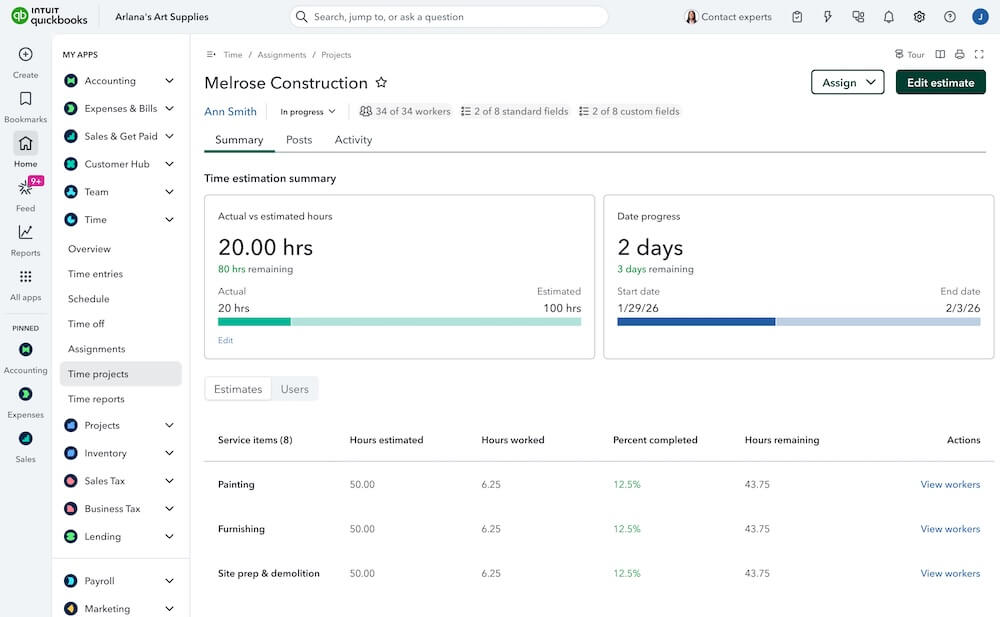
Time tracking is now built into QuickBooks.
Important product and disclaimer information
Money movement services are provided by Intuit Payments Inc., licensed as a Money Transmitter by the New York State Department of Financial Services. For more information about Intuit Payments' money transmission licenses, please visit https://www.intuit.com/legal/licenses/payment-licenses/.
**Product Information
QuickBooks Payments: QuickBooks Payments account subject to eligibility criteria, credit, and application approval. Subscription to QuickBooks Online required. Not available in US territories or outside the US.
Enhancements to QuickBooks Payments
In a nutshell: Your feedback on QuickBooks Payments has been loud and clear, and we’ve made improvements as a result. Here’s a quick snapshot of them.
- Payment status accuracy: Every payment status—funded, returned, disputed—will sync in real time with the linked invoice. Say goodbye to invoices that show “paid” when funds bounced (or vice versa).
- Account verification emails: Clearer messaging, better deliverability, and a self-service resend option so you’re never stuck waiting on support.
- Reconciliation and auto-matching: Bank feed auto-matching is becoming more reliable, and you‘ll see fewer duplicate records.
- Clearer failure notifications: When a payment fails, you’ll see why and what to do next—no more vague system errors.
- Merchant Service Center: You’ll see clearer ACH refund error messaging, and you can update account details directly in QuickBooks.
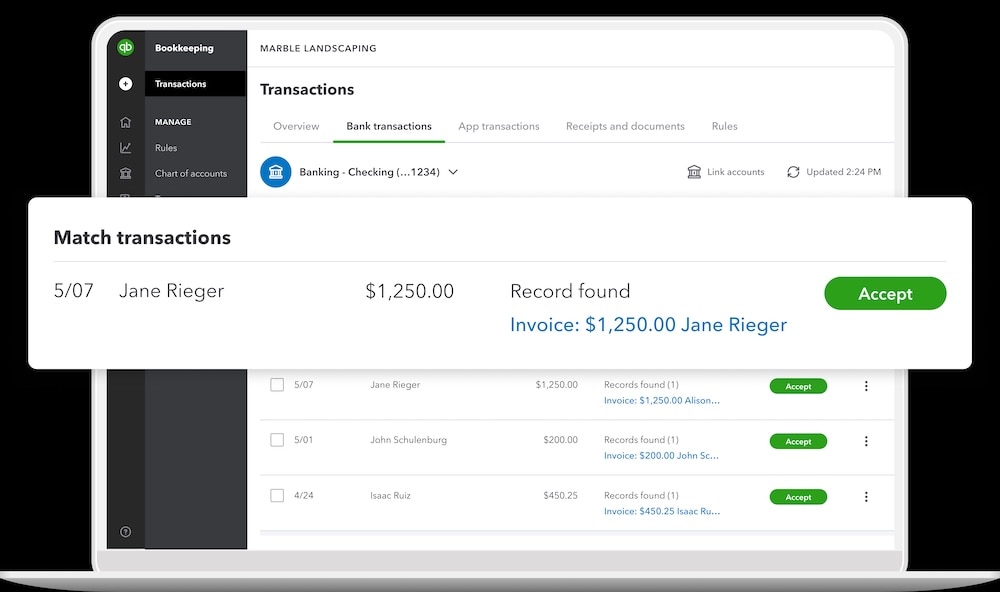
Help clients accept payments online and in store.
Important product and disclaimer information
Money movement services are provided by Intuit Payments Inc., licensed as a Money Transmitter by the New York State Department of Financial Services. For more information about Intuit Payments' money transmission licenses, please visit https://www.intuit.com/legal/licenses/payment-licenses/.
Intuit Enterprise Suite 30% referral bonus
In a nutshell: Refer clients to Intuit Enterprise Suite to earn a 30% referral bonus for your firm.*
As a thank you for referring new clients to Intuit Enterprise Suite, firms can now receive a 30% referral bonus of the first year’s subscription fees for every new client contract signed between May 15 and July 31, 2026.* Firms are paid their revenue share at the same payment frequency as their client’s contract. either monthly or annually.
To qualify, you must be enrolled in the ProAdvisor revenue share program. Then get started by filling out a client referral form. You can also schedule a call to find out more.
Note: This offer is for unmanaged firms approved for the ProAdvisor revenue share program. Managed firms will be notified separately about a different revenue share program.
Get a 30% referral bonus for Intuit Enterprise Suite.
Important product and disclaimer information
*Offers
Intuit Enterprise Suite 30% referral bonus program
Eligibility. To participate in the Intuit Enterprise Suite Referral Bonus Program ("IES Referral Bonus Program"), you must be a QuickBooks Online Accountant firm enrolled in the ProAdvisor Revenue Share Program prior to your referred client's first payment. The referred client must successfully execute an IES contract between May 15, 2026 and July 31, 2026, place an order, and make the required subscription payments during the client's first year. Clients who currently hold or previously held an IES contract, or who are currently or have previously been enrolled in any IES Revenue Share Program, are not eligible for enrollment under this or any subsequent IES Rev. Share Program. Firms may not earn revenue share on referred clients under multiple Intuit programs.
Referral Bonus Calculation and Basis. A referral bonus of 30% is earned on the referred client's subscription fees during their first year. The calculation is based on amounts paid to Intuit for IES accounting services and Workforce Elite subscriptions (including per-employee fees) ordered under a contract, after applicable discounts and before taxes. Merchant and other usage-based charges, professional services, and training fees are expressly excluded.
The referral bonus is paid on or around the 15th–20th of the month following the client's successful payment. Referral bonus accrues only on amounts actually collected; no referral bonus is owed on uncollected or partially collected billings (pro rata applies to partial payments). Referral bonus ceases upon non-payment, account pause, suspension, or cancellation.
General. This IES Referral Bonus Program is non-transferable and may not be combined with any other Intuit promotional offer for the same referred client. Intuit may modify or terminate this Program, or these terms, at any time and for any reason, in its sole discretion with notice to you.
Table of contents
Table of contents
Recommended for you


Get the latest to your inbox
Get the latest product updates and certification news to help you grow your practice.
Looking for something else?
Call Sales: 1-844-435-1308





In a nutshell: Get an all-in-one view of 1099 filing status for all your clients, and save time filing through QuickBooks Online Accountant.