QuickBooks Online new features and updates—May 2026.
product update

QuickBooks Online new features and updates—May 2026

Accounting is at an inflection point, with factors like rising client expectations and a shrinking talent pool obstructing firms’ growth. We believe the future of accounting will run on intelligence, and this month’s updates bring that future closer. 

At the heart of QuickBooks is Intuit Intelligence—combining AI, data, and your expertise. Count on it to continuously monitor performance, surface insights, and handle routine tasks within your oversight. While you run your day-to-day in Intuit Accountant Suite and your clients manage theirs in QuickBooks, Intuit Intelligence unifies them both to help reduce manual work, increase accuracy, and surface what matters—so you can focus on shaping your clients’ tomorrows. Here’s what’s new this month.

Share these QuickBooks updates with your associates and clients on the latest innovations relevant to business owners and admins.

Stay In the Know

Learn about the most exciting innovations ... visit the Hub to watch weekly videos.

Visit the new Hub to check out the weekly episodes.

Intuit ProPartner Accountants (coming in 2027)

In a nutshell: Intuit ProPartner Accountants, backed by the power of Intuit Accountant Suite, is a program that represents our renewed investment in accountant partners like you.

Succeeding the ProAdvisor Program in early 2027, the global program ProPartner Accountants will provide expanded benefits to build your firm, extended revenue share, and enhanced support. Intuit ProPartner firms will also get many more opportunities for future-focused education and community connection to help you build your ideal firm.

Get in-depth information on Intuit ProPartner Accountants

Intuit Accountant Suite May 2026 updates

In a nutshell: Launching this month are several new updates to Intuit Accountant Suite.

Intuit Accountant Suite is the AI-native future of firm management; these updates are designed to help you better manage your firm, clients, and team, all in one place.

More efficiency in a unified platform

Constant context switching cuts into a firm’s productivity. New innovations in Intuit Accountant Suite help you find more efficiency, minimize disruptions, and help you focus on your work. Among many innovations coming this month, here’s a sneak peek:

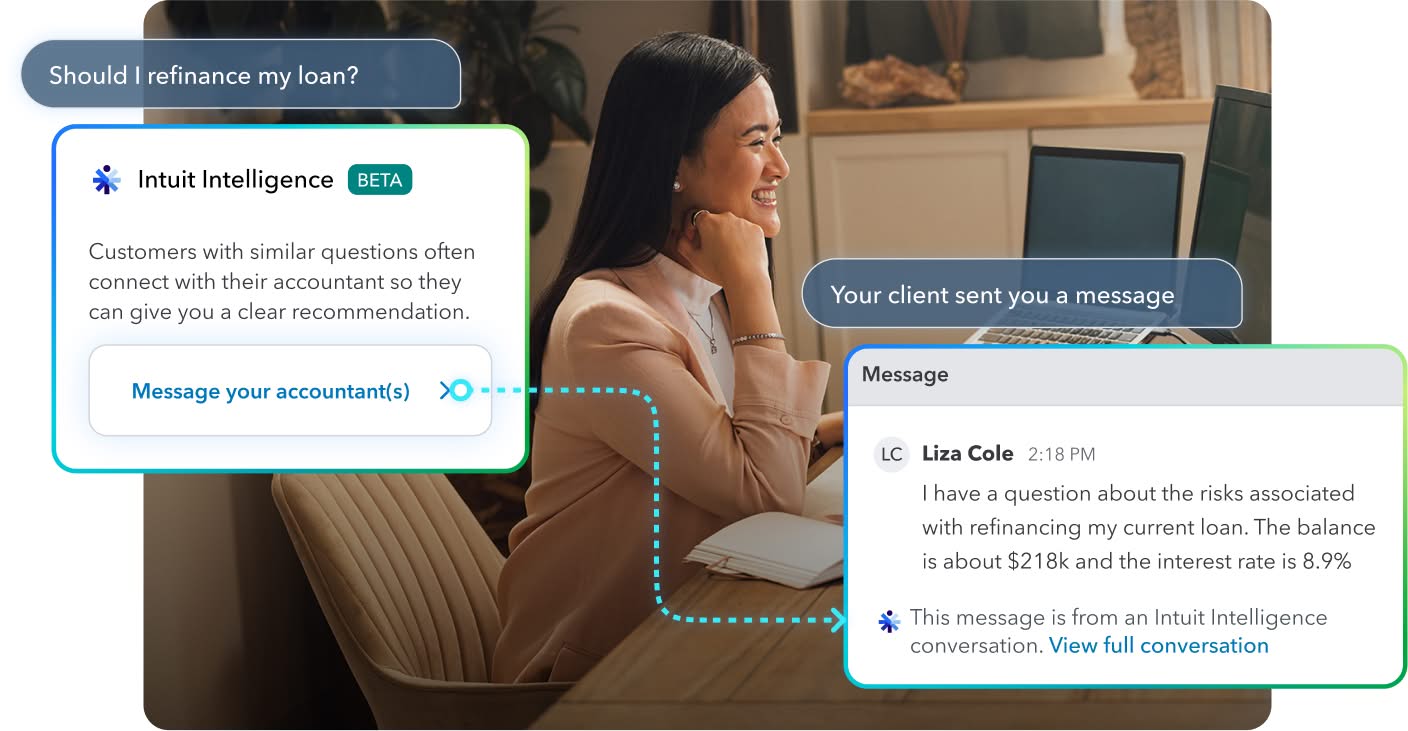
  • Requests (beta): Strengthen relationships for ongoing service delivery by centralizing communications with your clients. Clarify data, answer outstanding Intuit Intelligence questions, and share documents to guide outcomes—without extra meetings and prep work.
  • Standard KPIs: Track broken bank connections, unposted transactions, total transactions, and last close date across clients with view-only access in Client Insights.


Intuit Intelligence Requests feature message boxes from client to accountant
Get in-depth info on all the Intuit Accountant Suite updates.

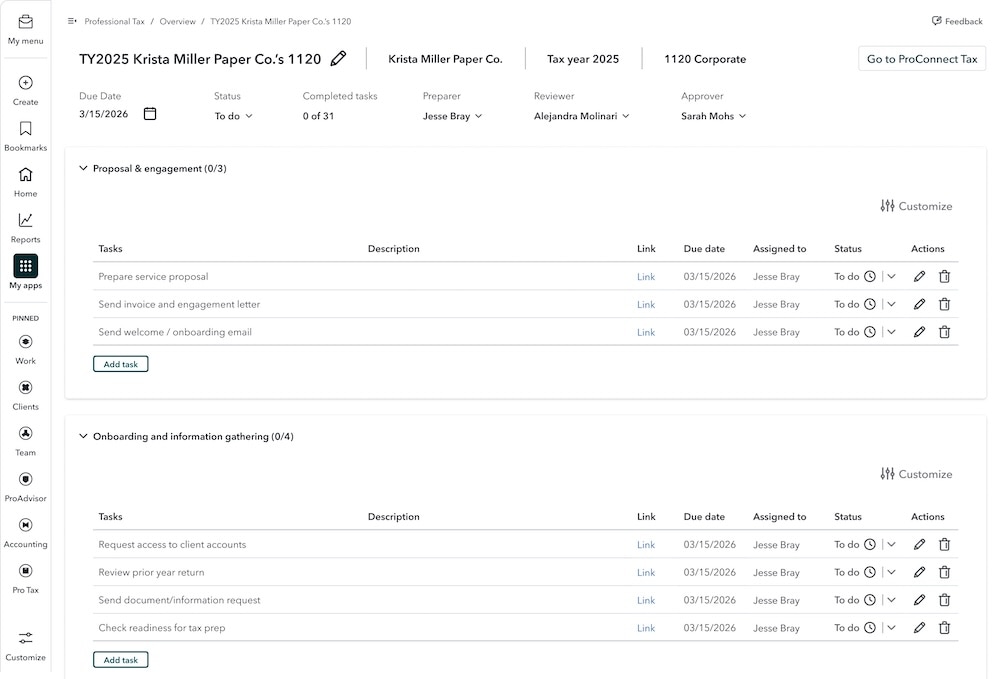
Tax prep in Intuit Accountant Suite, powered by Intuit ProConnect Tax (beta)

In a nutshell: Your most-requested integration is the newest feature in Intuit Accountant Suite.

Available this month in Intuit Accountant Suite is Tax Prep (beta), so you can tackle your accounting and tax workflows in one place.

Intuit Accountant Suite now provides customizable tax workflows that allow you to assign, track, and complete tax-related tasks. You can also track these workflows across your firm without having to switch into client files. Having the power of Intuit ProConnect Tax built into Intuit Accountant Suite gives your tax team greater visibility in one place, helping them save time and focus on delivering greater value to clients.

Project management dashboard for tax engagement workflow.
Accounting and tax workflows are all in one place.

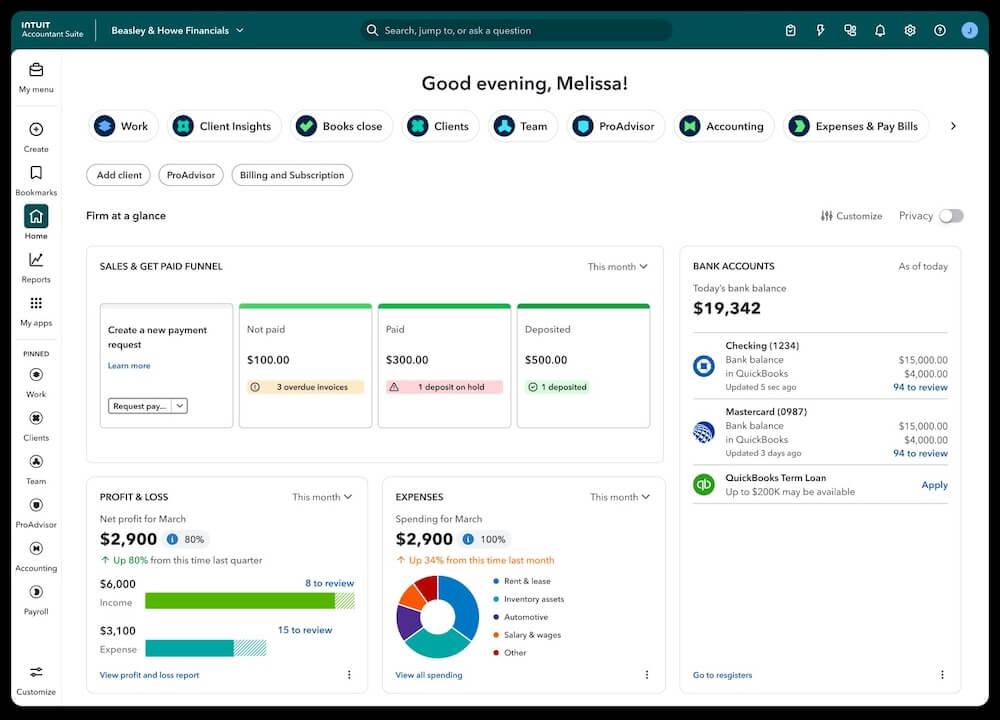
One intelligent platform, all-in-one value

In a nutshell: Learn more about what’s coming this month to QuickBooks Online.

More value: This month’s QuickBooks refresh will provide new capabilities for jobs to be done across workforce management, benefits management, payments, and credit. These capabilities are powered by AI for automation alongside your expertise, while you and your client maintain visibility and approval control.

Strengthened core features: This quarter, we’ve made thoughtful updates to reduce friction, improve accuracy, and give you more control over how you work. Improvements will be focused in these areas:

  • Accounting and banking
  • Invoicing and sales forms
  • Bills and vendor payments
  • Inventory and purchase orders
  • Reporting
  • Platform performance

Enhanced quality and user experience: You’ll find updates to the performance of common tasks across the QuickBooks platform, including:

  • Loading reports
  • Navigating between screens
  • Working with large transaction volumes

Help from accountants like you powers small business prosperity and compounds their rates of success. QuickBooks is designed to unify technologies, consolidate data, and multiply intelligence and efficiency. It’s built to ensure your expertise remains the core value.

Business accounting dashboard with financial analytics.
Get the full guide to see what's new in QuickBooks.

Key dates for AI-powered bank feed and modern reports

In a nutshell: This month, the AI-powered bank feed became the default across several products, and classic reports will be permanently retired.

The AI-powered bank feed became the default on May 8, although you can still choose to use the classic version. QuickBooks has significantly refined this bank feed experience since its initial launch. For example:

  • Speed has improved more than 50% for common actions such as loading and selecting transactions.
  • You can now continue working while rows finish processing.
AI-powered bank feeds improve your speed.

Modern reports will be the only available view after May 22, when classic reports will be retired.

  • Modern view currently includes several new features and more will become available by May 22.
  • You’ll still have everything you rely on from classic view, including reporting periods, filters, accounting methods, display options, comparisons, and toggles for active and zero-value rows.
  • All 150+ standard reports will automatically open in modern view starting May 22.
  • Custom reports you created in classic view will move to modern view in batches by company. Your data, filters, and customizations carry over, and you won’t need to move anything manually.

Since these transitions may affect your firm’s and your clients’ day-to-day work, consider planning ahead for them.

The QuickBooks bank feed transition is happening in May.

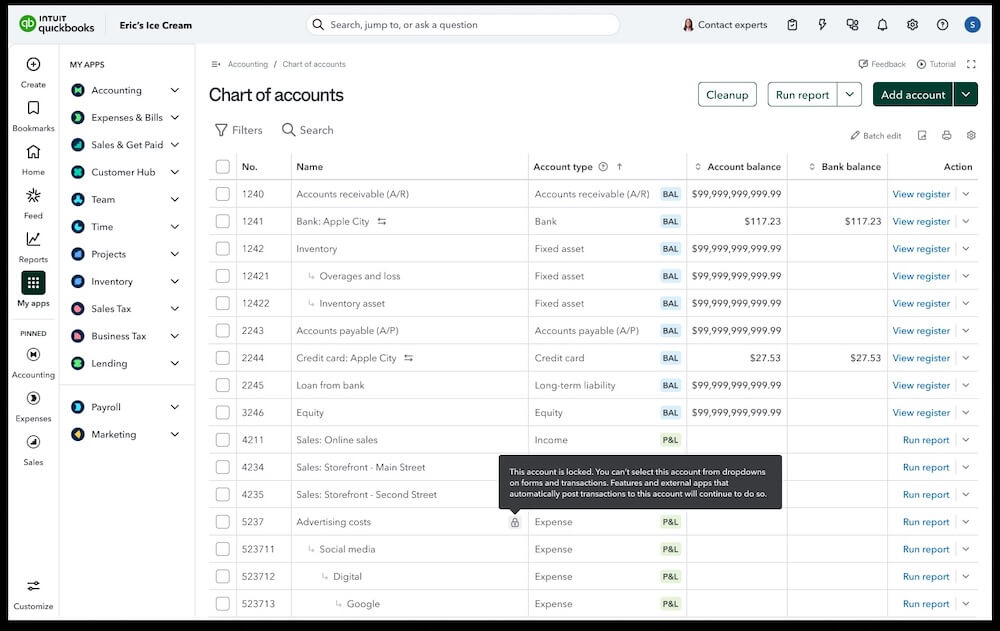
Locking an account in your Chart of Accounts

In a nutshell: You and your clients can lock an account in their chart of accounts to prevent users from posting to it.

Locking an account in your chart of accounts is most needed in the case of parent accounts, where the best practice would be to post to the subaccounts rather than to the parent account. This update helps your firm maintain best accounting practices and prevent mistakes or added work, such as reclassifying transactions at tax time.

In addition, the chart of accounts has a new “parent accounts only” filter. With this filter, you can select all parent accounts in order to lock them in one batch action.

QuickBooks online chart of accounts dashboard.

Latest Intuit Enterprise Suite updates

In a nutshell: The spring release of Intuit Enterprise Suite includes dozens of updates that expand upon multi-entity, business intelligence, construction, inventory, and order management capabilities, and introduce the new QuickBooks Workforce Elite.

We’re proud to share all the updates in the May release, including these highlights:

  • Import intercompany journal entries: To improve efficiency while maintaining control over the work, upload a CSV file to draft multiple intercompany journal entries at once.
  • Direct approvals through email: Reduce bottlenecks with approvals and rejections that can now take place from an approver’s inbox to help ensure your clients’ critical transactions are processed on time.
  • QuickBooks Workforce Elite: QuickBooks Online Payroll Elite is now Intuit QuickBooks Workforce Elite, expanded with a full set of team lifecycle management capabilities to support how your client’s HR team hires, onboards, manages, and retains employees. Clients with existing payroll and HR data can get started in Workforce by visiting Team and selecting Overview for a guided onboarding experience.
  • Construction—flexible project costing (beta): As your clients’ projects move from bid to execution, they’ll have expanded flexibility to move from basic costing to a more detailed costing approach without added manual work or data loss.
  • Certified payroll reports: Construction clients can now use Intuit Enterprise Suite to generate Department of Labor Form WH-347 reports in compliance with federal regulations, allowing them to bid and win more federally funded contracts.
  • Purchase order enhancements: Clients can reduce manual effort and improve accuracy and visibility with PO workflows that are easier to customize, automate, and scale, from vendor-facing documents to overdue reminders.
  • Resolution Center enhancements: Save time and reduce friction by viewing support case status, making updates, and reopening cases within 30 days, all from the updated Resolution Center.
Get details on all the latest updates to Intuit Enterprise Suite.

Important product and disclaimer information

Money movement services are provided by Intuit Payments Inc., licensed as a Money Transmitter by the New York State Department of Financial Services. For more information about Intuit Payments' money transmission licenses, please visit https://www.intuit.com/legal/licenses/payment-licenses/.

**Product Information

QuickBooks Payments: QuickBooks Payments account subject to eligibility criteria, credit, and application approval. Subscription to QuickBooks Online required. Not available in US territories or outside the US.

QuickBooks Workforce Payroll to include new HR tools

In a nutshell: Payroll is evolving to provide a single place to confidently manage your clients’ entire employee lifecycle.

QuickBooks Online Payroll Core, Premium, and Elite will soon be refreshed with new capabilities and renamed to QuickBooks Workforce Payroll, QuickBooks Workforce Premium, and QuickBooks Workforce Elite, respectively.

QuickBooks Workforce Payroll

In all QuickBooks Workforce plans, you’ll have more data visibility in the updated Employee list and Employee profile views. In addition, you’ll be able to create flexible, scalable, and robust retirement and savings plans custom-tailored to your client’s structure and goals through QuickBooks 401(k) by Vestwell. Benefits will directly sync with employee payroll data for efficient plan management and seamless reporting. You can also run background checks at per-report pricing, through a new integration with Checkr.**

QuickBooks Workforce Premium and Elite

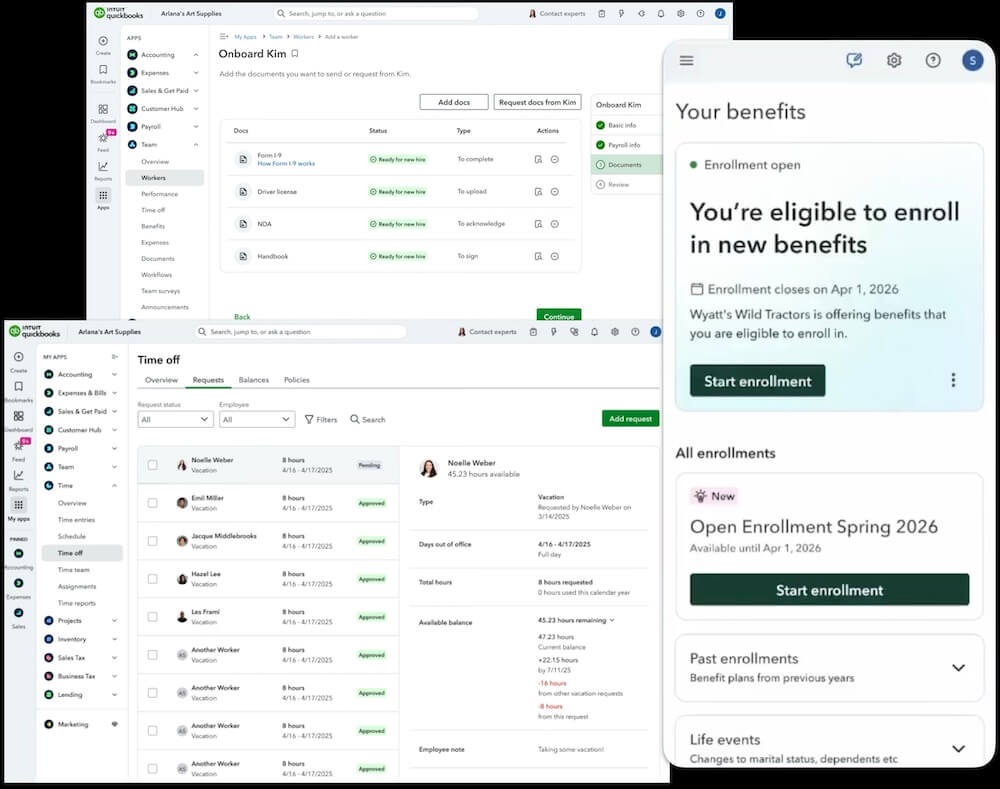
QuickBooks Workforce Premium and Elite plans provide a connected and streamlined experience to help support your clients across the entire employee lifecycle. You’ll have tools for recruiting, hiring and onboarding, time-off management, performance reviews, offboarding, and even rehiring.

You’ll also have customizable, automated workflows available for routine tasks, to help you and your clients save time, reduce errors, and maintain compliance–so you can focus on higher-value advisory work.

HR software dashboards showing employee benefits enrollment - QuickBooks Workforce.
Run client paperwork without the busywork.

Important product and disclaimer information

Money movement services are provided by Intuit Payments Inc., licensed as a Money Transmitter by the New York State Department of Financial Services. For details about our money transmission licenses, or for Texas customers with complaints about our service, please visit https://www.intuit.com/legal/licenses/payment-licenses/.

This information is intended to outline our general product direction, but represents no obligation and should not be relied on when making a purchasing decision. Availability of features and functionality varies by plan, which are subject to change without notice. Certain features will only be available on QuickBooks Workforce Premium or Elite plans. Additional terms, conditions, eligibility criteria, and fees may apply. 

**Features

Background Checks: Background check services provided by Checkr. Checkr's terms and additional fees apply. Subscription to QuickBooks Online Payroll required. 

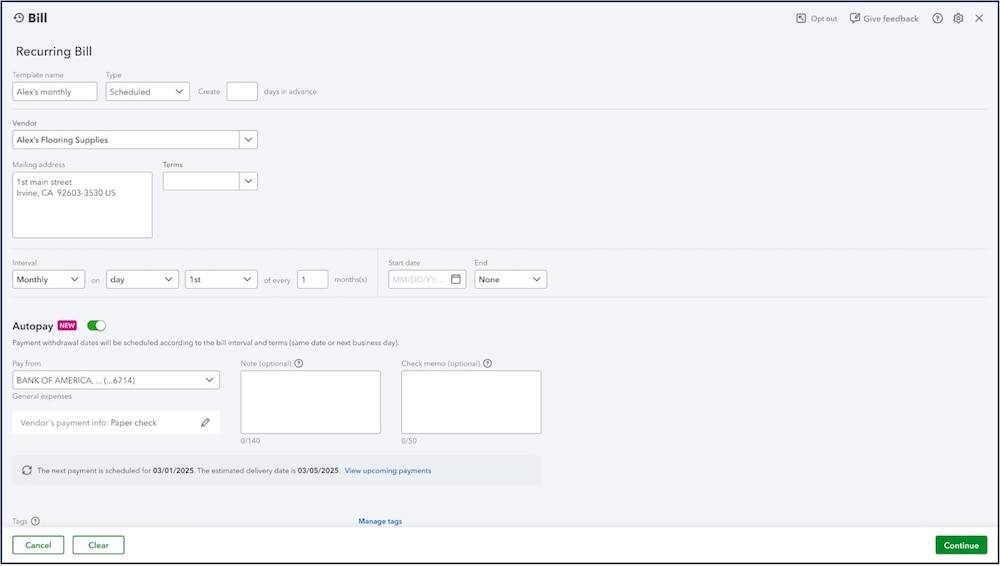
Bill Pay autopay recurring bills, now with free standard ACH

In a nutshell: Your clients using QuickBooks Bill Pay can now automate vendor payments by turning on Autopay for fixed-amount bills they receive on a recurring basis. They can send those payments using free standard ACH, available across all Bill Pay tiers for new and existing customers.

Recurring payments can also be automated from a recurring bill template, where you can customize the payment frequency, amount, payment source, start and end dates, and delivery method, and pay no transaction fees on standard ACH bill payments.

View and manage recurring templates and each one’s status by going to Expenses & Bills and selecting the Recurring bills tab. Your client can also set notifications to stay informed of any upcoming or failed payments. In addition, they’ll see markers and status tags among their transactions to differentiate automated payments from traditional ones.

Your client can help ensure their bills are paid on time with more efficiency, and keep more of what they earn, by setting up Autopay for recurring payments in Bill Pay.

Recurring bill pay in QuickBooks.
Set up recurring payments in QuickBooks Bill Pay.

Important product and disclaimer information

Intuit (Sponsor ID# 103311) is registered with the National Association of State Boards of Accountancy (NASBA) as a sponsor of continuing professional education on the National Registry of CPE Sponsors. State boards of accountancy have final authority on the acceptance of individual courses for CPE credit. Complaints regarding registered sponsors may be submitted to the National Registry of CPE Sponsors through its website: www.nasbaregistry.org.

Buy now, pay later with Affirm

In a nutshell: Your clients can offer their customers a new way to pay invoices—with buy now, pay later through Affirm.

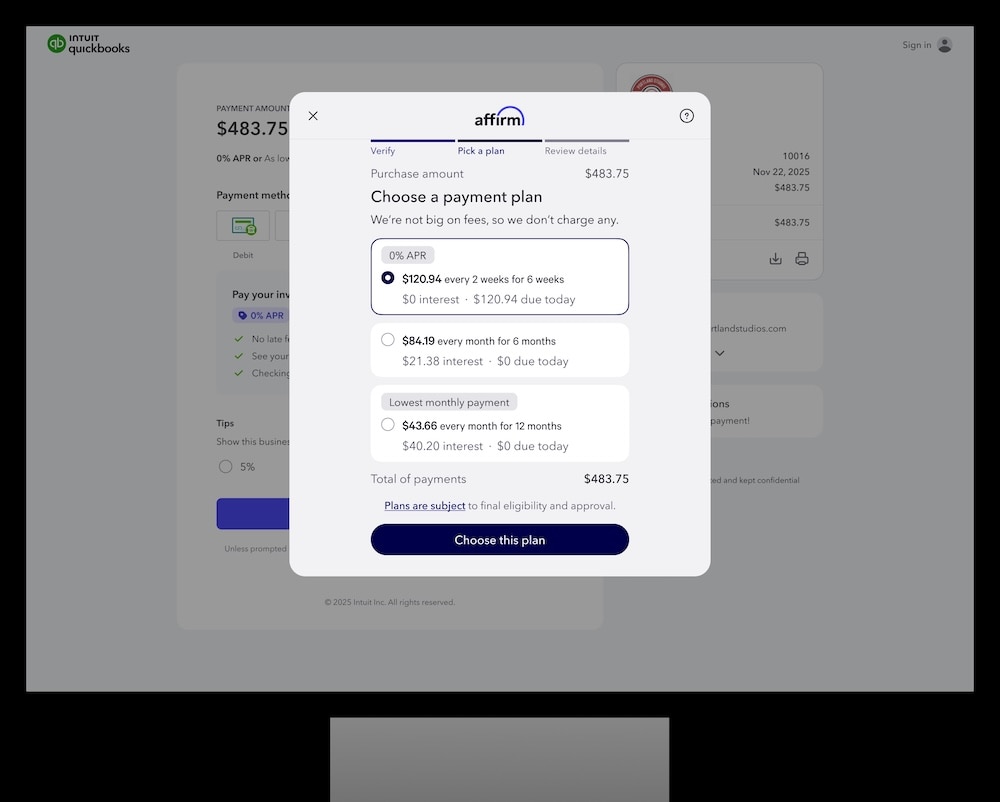
Clients can now encourage more sales by offering a pay-over-time option to their customers. When your client’s customer selects Affirm to pay their QuickBooks invoice, your client gets paid upfront and Affirm assumes all repayment risk, while their customer enjoys the flexibility to pay over time. The full invoice amount get paid, minus transaction fees, and their customer will pay Affirm in installments.

Affirm payment plan selection on desktop screen - buy now, pay later.
Buy now, pay later offers payment flexibility.

Important product and disclaimer information

Money movement services are provided by Intuit Payments Inc., licensed as a Money Transmitter by the New York State Department of Financial Services. For details about our money transmission licenses, or for Texas customers with complaints about our service, please visit https://www.intuit.com/legal/licenses/payment-licenses/.

QuickBooks Payments: QuickBooks Payments account subject to eligibility criteria, credit, and application approval. Subscription to QuickBooks Online required. Not available in U.S. territories or outside the US.

Payment options through Affirm are subject to an eligibility check, may not be available everywhere, and are provided by these lending partners: affirm.com/lenders. For example, a $1,000 purchase might cost $90.26/mo over 12 months at 15% APR. Options depend on the purchase amount, and a down payment may be required. For licenses and disclosures, see affirm.com/licenses. Buy now, pay later features have limited availability and are subject to change. Features may be more broadly available soon. If you do not currently see Affirm Buy now, pay later in your QuickBooks Online account, please email enable-affirm-qbo@intuit.com to request access.

ProAdvisor annual recertification

In a nutshell: It’s time to get recertified as a QuickBooks Online ProAdvisor for 2026.

QuickBooks Online has had another big year for innovation, adding and updating features that can help you improve client service. Recertification helps you keep your product knowledge sharp and helps firms build upon a solid foundation for long-term stability and growth. This year’s training and exam contain updates on exciting new innovations, including Intuit Accountant Suite.

The window to recertify is April 28–June 30, 2026. Prepare for the exam and learn about innovations in QuickBooks by visiting the self-paced training in ProAdvisor Academy.

Get recertified before the June 20 deadline.

Table of contents

Table of contents


Recommended for you

Get the latest to your inbox

Get the latest product updates and certification news to help you grow your practice.

Looking for something else?

Get QuickBooks

Smart features made for your business. We've got you covered.

Tax Pro Center

Expert advice and resources for today’s accounting professionals.

QuickBooks Support

Get help with QuickBooks. Find articles, video tutorials, and more.

How can we help?
Talk to sales 1-800-497-1712

Monday - Friday, 5 AM to 6 PM PT

Get product support

In a nutshell: Get an all-in-one view of 1099 filing status for all your clients, and save time filing through QuickBooks Online Accountant.