Intuit Connect, the premier event for accounting firms, is back, 
Oct. 26-28 in Las Vegas!
QuickBooks Online new features and updates—October 2026.
product update

QuickBooks Online new features and updates—October 2026

Table of contents

Table of contents

October is National Learning and Development Month to celebrate the vital role of education and skill enhancement in our lives. With the accounting profession continuing to shift to client advisory services, we’re seeing proof that even the most powerful technology can’t replace the power of human connection. Check out more on this with this article from Better Together, and be sure to read more about this month’s updates below.

Share these QuickBooks updates with your associates and clients on the latest innovations relevant to business owners and admins.

Stay In the Know

Learn about the most exciting innovations—visit the Hub to watch weekly videos.

Get certified in QuickBooks Workforce

In a nutshell: Help your firm level up its Intuit partner program benefits and gain CPE credits and professional development for yourself by earning a new certification for QuickBooks Workforce.

The new QuickBooks Workforce certification is a structured 5-course product training that’s best-suited to bookkeepers and accountants who deliver payroll services for their clients. Participants will explore product workflows, including employee self-onboarding, payroll setup, manual and automatic payroll, contractor payments, payroll reporting, automated taxes and forms, and payroll corrections.

Take advantage of this new guided path to strengthen payroll knowledge, use the full range of QuickBooks Workforce capabilities, and confidently advise your clients.

The QuickBooks Workforce certification course covers:

  • An introduction to QuickBooks Workforce.
  • Understanding payroll.
  • Setting up payroll.
  • Running and reconciling payroll.
  • Filing payroll taxes and completing year-end tasks.

Coverage of newer and advanced capabilities includes:

  • Intuit Intelligence payroll workflows.
  • AI-powered anomaly detection and review.
  • Payroll Tax AI for compliance assistance.
  • Multi-entity payroll in Intuit Enterprise Suite.
  • Connected HR, time, payroll, and financial data.

You’ll also have the option to take the test without the coursework and achieve certification with an 80% passing score.

This certification is the latest of many that allow your firm to move from Member to Partner tier in the upcoming Intuit ProPartner Accountant program.

Notes: This program will succeed the ProAdvisor Program in early 2027. The QuickBooks Workforce certification has no prerequisite. However, participants should have a working knowledge of QuickBooks.


Laptop displaying QuickBooks workforce certification page
Explore this and more Intuit certifications.

Important product and disclaimer information

Intuit (Sponsor ID# 103311) is registered with the National Association of State Boards of Accountancy (NASBA) as a sponsor of continuing professional education on the National Registry of CPE Sponsors. State boards of accountancy have final authority on the acceptance of individual courses for CPE credit. Complaints regarding registered sponsors may be submitted to the National Registry of CPE Sponsors through its website: www.nasbaregistry.org.

Better Together presents: “AI for Financial Storytelling” webinar

In a nutshell: Join us for a live, new, advisory-focused webinar on Thursday, October 22 from 11 AM – 12 PM PT.

How do you become your client’s first contact when they have a question about their business? Set yourself apart with your ability to surface meaningful stories about their business from within their financial data.

This practical webinar will show you how AI can help you get there, with a real, start-to-finish walkthrough using Intuit Accountant Suite, QuickBooks, plus any large language model. With this combination of tools, a client discovery conversation includes key metrics, trends, and an actionable story to drive effective decisions.

By attending, you’ll end up with a repeatable framework, ready-to-use prompts, and safe sample data and materials to practice on. In addition, you’ll learn how to incorporate AI tools into your workflows in order to:

  • Strengthen your firm’s client discovery process to uncover what really matters: their challenges, priorities, and goals.
  • Deepen analysis to pinpoint key metrics, understand how those metrics have changed, and see where they’re heading.
  • Shape the financial story to communicate your analysis in a clear, persuasive, client-ready narrative that supports business decision-making.
Sign up today to attend this webinar.

Applying vendor credits in Bill Pay

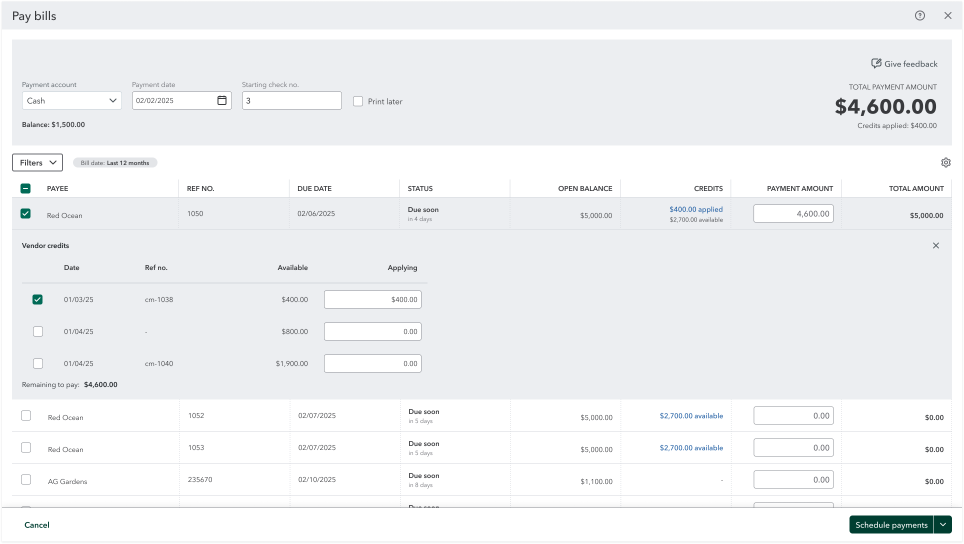
In a nutshell: You and your clients can now apply vendor credits while scheduling a QuickBooks Bill Pay payment, rather than using separate steps or workarounds.

Rather than relying on paper checks, outside tools, or partial payments, you can apply a credit and pay a bill in a single, time-saving step. You’ll also get full control over which credits go to which bills, rather than only seeing the total credit amount. When your client’s payment is complete, the remittance advice their vendor receives will show which credits were applied, adding clarity and transparency to their work together.

Here’s how it works:

  • Pay bills now lists each available vendor credit, with date, reference number, and available balance.
  • You select which vendor credits to apply and how much of each credit.
  • The applied credits will appear when you go to Schedule payment.
  • The email and remittance advice to your client’s vendor will show the applied credit(s).
Pay bills dashboard with detailed invoice list
Find out how to enter vendor credits and refunds in QuickBooks Online.

Important product and disclaimer information

Money movement services are provided by Intuit Payments Inc., licensed as a Money Transmitter by the New York State Department of Financial Services. For more information about Intuit Payments' money transmission licenses, please visit https://www.intuit.com/legal/licenses/payment-licenses/.

Draft payroll by uploading spreadsheets

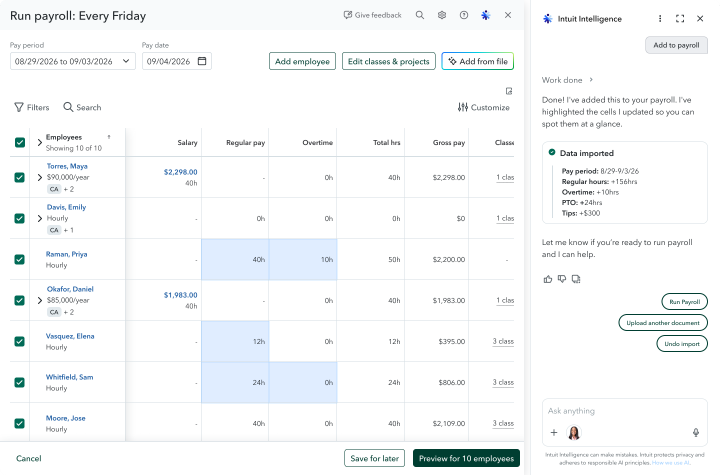
In a nutshell: QuickBooks Workforce Premium and Elite users can now skip the manual entry and prepare payroll by uploading spreadsheets directly into Intuit Intelligence.

Chances are good that your clients gather payroll data from a multitude of disconnected sources. However, manually aggregating disparate payroll data elevates the stress of running payroll correctly and on time. Mid-market customers surveyed about payroll preparation say that the time and effort of entering data manually is a top pain point.

Preparing payroll is now easier than ever with the help of Intuit Intelligence. When you or your client upload a CSV or Excel file of payroll data directly in the chat window, Intuit Intelligence extracts the data and requests clarification as needed. After this process is complete, you’ll see the imported data in the review table. Upon review and confirmation, this data is added to your client’s payroll. 

Online payroll dashboard with employee pay details
Check out the latest QuickBooks Workforce updates.

Important product and disclaimer information

Money movement services are provided by Intuit Payments Inc., licensed as a Money Transmitter by the New York State Department of Financial Services. For more information about Intuit Payments' money transmission licenses, please visit https://www.intuit.com/legal/licenses/payment-licenses/.

Classify employee hours across service items and dimensions

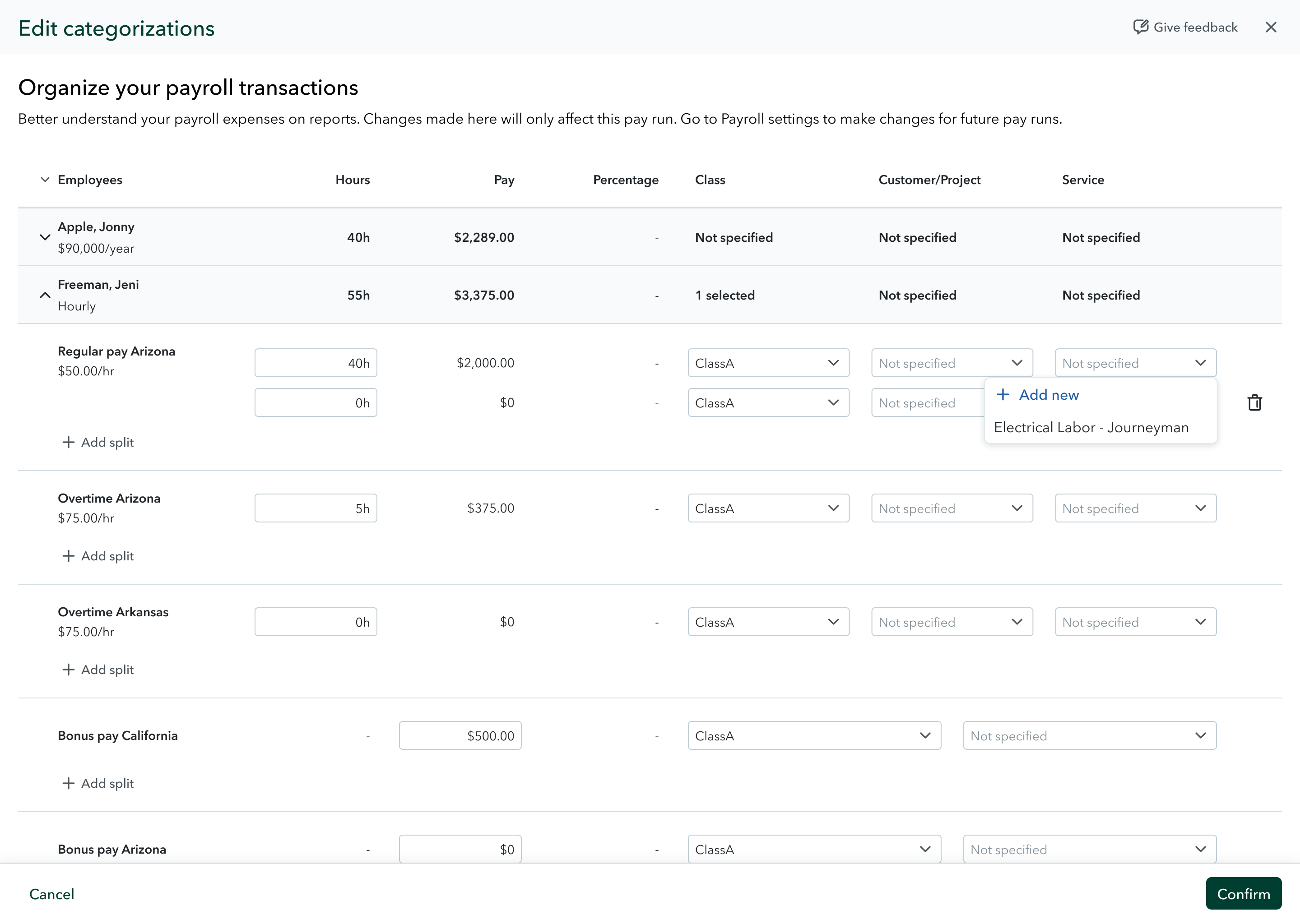
In a nutshell: You and your clients can now track service items by paycheck, so you know which labor costs land against the work that each team member performed. 

Classify employee hours across service items and a range of customizable dimensions with this new tracking capability in QuickBooks Workforce Premium and Elite, and QuickBooks Online. When you track service items by paycheck, you can allocate and track payroll costs granularly across each job, customer, or project. 

This capability builds on custom dimensions tagging, introduced earlier this year. You can add the dimension of service items in order to gain all-new insights. Analyze income and spend across various categories, and get the answers that fit your clients’ needs, such as union wage reporting, workers’ compensation codes, grant-based costing, and more.

With this update:

  • Service items on timesheets will flow straight into your client’s payroll.
  • You can split a single paycheck across multiple service items.
  • You can edit or reassign service items while running payroll or correcting a paycheck.
  • Service item details carry through to your job costing reports.
Get started with class tracking in QuickBooks.

Important product and disclaimer information

Money movement services are provided by Intuit Payments Inc., licensed as a Money Transmitter by the New York State Department of Financial Services. For more information about Intuit Payments' money transmission licenses, please visit https://www.intuit.com/legal/licenses/payment-licenses/.

Checkr background checks in QuickBooks Workforce

In a nutshell: Background checks through Checkr help growing businesses maintain a streamlined, unified hiring process with seamless workflows.**

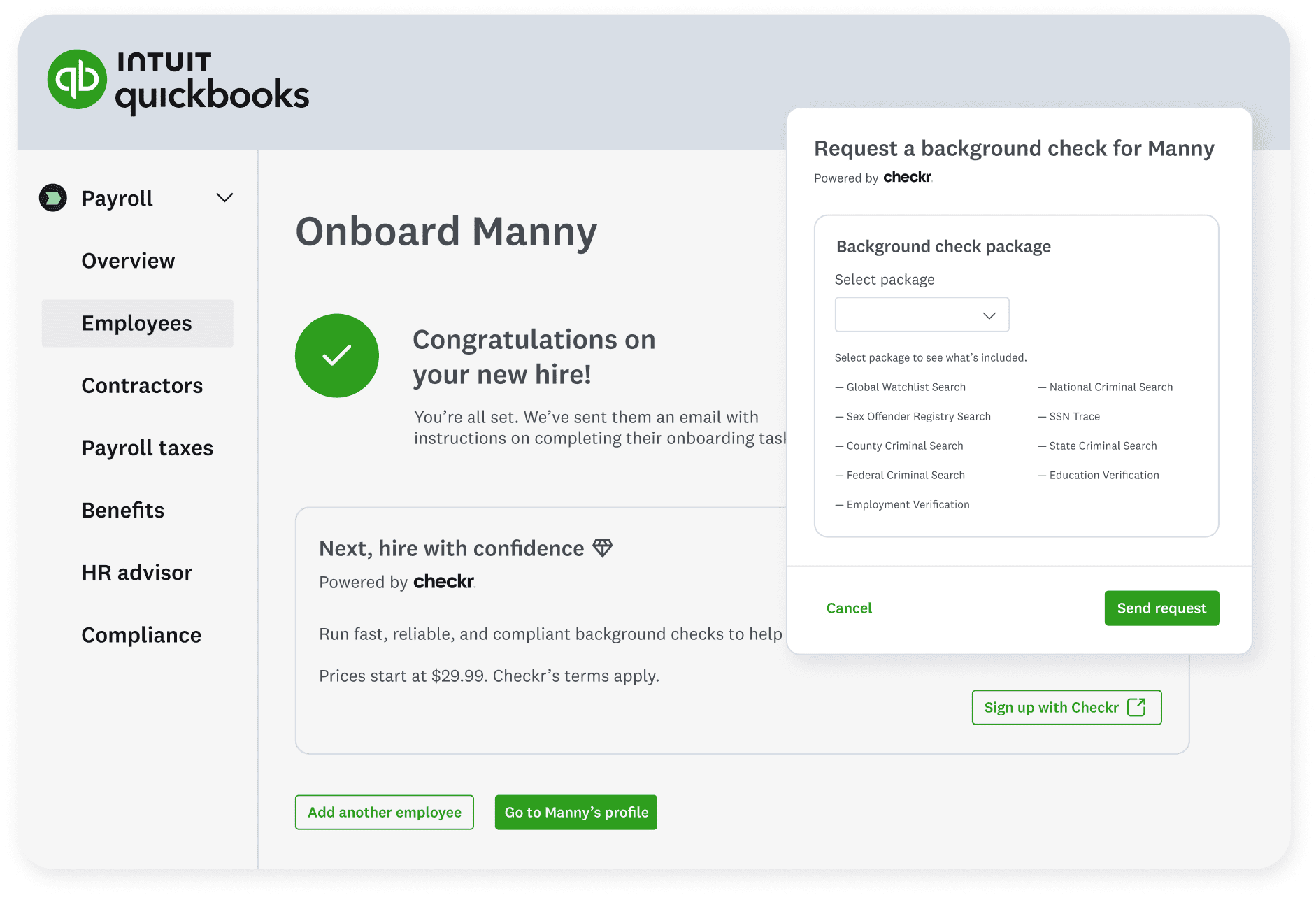
Running background checks no longer means leaving QuickBooks and searching for a reputable provider. The team lifecycle management tools inside QuickBooks Workforce include fast, smooth, and safe background checks through our partner, Checkr. These background checks start at $29.99 per report and are integrated into employee onboarding.**

Your client can initiate background checks in seconds from their hiring workflow in QuickBooks for an efficient and consistent process. They can also start background checks of existing employees from the employees’ profiles or through the Background checks overview page in QuickBooks Workforce. 

QuickBooks payroll onboarding with background check
Get more details on background checks through Checkr.

Important product and disclaimer information

**Features

Background checks: Background check services provided by Checkr. Checkr’s terms and additional fees apply. Subscription to QuickBooks Workforce required.

Pricing starts at $29.99 per report: Checkr works with state and county courts, DMVs, databases, and other third parties to complete your background checks. Some of these parties impose surcharges (“passthrough fees”) to the public to retrieve records. These passthrough fees are included in your invoice.

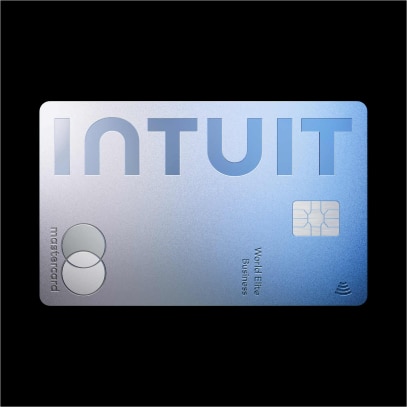
Intuit Business Credit Card now available to firms and business owners

In a nutshell: Business owners and accountants can access more capital with no impact to their personal credit score, and save time through QuickBooks-integrated workflows with the Intuit Business Credit Card.

To help owners and accountants reinvest in their businesses, the Intuit Business Credit Card features no annual fee** and unlimited 2% cash back on everyday purchases.** 

In addition, this card offers: 

  • 5% unlimited cash back on Intuit products and services**, even for your firm, on client subscriptions you pay for with the card.
  • QuickBooks auto-sync saves you time with no bank feed setup or connection issues.
  • Receipt capture that automatically match to transactions.
  • A $300 cash bonus**.
  • Unlimited virtual and physical credit cards for the team, with limits and controls.
  • Exclusive offers from Intuit and additional partners.

While business owners often face challenges qualifying for traditional business credit, the Intuit Business Credit Card can widen your client’s and firm’s access to capital. If approved, this access provides the flexibility to float expenses month to month, while earning cash back rewards for your business. Approved businesses can go from application to spending in as little as 3 minutes, with immediate access to a virtual card. 

Avoid month-end manual work—transactions from the Intuit Business Credit Card automatically sync and reconcile with QuickBooks data. The Intuit Business Credit Card automatically connects to the QuickBooks bank feed, giving you and your client a real-time view of cash flow and business performance so you can run reports without chasing clients to fix broken bank feeds.

Cardholders also receive automatic notifications to upload receipts, helping everyone skip paper expense records and stress less at tax time.

Intuit World Elite Business Mastercard card
Explore the new Intuit Business Credit Card with no impact to your personal score.

Important product and disclaimer information

**No annual fee: See Intuit Business Credit Card Cardholder Agreement.

Cash back: 5% cash back on purchased Intuit products and services does not include transactional fees (ex: merchant services). All other completed purchases will receive 2% cash back. All cash back for bonuses and rewards will be applied in the form of a statement credit to your Intuit Business Credit Card account. Closed accounts with cash back balances may be forfeited. See Rewards Program Terms for details. The Intuit Business Credit Card cannot be used to pay other debts. (ex: a loan or credit card balance).

$300 bonus: Earn the $300 bonus after you spend $3,000 in purchases within the first 3 months of account opening. Closed accounts with cash back balances may be forfeited. See Rewards Program Terms for details. The Intuit Business Credit Card cannot be used to pay other debts. (ex: a loan or credit card balance).

Intuit Business Credit Cards are issued by WebBank.

Mastercard and the circles design are registered trademarks of Mastercard International Incorporated.

Switching to QuickBooks Workforce from ADP or Gusto

In a nutshell: Clients switching to QuickBooks Workforce from ADP or Gusto can import complete employee records and year-to-date payroll history without manually starting from scratch.

Entering historical employee and payroll data by hand keeps many businesses from switching payroll providers. Many business owners who start the process may end up abandoning it before their next payroll run.

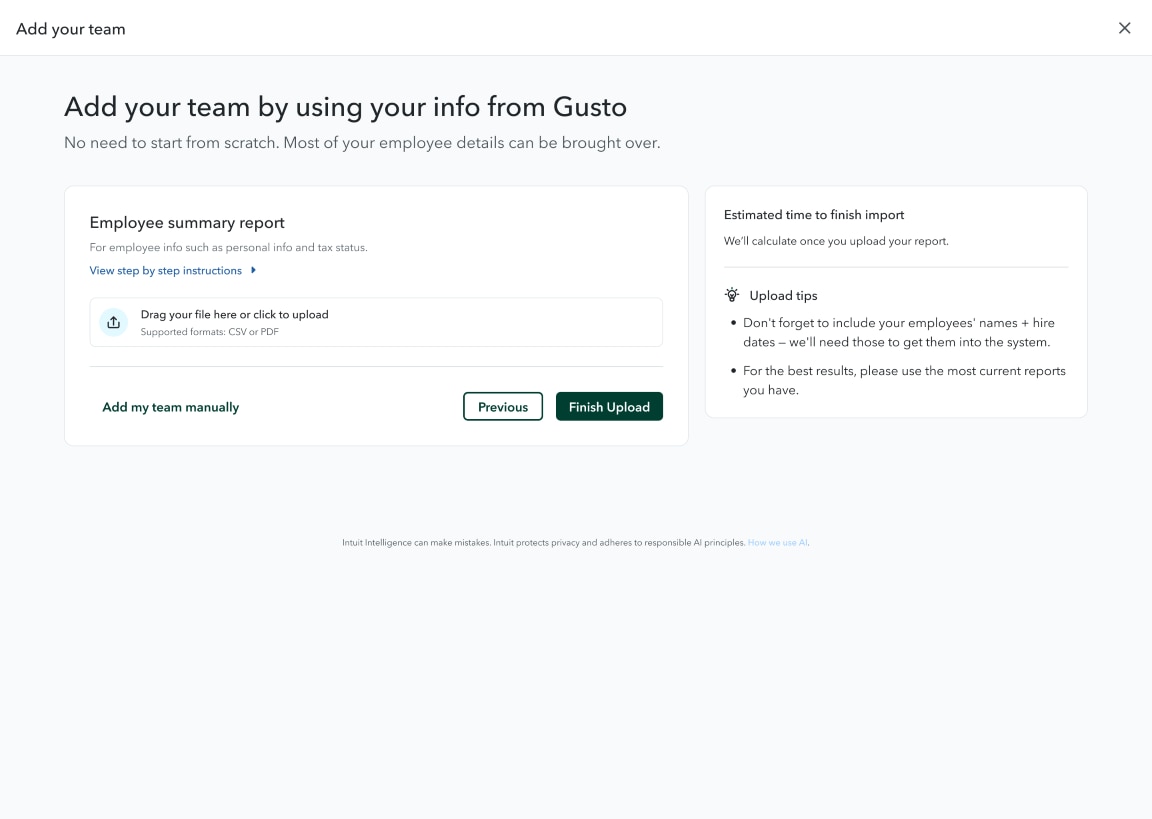
You can avoid manually entering hundreds of fields by importing the employee and payroll data reports from ADP or Gusto into QuickBooks Workforce. 

To help make the process more seamless for your client, AI completes the data extraction step after import, structuring employee records and a full year-to-date pay history. Then, an Intuit expert will review and resolve exceptions, verifying data-migration accuracy by catching what automation alone cannot, such as duplicate deductions and tax edge cases. 

Your client then reviews only what’s flagged, rather than hundreds of fields, saving your client and firm time for higher-value discussions.

Add your team using info from Gusto
Find out how to switch to QuickBooks Workforce from ADP or Gusto.

Recommended for you

Looking for something else?

Get QuickBooks

Smart features made for your business. We've got you covered.

Tax Pro Center

Expert advice and resources for today’s accounting professionals.

QuickBooks Support

Get help with QuickBooks. Find articles, video tutorials, and more.

How can we help?
Talk to sales 1-800-497-1712

Monday - Friday, 5 AM to 6 PM PT

Get product support