Intuit Connect, the premier event for accounting firms, is back, 
Oct. 26-28 in Las Vegas!
AI in QuickBooks Online is already here; here’s how it changes your work.
product update

AI in QuickBooks Online is already here; here’s how it changes your work

If you’re wondering how AI will disrupt QuickBooks Online, I have news for you: It’s already happening.

Intuit Assist and Intuit Intelligence have been making their way into more and more areas of QuickBooks, from bank transactions and reconciliation, to invoicing, customer management, payroll, projects, taxes, and financial analysis.

After spending time poking at these features, testing them, and figuring out what they do well, I’ve reached an important conclusion: AI in QuickBooks Online isn’t replacing the work we do. It is changing the nature of the work we do.

When I started bookkeeping in the 1990s, I spent time entering the date, vendor, dollar amount, category, and description for every transaction; five pieces of information, over and over and over again, only to reconcile for an hour to find the $.09 discrepancy caused by transposed pennies.

Those days are long gone. I’m sure you don’t miss them any more than I do.

Today, QuickBooks brings in the data, suggests where it belongs, looks for unusual activity, and analyzes what the numbers mean to a growing business. 

Our role becomes something much more valuable: Verify, interpret, communicate, and be the steward of the entire experience. That is where I think the real opportunity lies for us.

AI Agents by version

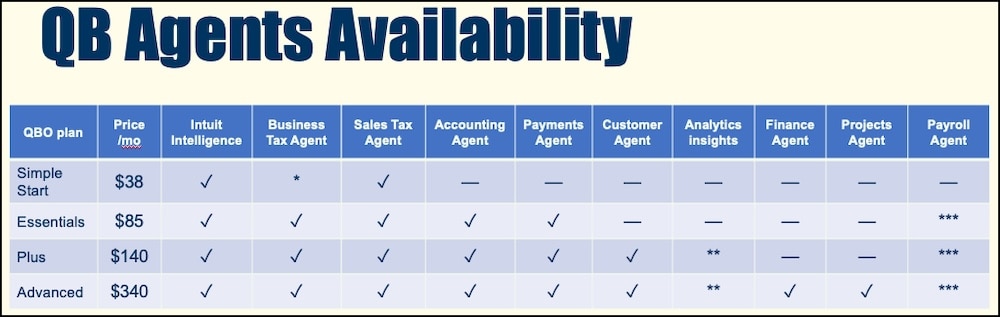
It’s important to realize that AI in QuickBooks isn’t universal; the features scale according to the version you’re in. The Accounting Agent that rules the Bank transactions feed doesn’t appear until Essentials. The new Customer Agent for CRM work is only in Plus and up. The really meaty Finance Agent for reporting is only in Advanced.

These new opportunities were part of the recent price increase, and once you start implementing the new capabilities, you’ll find they’ll bring your clients new revenue.

QB agents availability comparison table graphic.

Start with the work you already do every day

You don’t have to completely reinvent your accounting practice to start using AI. Some of the most useful AI features are reinvigorating workflows already in your systems and procedures.

Take the bank feed, for example. QuickBooks moved from machine learning based on your transaction history to the Accounting Agent, making AI-powered suggestions about payees and categories. New colored badges indicate its confidence level and, importantly, give you more information about why it made a recommendation.

But there’s a catch: You have to train each company’s experience. The AI learns within the context of each QuickBooks file. As you review transactions and consistently categorize them, each one becomes part of the Intuit experience.

This is where accountants and bookkeepers still matter. If you feed the system sloppy information, you’re going to get sloppy results. “Garbage in, Garbage out: has never been more relevant.

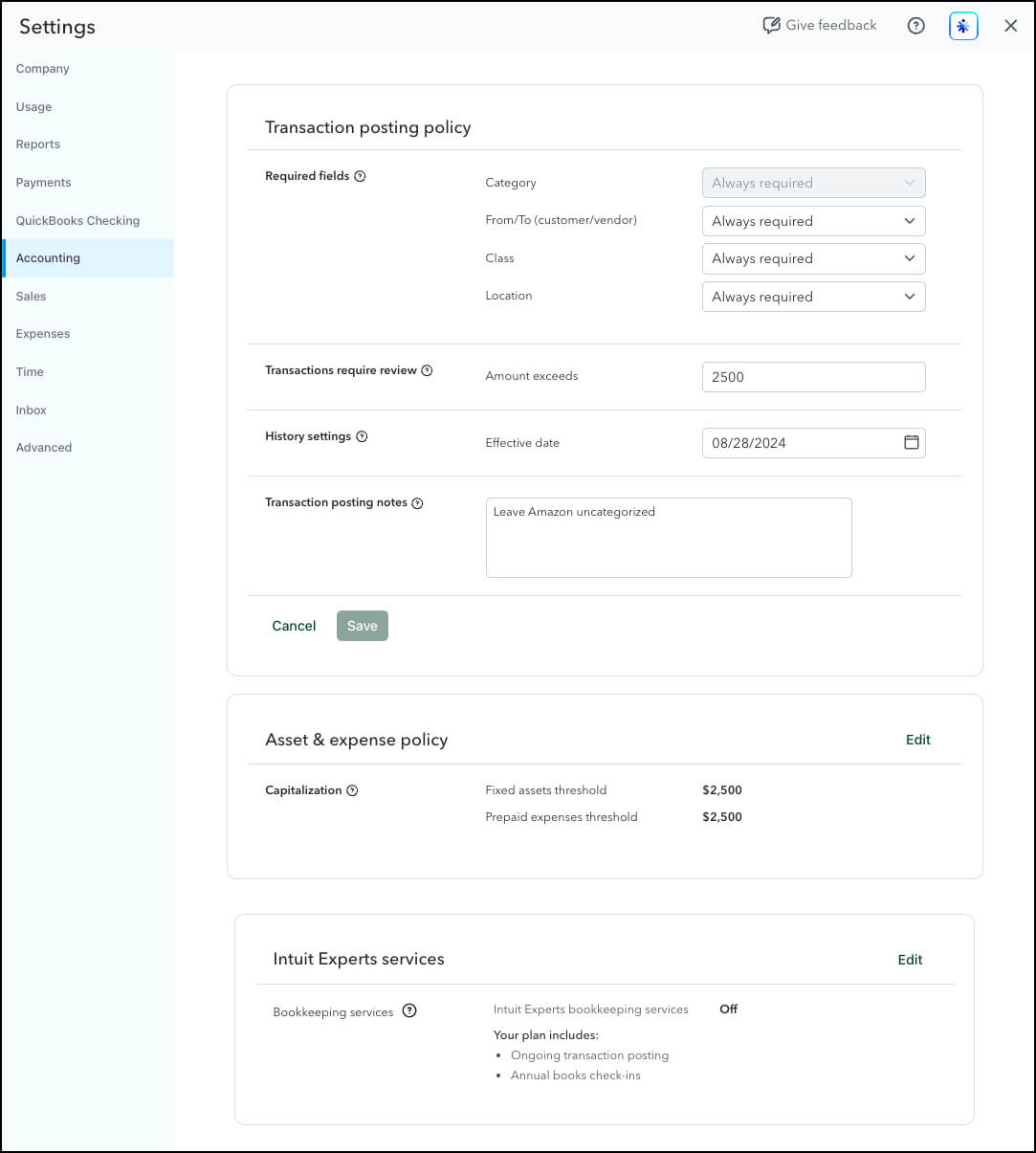
New QuickBooks settings include creating Policies for each company that govern categorization. For example, you can tell QuickBooks whether you require payees and receipts. What determines the class and location? What dollar thresholds always require human review, or are used for Fixed Assets and Prepaid Expenses? How far back do you want historical information to be considered?

That distinction is important. Automation doesn’t mean giving up control. You can tell QuickBooks, “You can handle these transactions when you’re 100% confident, but I still want to eyeball anything over $2,500.”

Accounting settings dashboard with transaction policies.

Bookkeeping is becoming exception management

Reconciliation is another place where I see our work changing dramatically.

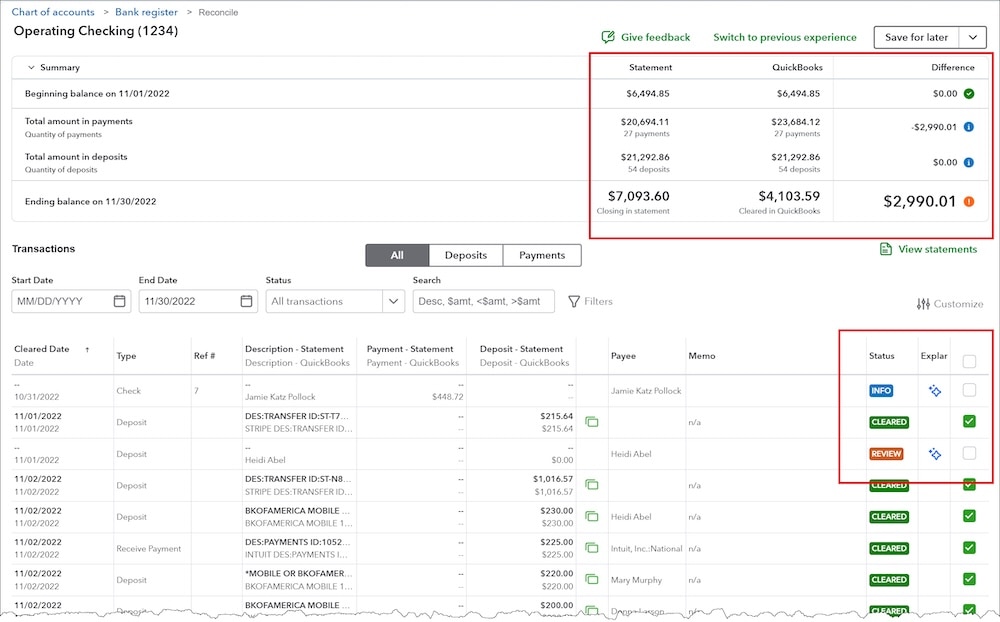
Instead of staring at a whole reconciliation screen trying to figure out why you’re off, the newer tools surface differences between the bank statement and QuickBooks to help point you toward the problem.

What doesn’t match? Is it an expense? A deposit? A missing transaction? The idea is that instead of reviewing everything, you spend more of your time reviewing the exceptions.

AI in QuickBooks.

The same thing is happening in reports.

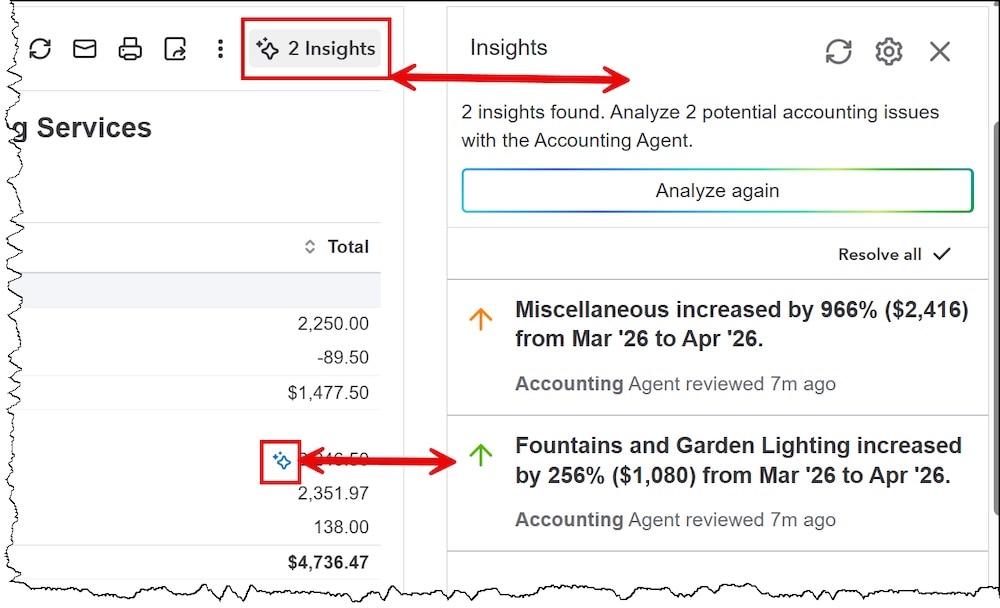
QuickBooks can look at your Profit and Loss and Balance Sheet for anomalies and call out numbers that break the normal pattern. Maybe two rent payments were entered in the same month. Maybe there’s a large transaction sitting in Insurance that really belongs in a subcategory.

Sometimes the anomaly is a bookkeeping error, but sometimes the difference is calling your attention to a business concern. If revenue suddenly falls or an expense unexpectedly spikes, that’s an opportunity for a conversation with the client.

Accounting dashboard showing spending insights alerts; anamoly detection.

Intuit Assist can help us get paid faster

The Payments Agent around invoicing and payments is not just a practical time saver, but will also put money in your pocket faster.

For example, you can ask Intuit Assist to create an invoice using natural language: who the customer is, what you did, how many hours you worked, the rate, date, and terms.

You can also import information from documents, images, or copied text to help populate invoices.

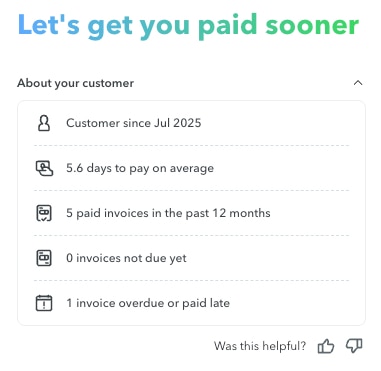
But what I find even more interesting is what happens when QuickBooks starts looking at the customer’s payment history. How long have they been a customer? How many invoices are still open? Do they habitually pay late? The AI will make recommendations to shorten your cash cycle, such as changing the payment terms or reminding the customer that you will add late fees after 30 days.

Customer payment insights dashboard summary panel.

QuickBooks is starting to think like a CRM, too

The Customer Agent is still under development, but this is one of the areas I’m watching closely.

QuickBooks can connect to Gmail and Outlook, identify potential leads, and help track them through a sales pipeline. You can follow opportunities, initiate emails, and move conversations toward estimates and invoices.

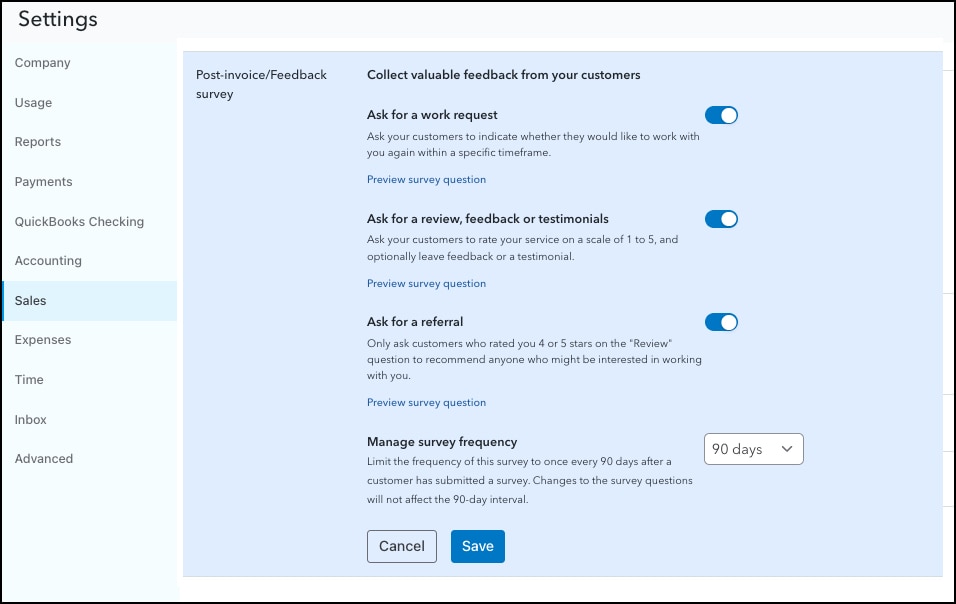
There are also tools for customer reviews, testimonials, referrals, and follow-up.

One of the best ways to increase sales and decrease customer acquisition costs is to go back to people who already know and like you. If a happy customer says they want to work with you again in November, wouldn’t you like your system to help you remember to call them in November?

And if somebody gives you a poor review, wouldn’t you rather know why instead of having them ghost you?

Customer feedback survey settings dashboard screen, QuickBooks customer hub

There are also built-in tools for contracts with electronic signatures. Upload a PDF and add placeholders for text, initials, dates, and signatures. Send the form for multiple signatures. Their signed contracts live in their customer details, then you can convert them to proposals and estimates in a few clicks.

While this might not replace dedicated signature apps for every business, for straightforward contract signing, this feature will eliminate an entire third-party software solution from your stack.

This is where advisory starts getting really interesting

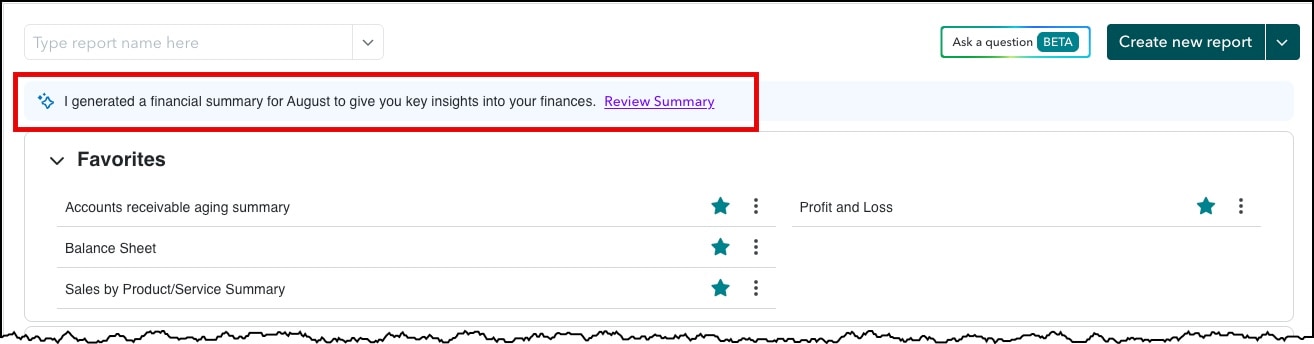
The Finance AI in Advanced is doing a great job … once you know where to look. Head into Reports > Standard Reports, then stop your eye on that “I generated a financial summary to give you key insights into your finances.” Click Review Summary right now. Seriously. Stop reading me talking about it and just go look for yourself. Come back here when you’re done!

Export this summary to Excel and send it to your clients. Then raise your rates because you just leveled up your services.

Report QuickBooks Online.

In addition to financial summaries, you can start asking questions in Intuit Intelligence.

Instead of running three reports, exporting them to Excel, comparing several periods, and doing all the calculations yourself, just ask the blue sparkle in the upper right corner.

  • “How can I improve my profitability?”
  • “What’s my liquidity ratio?”
  • “Which customers and products are driving my revenue?”
  • Even start thinking ahead: “I want to sell my business in three years. What am I going to have to pay attention to?”

QuickBooks reviews the accounting data, identifies trends, looks for contributing factors, and returns an analysis in plain English.

Where you come in is sharing these with the client to help them understand the actions they need to take.

AI is also reaching payroll, projects, and taxes

Some of the newest AI tools are becoming increasingly specialized.

In QuickBooks Online Workforce Premium and Elite, for example, one feature I find useful is simply knowing ahead of time approximately how much cash I’ll need for the next payroll run. The Payroll Agent sends me a text message the week before with an estimate for total upcoming payroll cost. 

Employees can also submit time through SMS, and the system can identify discrepancies before payroll is finalized.

Project Management AI is getting much more sophisticated, especially for construction. You can use existing documentation—contracts, proposals, estimates, and PDFs—to help create projects including phases and cost centers. AI monitors income, costs, progress, and profitability. 

It will even flag situations such as a project being 25% complete, while only 10% has been billed. That’s useful! If estimates vs actuals start drifting, QuickBooks Online calls attention to the variance before it’s too late to do anything about it.

I also have to give the new Sales Tax Agent a double thumbs up. Assigning sales tax categories across hundreds of products used to be an incredibly tedious process, one item at a time. QuickBooks can now suggest targeted tax categories and lets you review them all on one screen. 

It will also look for inconsistencies before filing using a brand-new interactive report.

Have you ever taken a moment to peek at the new Business Tax center? This section reviews your balances, entity type, industry, and tax mappings to surface potential deductions. Businesses can make sure that they’re not leaving money on the table.

But there’s an important lesson hiding in this example: The Business Tax Agent can only analyze the information you give it. If your accounts aren’t mapped to tax categories correctly, your balance sheet isn’t completely reconciled, or your products and services aren’t set up properly, you can’t expect brilliant answers.

That’s why QuickBooks AI makes good bookkeeping more important, not less.

Inbound and outbound

Through partnerships with both OpenAI and Anthropic, Intuit has created its own brain. ChatGPT powers the analysis. Claude assists with programming as well as under-the-hood back-end workflows. Intuit brings them together to allow QuickBooks Online’s features to interact, not just manage data.

It's also important to explore the MCP connectors to external AI tools. You can connect your ChatGPT or Claude business subscriptions directly to QuickBooks Online to include accounting data in other work you’re doing (be sure to use a paid subscription to keep your data secure!).

There are also a host of new AI-native third party apps that allow you to leverage QuickBooks data in all new ways. Some of the solutions I’ve been exploring include Pilot’s Meridian for autonomous books close, and Veltrix to bring together data from all your connected apps (use code ROYALWISE for 4 months free).

In other words, AI in QuickBooks Online isn’t just IN QuickBooks Online!

The firm of the future is still human

There’s a lot of conversation about whether accountants and bookkeepers should be worried about AI making QuickBooks obsolete. I see enormous opportunity. A business owner who can’t even generate a P&L isn’t going to ask Claude to do their books.

  • If QuickBooks can identify an anomaly so that I don’t have to manually scan a P&L by month and make mental comparisons, that makes me more proactive.
  • If QuickBooks can surface the reason profitability changed, that gives me something meaningful to discuss with my client, and a reason to add monthly or quarterly meetings to my service packages.
  • If QuickBooks can take repetitive data entry work off my plate, I can spend more time doing higher-value work that actually requires my experience.

That is the shift I see happening. The accountant of the past entered the data. The accountant of today verifies the data. The accountant of the future uses that data to help the client understand what’s happening, why it’s happening, and what they should do next.

Every time I read a Facebook post complaining, “I never asked for all this AI stuff!,” that tells me that they value their routine more than their expertise. I would guess that they would never want to go back to entering “date, vendor, dollar amount, category, description” manually.

QuickBooks AI is still in its infancy. Its accuracy is improving daily. It’s not perfect yet, and we’re just seeing the low-hanging fruit of what it will be able to do.

Now it’s time for you to start exploring. Click that sparkle!

To see all these agents in action, I recently recorded a brand-new course, "AI in QuickBooks Online," featuring hands-on demos and detailed explanations, with 2 hours CPE. Register now.

Recommended for you

Get the latest to your inbox

Get the latest product updates and certification news to help you grow your practice.

Looking for something else?

Get QuickBooks

Smart features made for your business. We've got you covered.

Tax Pro Center

Expert advice and resources for today’s accounting professionals.

QuickBooks Support

Get help with QuickBooks. Find articles, video tutorials, and more.

How can we help?
Talk to sales 1-800-497-1712

Monday - Friday, 5 AM to 6 PM PT

Get product support