Enterprise resource planning (ERP) systems connect financial transactions to operational processes across sales, inventory, payroll, and beyond, creating a unified, real-time view that eliminates blind spots and transforms month-end closes from weeks-long exercises into streamlined, automated workflows. For accountants advising mid-size businesses, ERPs mean the difference between reactive reporting and proactive strategic insight, shifting finance teams from data gathering to high-value advisory work while maintaining year-round audit readiness.
But strategy is one thing, execution is another. In this guide, we'll walk through the ERP implementation cycle, key challenges to anticipate, and how to measure real ROI.
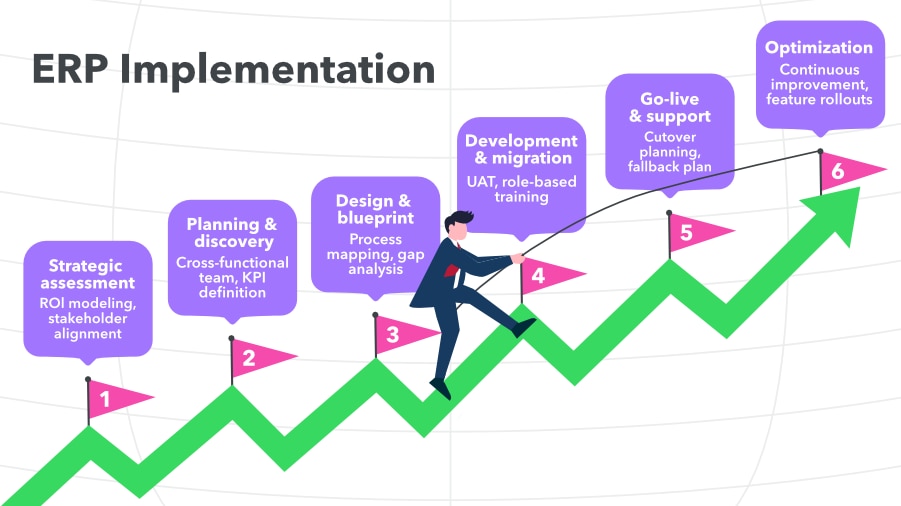
The ERP implementation cycle
ERP implementation success depends on treating it as an operational transformation, not just a software installation. Each phase sets up the foundation for how finance teams will operate for years, making early decisions disproportionately important to long-term outcomes. You, the accountant, were probably instrumental in helping your client identify the right ERP for their needs. Now, you can help guide them through ERP implementation; not just setting up the software for the first time, but helping your client with resources on software change management and how to ensure their team ramps up quickly.
Phase 0: Strategic assessment
Before committing to ERP, confirm the investment will deliver measurable value.
- Needs analysis: Document process inefficiencies and quantify costs. For example, billable hours lost to manual data assembly, delayed reporting reducing advisory value, or compliance risks increasing liability.
- ROI modeling: Tie projected gains to operational changes, not vague “efficiency” claims. Quantify time saved from automated consolidations, error reduction from integrated controls, and advisory capacity unlocked by real-time data.
- Stakeholder alignment: Secure leadership buy-in for budget, timeline, and process changes. ERP success demands commitment through every phase.
Phase 1: Planning and discovery
Lay the groundwork for technical success and business adoption.
- Cross-functional team: Include finance leadership, operations, compliance, and IT. For multi-entity rollouts, have each entity represented.
- Scope definition: Decide which processes to replicate, which ones to redesign, and the sequence for implementation to avoid scope creep.
- KPI transfer: Carry goals from Phase 0 into concrete project KPIs to keep the project focused. An example could be “Reduce month-end close from 12 days to 6 days.”
- Deployment architecture: Align cloud vs. on-premise decisions with data residency needs, integration requirements, and scalability goals.
Phase 2: Design and blueprint
Turn requirements into a configuration plan that avoids costly customizations.
- Process mapping: Redesign workflows using ERP best practices and standardization where possible, while keeping flexibility for unique needs.
- Gap analysis: Identify critical requirements vs. nice-to-have preferences to guide integration planning and surface any necessary customizations.
- Controls framework: Embed segregation of duties, approval hierarchies, and audit trails directly into workflows.
Phase 3: Development and data migration
Build, configure, and prep your data while minimizing disruption.
- Configuration strategy: Prioritize out-of-the-box functionality to limit future maintenance.
- Integration planning: As early as possible, map and test data flows with existing systems, building in error handling for peak periods.
- Data migration: Clean and validate data before moving it. Compare trial balances in both systems during parallel runs.
- Iterative builds: Start module-specific testing before development is fully complete to catch issues earlier.
Phase 4: Testing and training
Ensure the system works for real-world processes before going live.
- User acceptance testing: Run full cycles—for example, month-end close or intercompany postings—in the new system while operating the legacy one in parallel.
- Deployment strategy: Choose between a “big bang” or phased rollout based on complexity and risk.
- Role-specific training: Pair vendor training with workflow-specific examples. Create super-user networks for internal support.
Phase 5: Go-live and support
Transition with minimal disruption and set the tone for adoption.
- Cutover planning: Avoid critical business dates. Keep a fallback plan to temporarily revert if needed.
- Stabilization period: Expect a short-term productivity dip; plan extra support and capacity during this time.
- Support structure: Use a tiered model with super-users handling common issues and vendor resources for advanced troubleshooting.
Phase 6: Optimization and maintenance
Keep the system evolving alongside the business.
- Continuous improvement: Review workflows quarterly to find automation opportunities and address adoption gaps.
- Change management: Maintain onboarding processes for new hires and document business-specific procedures.
- System evolution: Evaluate and roll out new features strategically to avoid major changes during peak business cycles.