Intuit Connect 2026 is a wrap! 
Watch the replay and catch up on the highlights.
New features and updates—November 2026: QuickBooks Online, Intuit Accountant Suite, and Intuit Enterprise Suite.
product update

New features and updates—November 2026: QuickBooks Online, Intuit Accountant Suite, and Intuit Enterprise Suite

Table of contents

Table of contents

November 10 is International Accounting Day, our favorite time of year to remind accounting professionals that we treasure our work together. We’re proud of the innovations that result from collaborating with accountants, and we cherish our shared goal of helping your clients and firm thrive. We thank all of the accounting professionals worldwide!

This month’s updates show our continued investment in your growth—building capacity, growing advisory services, and connecting with businesses that need your expertise. Share the updates with your associates and clients on the latest innovations relevant to business owners and admins.

Note: Screen images simulated.

Stay In the Know

Learn about the most exciting innovations—visit the Hub to watch weekly videos.

Intuit Accountant Suite updates

In a nutshell: Launching this month are several new updates to Intuit Accountant Suite, the AI-powered platform designed to help you scale your firm, your way.

Agentic Books Close pilot program

Close faster by having AI handle month-end prep based on your firm standards. The tools adapt to your way of working over time and track actions in an audit log. Books come ready for approval, so your team gets time back while staying in full control of every close.

You’re invited! Get a first look at Agentic Books Close by participating in the pilot program.** Your firm can access the tools at no cost and give feedback to further improve these new capabilities.

Books Close (beta**)

Available in Intuit Accountant Suite Core and Accelerate at no extra cost.

From one place, you can now manage your clients’ books and standardize your firm’s month-end close processes. Assign your team’s preparers, reviewers, and approvers. Track status, make corrections, and complete each close to deliver consistent quality for every client.

Resolution Center (beta**)

Use one dashboard to ease ticket tracking and uncover details of each product support request for your firm and clients. Submit, track, and talk to the support team in one place, and reopen requests anytime. You can find the Resolution Center by going to Settings ⚙ and selecting Resolution Center under Tools headline.

User groups (Accelerate Feature)

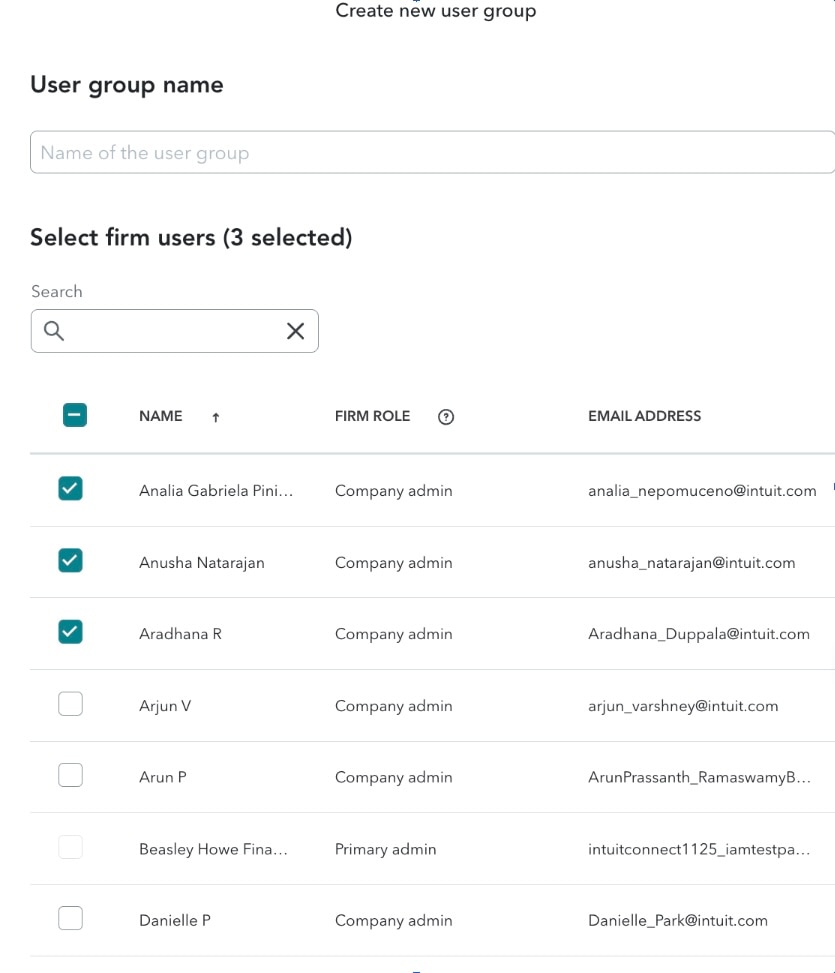
Secure access that scales with your firm. Keep data secure with access that's always right for the role. Choose from pre-built permissions or build your own. Assign and edit them in bulk by service line, office, client, or user group you define.

Create new user group selection interface
Sign up for Accelerate to try user groups at no cost through January 20, 2027.

 Important product and disclaimer information

**Beta features are subject to change or discontinue at any time, and Intuit may introduce fees or other pricing requirements for such features in the future.

**Agentic Books Close is available at no additional cost during the Pilot program; a paid add-on will be required post-Pilot to continue access.

QuickBooks foundational updates based on your feedback

In a nutshell: This release demonstrates our continued investment in everyday workflows you can count on for clean books and reliable performance.

Investing in reliability

The more QuickBooks does for your book of business, the more you need dependable workflows and tasks that are ready when you are. These include the following:

  • Bank connections that stay put, sync more reliably, stay authorized through data refreshes, and trigger proactive notifications so you can resolve them to keep transactions flowing.
  • A clearer home base, with a home screen that’s quicker to scan and move around, enhanced bookmarks for your most-used reports, and a new global panel that puts key tools within reach.
  • Mobile that keeps up with you, including more reliable bank connections, more accurate trip and mileage tracking, smoother invoicing, and smarter receipt capture.
  • Reporting you can count on, with debit/credit columns you can toggle on transaction reports, prompts to refresh reports in one click, and groupings you can expand and collapse in your Balance Sheet and P&L Excel exports.

Sharpening focus on accuracy

For cleaner books and the confidence to let QuickBooks do more for your firm and clients, you need complete trust in the accuracy underneath it all.

  • Reconcile faster with less manual work by having Intuit Intelligence automatically match clients’ transactions, and flag any discrepancies between the books and bank.**
  • Post payroll correctly to your books without extra work,** plus record and file taxes for past paychecks right in QuickBooks.
  • Streamlined deposits and payouts, plus refunds that are easier to complete and automatically default to the original payment method.
  • An accurate and intuitive modern reporting experience with less friction and more insight, including budget reports that match your expectations, customizations that stay put, and automatic detection of the correct prior period during comparisons.
Get more details on the updates in the latest Quarterly Release Guide

Important product and disclaimer information

Money movement services are provided by Intuit Payments Inc., licensed as a Money Transmitter by the New York State Department of Financial Services. For details about our money transmission licenses, or for Texas customers with complaints about our service, please visit https://www.intuit.com/legal/licenses/payment-licenses/.

**Intuit Intelligence: Intuit Intelligence can make mistakes. Intuit protects privacy and adheres to responsible AI principles.

**QuickBooks Workforce: Sold separately.

Innovations in QuickBooks Online

In a nutshell: You and your clients may notice several new capabilities across QuickBooks.

With QuickBooks Workforce, clients can:

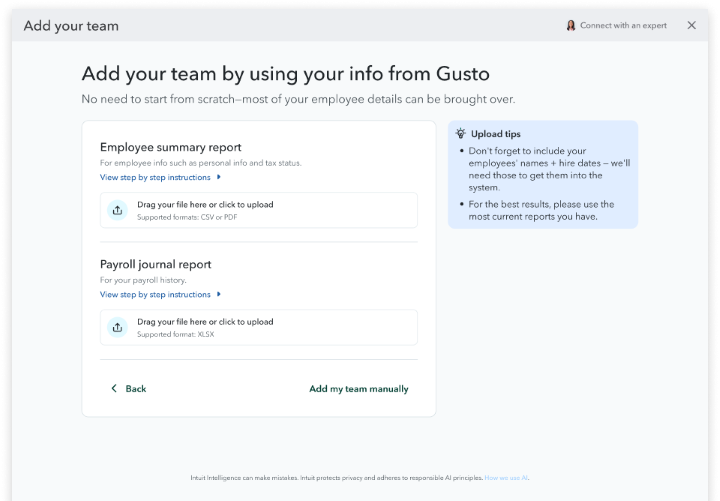
  • Move to Workforce from Gusto or ADP without manually entering employee records or pay history, with expert verification to protect the data that saves your team the most time.
  • Run payroll from Intuit Intelligence chat and QuickBooks mobile to confidently complete the task from anywhere while reducing even more manual work.**

With QuickBooks Payments, clients can:

  • Add Claude or ChatGPT to invoicing workflows so they can get paid faster without sacrificing control. Plus, each payment from invoices sent through Claude and ChatGPT gets recorded automatically in QuickBooks.
  • Offer Affirm buy now, pay later for more payments, including estimates, recurring invoices, and payment links to help their businesses stay competitive and increase conversion.

More innovations include:

  • Lending options for clients
  • Business health for lending provides clarity about how a client’s finances may affect their eligibility and access to available funding options. This includes real-time financial analysis of the factors that impact their approval odds** and ways to strengthen them.
  • Trusted partner lenders (beta**), available to some businesses, evaluates them for all lending options at once through a controlled online environment.
  • Proposal-to-paid helps project-based clients pitch the work, close the deal, and get paid, all through QuickBooks. Keep work moving from proposal to payment without duplicate entry.
  • Apply vendor credits while scheduling a QuickBooks Bill Pay payment, rather than using separate steps or workarounds.
Add your team using info from Gusto
Get more details on the updates in the latest Quarterly Release Guide.

Important product and disclaimer information

Money movement services are provided by Intuit Payments Inc., licensed as a Money Transmitter by the New York State Department of Financial Services. For details about our money transmission licenses, or for Texas customers with complaints about our service, please visit https://www.intuit.com/legal/licenses/payment-licenses/.

**QuickBooks Workforce: Sold separately.

**Intuit Intelligence: Intuit Intelligence can make mistakes. Intuit protects privacy and adheres to responsible AI principles.

**“Approval odds” refers to the likelihood of approval for QuickBooks Term Loan or Line of Credit.

QuickBooks Online Advanced updates

In a nutshell: The latest release in QuickBooks Online Advanced helps bring the core of your client’s back office onto one platform, so they can grow without a big finance team or a patchwork of tools.

This release moves forward in multiple areas: 

Inventory: accurate cost, down to the unit

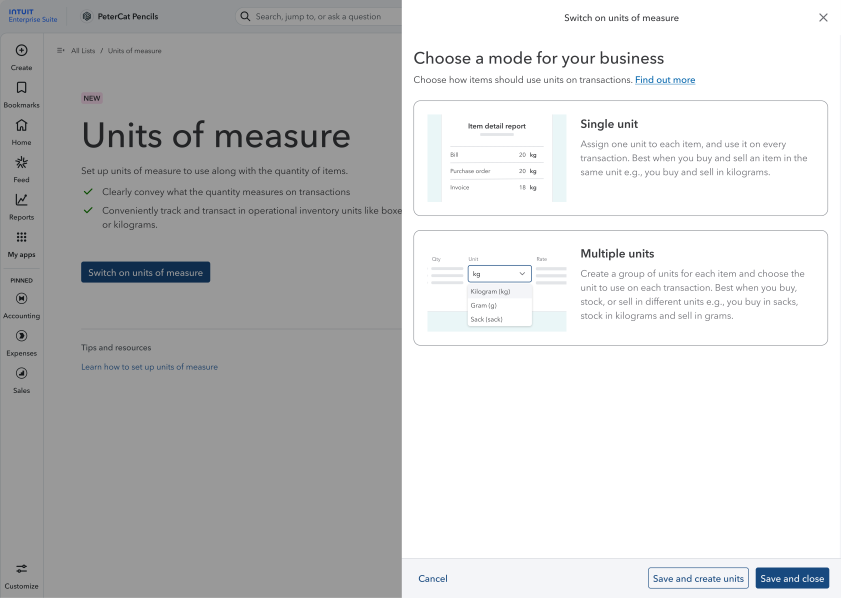
  • With units of measure, your client can buy in bulk, sell by the unit, and handle conversion automatically.
  • Inventory value adjustments let your client correct an item’s dollar value without affecting its quantity; no more journal entries needed.
  • Inventory reports now display data grouped by vendor, so your client can see exactly what to reorder and from whom, plus how long stock has been sitting and skip manually combining reports.

Desktop migration**: more moves with you

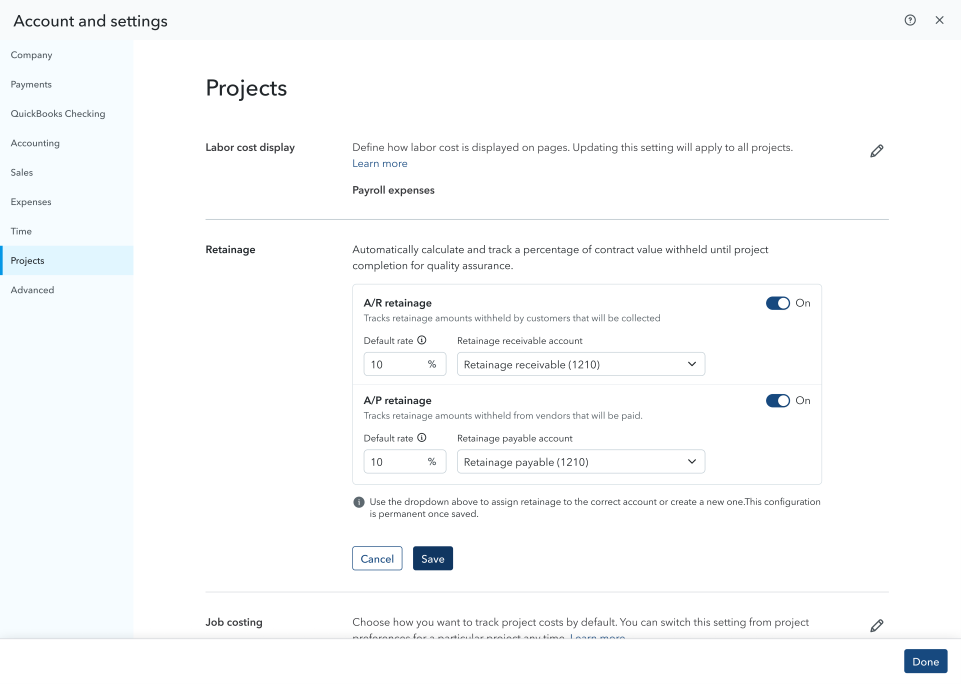
  • Multilevel job/sub-project structures migrate into Projects in Advanced, instead of flattening into sub-customers, so clients can keep job hierarchy intact (beta**).
  • When migrating from Desktop, multiple billable expenses combine into one clearly labeled invoice line to provide far more clarity on both sides.
  • Your client can select from a customer’s multiple shipping addresses directly on the invoice, to ensure they’re billing to the right location while avoiding manual workarounds.
Account and settings projects retainage screen
Business app dialog for units of measure
Discover all the updates in QuickBooks Online Advanced.

Important product and disclaimer information

**Desktop migration: Data migration is currently available to existing QuickBooks Desktop or Enterprise customers who are migrating to QuickBooks Online Advanced or Intuit Enterprise Suite. A consultation is required. Some data may not be eligible for migration. Pricing, terms, conditions, special features and service options are subject to change without notice. Additional data migration services may be available at additional cost through third-party partners.

**Beta features are subject to change or discontinue at any time, and Intuit may introduce fees or other pricing requirements for such features in the future.

New Resource hub for accounting professionals

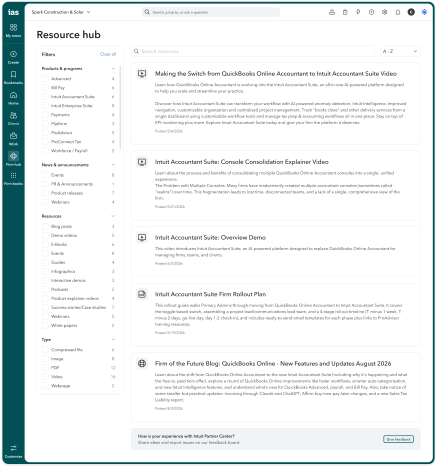
In a nutshell: Intuit Accountant Suite’s Resource hub is a new one-stop destination that accountants and firm leaders can count on for in-depth information across the full suite of Intuit products.

Visit this refreshed hub in Intuit Accountant Suite within Settings ⚙ to find product information, implementation guidance, enablement resources, and client-facing materials. Sort resources by product line and resource type, and search by keywords to find the content you need.

These three resources can help your firm:

  1. Support growth using playbooks and materials that help firms enable and expand higher-value advisory services.
  2. Build confidence to adopt and recommend products using ready-to-use materials like case studies, product demos, and comparison guides
  3. Streamline onboarding, migration, and product transition with resources such as the Intuit Accountant Suite console consolidation guide and Desktop-to-cloud migration guide.
Visit the Resource hub today.

Clean up client books faster with Chart of Accounts cleanup

In a nutshell: Chart of accounts cleanup uses Intuit Intelligence to find common problems in a new client’s chart of accounts and helps you correct the issues.

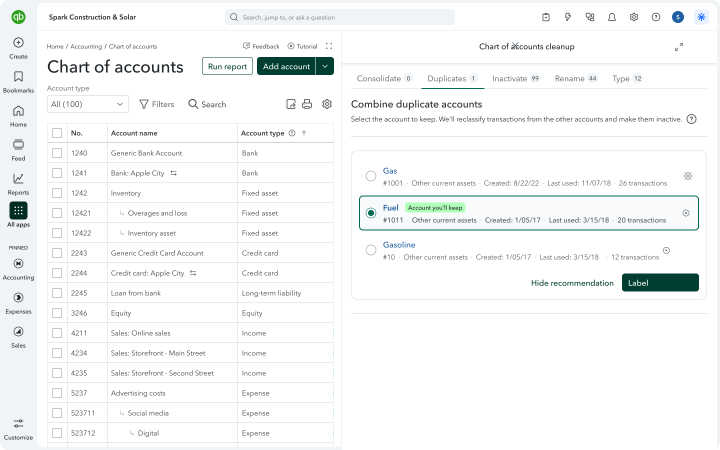
Cleaning up a new client’s books can require repetitive, cumbersome, and manual work to rearrange the chart of accounts and reclassify a large volume of transactions to align with a new structure. Now, you can quickly get to clean financial reports, better recommendations from Intuit Intelligence, and higher-value client service faster by using Chart of accounts cleanup. 

When you choose this option, you’ll see a cleanup plan before the process begins. You stay in control of reviewing and approving the plan, and the cleanup will only touch records outside of closed books periods.

Chart of accounts cleanup can help you:

  • Consolidate the chart of accounts. The cleanup process will identify redundant accounts in the Chart of accounts. It will then add the vendor to each transaction, move the transactions into one account, and inactivate the old accounts. It can also house related accounts under a parent account, and lock the parent so new transactions post to the subaccounts.
  • Fix duplicates. Cleanup will group accounts that track the same thing. You pick which account to keep, and QuickBooks moves transactions into the account you’re keeping. It will separate accounts when there’s a tax reason to do so, such as those for fully-deductible vs. partially-deductible meals.
  • Inactivate, rename, and change account type. QuickBooks finds accounts that haven’t been used in years and suggests inactivating them. It also fixes capitalization, spelling, and stray symbols so names match the rest of the chart of accounts. You’ll also be able to review and approve suggested account types and detail types when an account has been set up incorrectly.
  • Respect closed books by default. Transactions before your closed books date aren’t touched, so financial statements you’ve already finalized stay intact. You can choose a different date if needed.
  • Use the new Chart of accounts edit mode. Drag-and-drop accounts to create parents and subaccounts. Quickly edit account names, types, and detail types in one screen.
Accounting software chart of accounts interface
Try Chart of accounts cleanup now.

Firm-side Bill Pay approval workflows

In a nutshell: Firm-level approval workflow capabilities in QuickBooks Bill Pay let you define more approvers for a client’s bill payments.**

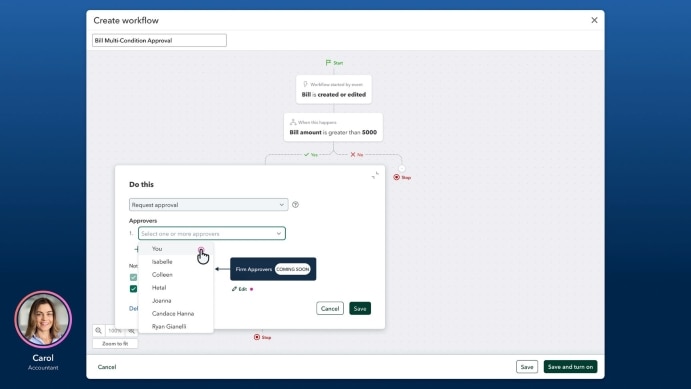
Per client engagement, you can add members of your team as eligible approvers on a client’s existing payment approval workflow. 

This builds upon the existing client-level approval infrastructure in QuickBooks that includes:

  • Bill Clerk, Bill Approver, and Bill Payer roles.
  • Approval groups of up to 7 people.
  • Your choice of either sequential or parallel approval paths.
  • Automatic routing you can customize based on bill amount or vendor.

These new capabilities let you widen your pool of potential approvers—while upholding the governance you need—to keep payments on track and cash flow up-to-date.

User creating bill approval workflow screen
Find out how to set up bill pay approvals.

Important product and disclaimer information

Money movement services are provided by Intuit Payments Inc., licensed as a Money Transmitter by the New York State Department of Financial Services. For details about our money transmission licenses, or for Texas customers with complaints about our service, please visit https://www.intuit.com/legal/licenses/payment-licenses/.

**QuickBooks Bill Pay: Subject to eligibility criteria, credit, and approval prior to first payment. Subscription to QuickBooks Online required. Bill Pay is included with QuickBooks Online and Bill Pay Elite is included with QuickBooks Online Advanced when purchased directly from QuickBooks.com or QuickBooks Sales. Not available in U.S. territories or outside the U.S. 

**User Roles and Approval Workflows: Available in QuickBooks Bill Pay Elite or QuickBooks Online Advanced. Not available for QuickBooks Online Simple Start customers. 

QuickBooks’ partner SimpleClosure helps clients close state payroll tax accounts

In a nutshell: Through SimpleClosure within QuickBooks Workforce, you and your clients can initiate a seamless, compliant closure of payroll-related tax accounts in less than 10 minutes.

Help ensure compliant closure of state payroll tax accounts and avoid fines by taking advantage of our partnership with SimpleClosure inside the QuickBooks Workforce cancellation flow.

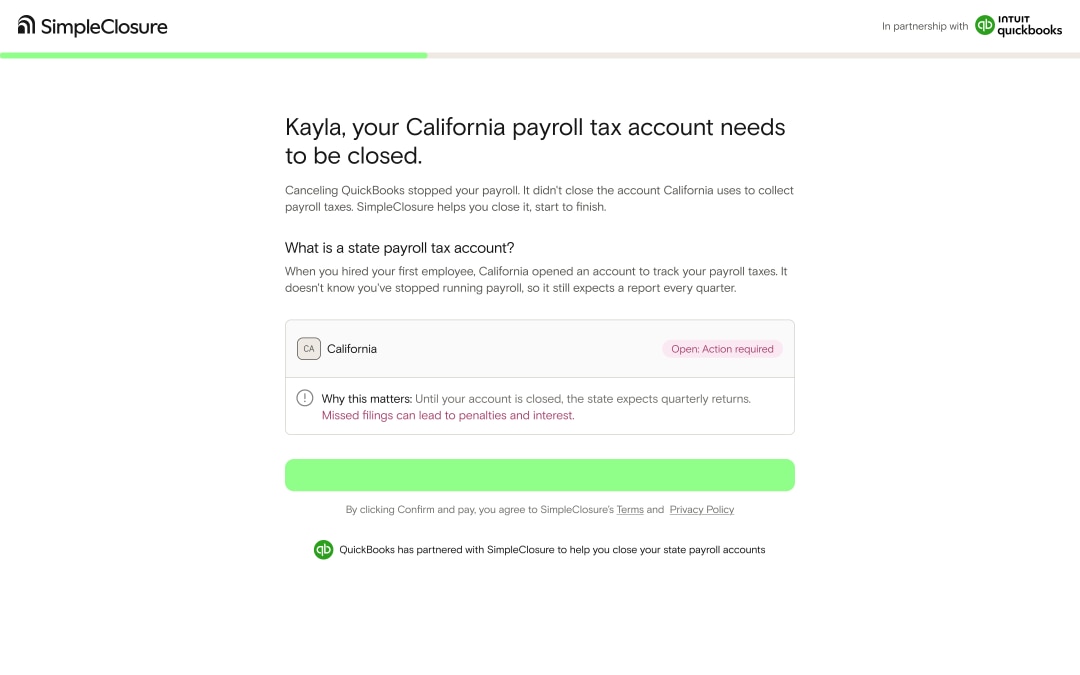
Business owners may not fully understand that payroll tax accounts can remain open even after active payroll payments stop. This discrepancy can result in unexpected filing requirements, notices, fees, and penalties.

SimpleClosure can help you and your clients manage closure of these accounts, whether due to operational changes like workforce restructuring or closing operations in a specific state. For businesses that plan to dissolve, SimpleClosure can handle it with services to address the 95+ moving parts of a shutdown.

SimpleClosure California payroll tax account notice
Find out more about payroll account closure with SimpleClosure.

 Important product and disclaimer information

Money movement services are provided by Intuit Payments Inc., licensed as a Money Transmitter by the New York State Department of Financial Services. For details about our money transmission licenses, or for Texas customers with complaints about our service, please visit https://www.intuit.com/legal/licenses/payment-licenses/.

1 Initiate closure of payroll-related tax accounts in less than 10 minutes: Based on data from a test of 4,000 SimpleClosure customers, conducted in August 2026. On average, it takes 7.3 minutes to complete onboarding and initiate the closure of at least one state tax account. The average time it takes to initiate the closure of additional state payroll tax accounts is 20 seconds. SimpleClosure’s completion of closure varies by customer. On average, a customer has 1.5 state tax account IDs to close. SimpleClosure and QuickBooks Workforce are sold separately. Additional terms and fees apply.

Important product and disclaimer information

Money movement services are provided by Intuit Payments Inc., licensed as a Money Transmitter by the New York State Department of Financial Services. For details about our money transmission licenses, or for Texas customers with complaints about our service, please visit https://www.intuit.com/legal/licenses/payment-licenses/.

**QuickBooks Bill Pay: Subject to eligibility criteria, credit, and approval prior to first payment. Subscription to QuickBooks Online required. Bill Pay is included with QuickBooks Online and Bill Pay Elite is included with QuickBooks Online Advanced when purchased directly from QuickBooks.com or QuickBooks Sales. Not available in U.S. territories or outside the U.S. 

**User Roles and Approval Workflows: Available in QuickBooks Bill Pay Elite or QuickBooks Online Advanced. Not available for QuickBooks Online Simple Start customers. 

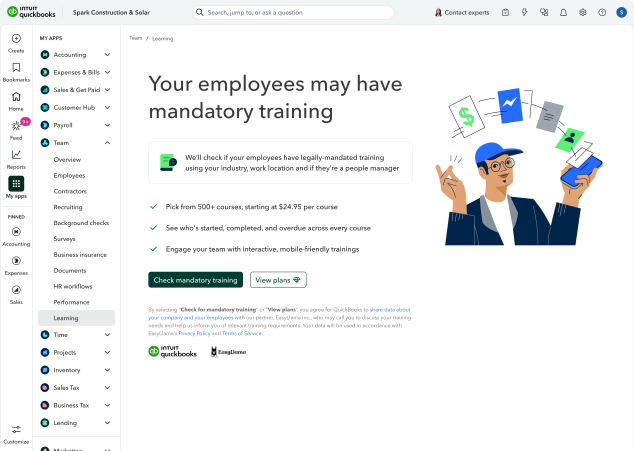
EasyLlama training courses in QuickBooks Workforce

In a nutshell: Your client can now train their team members through QuickBooks Workforce by using a centralized library of training courses from EasyLlama.

Engage a team by assigning and managing interactive employee training from a legally vetted library by EasyLlama.** These courses range from compliance essentials to skill development.

Within Workforce, your client can also track progress and completion. They can see who’s started training, who’s done, and what’s overdue across every course. They can also keep a keen eye on compliance training completions to prevent exposure to added risk. 

Plus, employees will have access to their training through the QuickBooks Workforce employee website, so they can complete it anytime.

QuickBooks EasyLlama online dashboard promoting mandatory training
Check out all the training in QuickBooks Workforce, powered by EasyLlama.

Important product and disclaimer information

**Course library and learning management tools provided by EasyLlama. EasyLlama plans are sold separately. EasyLlama’s Terms of Service and Privacy Policy apply. Preview course library catalog at www.easyllama.com/training-library.


Recommended for you

Looking for something else?

Get QuickBooks

Smart features made for your business. We've got you covered.

Tax Pro Center

Expert advice and resources for today’s accounting professionals.

QuickBooks Support

Get help with QuickBooks. Find articles, video tutorials, and more.

How can we help?
Talk to sales 1-800-497-1712

Monday - Friday, 5 AM to 6 PM PT

Get product support