Intuit Connect, the premier event for accounting firms, is back, 
Oct. 26-28 in Las Vegas!
QuickBooks Online new features and updates—September 2026.
product update

QuickBooks Online new features and updates—September 2026

Table of contents

Table of contents

Global Talent Acquisition Day is on September 2, and is launching in time with the new school year is our free Accounting Futures program, designed to help strengthen the accounting talent pipeline. The program gives accounting students a clear path to career development, access to industry advisors, and real credentials that firms prioritize. If your firm wants to hire now, don’t forget to consider non-traditional candidates. Along the way, be sure to check out this month’s updates.

Share these QuickBooks updates with your associates and clients on the latest innovations relevant to business owners and admins.

Stay in the know

Learn about the most exciting innovations—visit the Hub to watch weekly videos.

How to get ready for Intuit ProPartner Accountants

In a nutshell: Intuit ProPartner Accountants officially launches next year, and the best time for firms to prepare is right now.

In early 2027, the ProAdvisor program is evolving into ProPartner Accountants, our redesigned global partner program within Intuit Accountant Suite that is designed to help you build your ideal firm. Participating firms get future-focused education, a connected community, and five tiers of benefits that help grow revenue, improve efficiency, and come together to build the future of accounting. Higher tiers will get access to benefits, including premium support, client referrals, and up to 25% revenue share. Your firm can move up the tiers by completing product certifications, using more Intuit products, and connecting more clients in Intuit Accountant Suite.

How to get started with Intuit ProPartner Accountants

The ProAdvisor Program remains your program of record until ProPartner Accountants launch in early 2027. But taking a few steps now positions your firm well for the transition. 

Your readiness checklist

We recommend taking these three foundational steps now:

  • Switch to Intuit Accountant Suite: ProPartner Accountants is seamlessly integrated within Intuit Accountant Suite, and you’re required to switch to gain access. Your primary admin can easily switch QuickBooks Online Accountant to Intuit Accountant Suite from the firm tab in Billing and subscriptions or create a new account.
  • Get certified: To receive a tier higher than the member tier, at least one person in your firm must be actively certified with any one of these: QuickBooks Online Level 1, QuickBooks Online Level 2, QuickBooks Workforce, or Intuit Enterprise Suite.
  • Consolidate consoles: To maximize the value of the program, put a plan in place to consolidate consoles if your firm has multiple consoles. This ensures that your projected tier in fall 2026 accurately reflects the full scale and value of your book of business.

Preview your firm’s projected tier

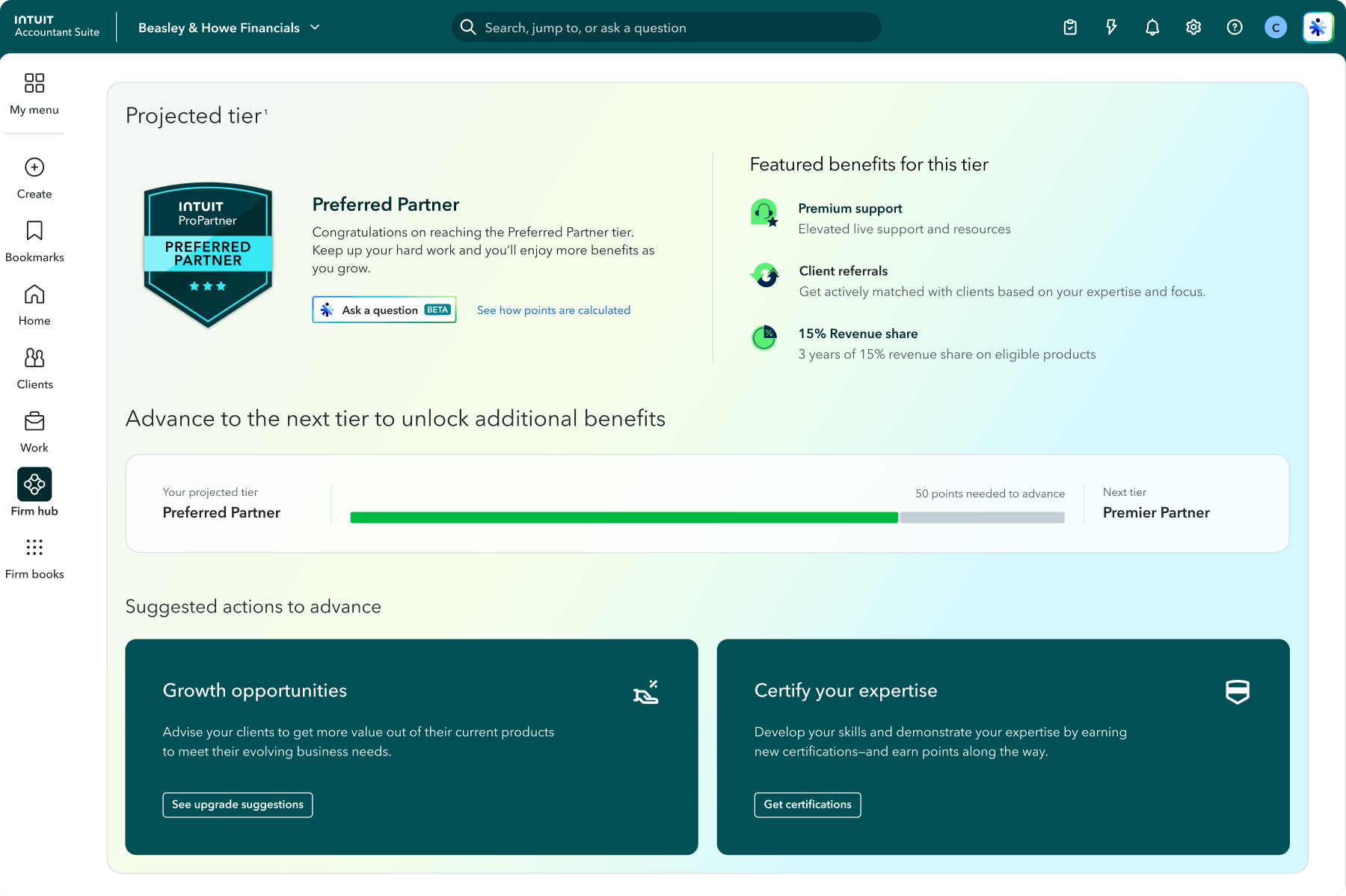
You don’t have to wait until launch to see where your firm stands. Inside Intuit Accountant Suite, you can view your projected tier along with suggested actions to maximize your standing before launch. In many cases, your launch tier will be based on your projected tier, the tier calculated from your points earned between August 1, 2025 and July 31, 2026. However, points you earn between August 1, 2026 and the launch of ProPartner Accountants in early 2027 will also be considered and can help you work toward unlocking a higher tier.

ProPartner preview dashboard with tier progress
Intuit ProPartner Accountants is a partnership built for you.

Important product and disclaimer information

This post is informational only and does not establish any legal or financial obligation on Intuit’s part. All information and details contained in this guide is subject to change without notice, including but not limited to program tiers, benefits, features, methodology, and functionality. Any projected or displayed tier status is an estimate only and is not guaranteed. Additional terms, conditions, fees, and eligibility criteria may apply to certain tiers, benefits, or features.

Intuit Intelligence can make mistakes, including about your tier status, program benefits or eligibility. Responses are for informational purposes only and are not a guarantee of eligibility, tier status, or benefits. Intuit protects privacy and adheres to responsible AI principles.

QuickBooks Workforce HR tools within Intuit Accountant Suite

In a nutshell: You can now access team lifecycle management tools for your firm within Intuit Accountant Suite for a connected, streamlined experience across your firm’s entire employee lifecycle.

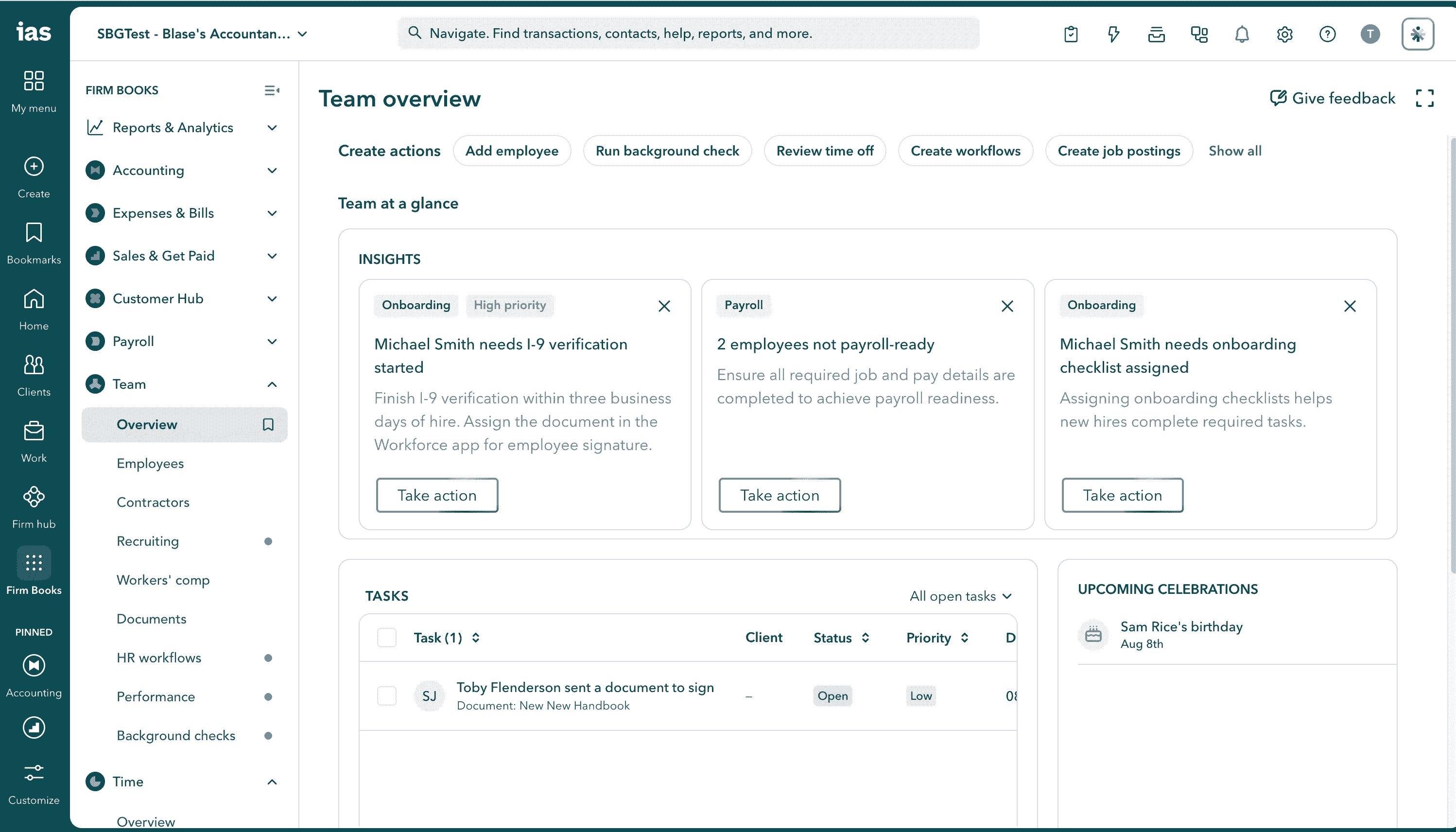
In addition to payroll, your firm can use integrated QuickBooks Workforce tools in Intuit Accountant Suite for recruiting, hiring, onboarding, time-off management, and performance reviews. You’ll also have customizable, automated workflows available for routine HR tasks to help your firm save time, reduce errors, and maintain compliance. 

Try out these new capabilities by going to Firm books and selecting Team and Time.

Note: QuickBooks Online Payroll expanded into QuickBooks Workforce in May 2026.

Workforce Now in IAS dashboard for employee management
QuickBooks Workforce is built into Intuit Accountant Suite.

Important product and disclaimer information

Money movement services are provided by Intuit Payments Inc., licensed as a Money Transmitter by the New York State Department of Financial Services. For more information about Intuit Payments' money transmission licenses, please visit https://www.intuit.com/legal/licenses/payment-licenses/.

Intuit Enterprise Suite updates

In a nutshell: The latest Intuit Enterprise Suite updates help strengthen the platform with enterprise-grade tools, AI-native intelligence, industry-specific workflows, and built-in workforce solutions that help clients run more of their business in one place. Preview a few select highlights below.

Report the way your client’s business operates

Dimensions provide the flexibility to tag a client’s transactions with multiple attributes to better match reporting and transactions to their business structure.

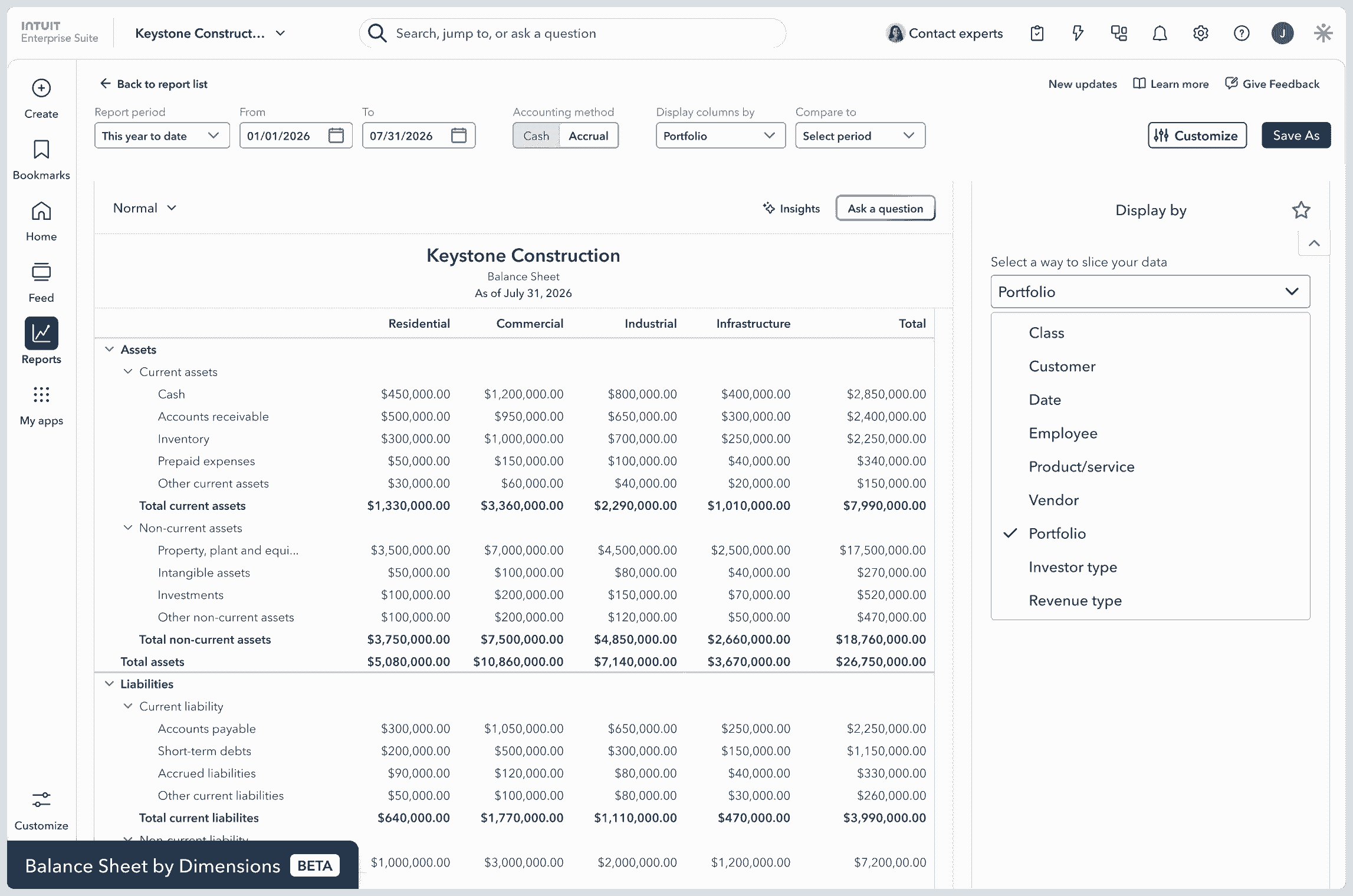
  • Generate a report providing a multidimensional financial view of your client’s business, such as a balance sheet by dimension report for a single entity (beta).
  • Add dimensions to time, billable expenses, and recurring payment transactions.
  • Assign dimensions at the header level of invoices.
  • Generate eight new projects reports by dimension, including cost to complete and WIP.
  • Reparent dimensions as reporting needs evolve.

Projects with improved reporting and permissions

For project-based businesses, you now have access to better reporting and permission controls.

  • New project reports include Open Purchase Orders by Project and Project Costs by Vendor and Project Detail to help you manage project profitability with confidence.
  • Projects have been updated, based on your feedback, to allow you and your clients to apply dimension value filtering on project reports—and see project associations on project transaction pages. In addition, ship-to addresses on purchase orders now automatically default to the project site address, and you can split payroll by project.

Inventory and manufacturing depth

Intuit Enterprise Suite continues to deepen its inventory and manufacturing capabilities for inventory-based businesses.

  • Units of measure allow businesses to order, receive, and sell goods in the quantities that make sense at each stage. 
  • Invoices with multiple shipping addresses lets you and your clients add multiple addresses per customer, and select one from an invoice dropdown, eliminating manual work.
IES balance sheet by dimensions
Get details on all the updates on Intuit Enterprise Suite.

Important product and disclaimer information

Summer 2026 beta features are available to Early Access program participants. Join the Early Access Program here.

Beta features are subject to change or discontinue at any time, and Intuit may introduce fees or other pricing requirements for such features in the future.

QuickBooks Online Advanced updates

In a nutshell: The latest release in QuickBooks Online Advanced helps your firm steer toward advisory work, and spend less time on reconciling, formatting reports, and chasing down project numbers.

Management reports that go out the door faster

Use management report templates to pull live KPIs, dashboards, and financial summaries into structured documents you can share out as board packages, lender reports, or investor updates. Configure formatting, calculated fields, and global settings once, and automatically apply them to save hours of formatting per client, per cycle.

For work requiring a spreadsheet, two-way spreadsheet sync pulls live reports into Excel or Google Sheets with structure and formulas intact, and lets you push edits back to QuickBooks Online Advanced in one step.

Project profitability you can see before the invoice goes out

Construction financial capabilities, previously a paid add-on, are now included in QuickBooks Online Advanced. Bring structured budgets by phase, AIA-style progress billing, change order management, and WIP over/underbilling reporting directly into your client’s books—so job costs, billing, and profitability sit in one place instead of being reconciled after the fact.

Project Management AI now monitors budgets against actuals in real time and flags when a project is trending toward an overrun, so your client can have a conversation about scope, staffing, or customers before the margin is already gone. Clients can also generate estimates from project parameters and prior data, helping standardize proposals across engagements.

Inventory that stays accurate through the order cycle

Advanced now brings more of your client’s product-based workflow into their books to help prevent margin surprises. Stock and margins stay accurate at every step, and you get trustworthy numbers with less reconciling across separate systems.

  • Sales orders reserve stock and trigger purchase orders automatically at the reorder threshold.
  • Item receipts update costs the moment goods arrive.
  • Moving average cost valuation recalculates in real time across the full order-to-invoice cycle.

Finance AI

Finance AI in QuickBooks Online Advanced now does more than surface numbers; it drafts the narrative around them.

  • Get a monthly summary of performance highlights, such as revenue trends, expense patterns, and notable variances, formatted for client or stakeholder review. 
  • Automatically monitor KPIs continuously and identify anomalies. When cash flow dips below a threshold, or expenses in a category move unexpectedly, you and your client get notifications and suggestions for next steps.
  • Generate faster answers for clients with the conversational Intuit Intelligence interface.** Type a question in plain language and get insights grounded in a client’s live data without exports or reports.

Streamline AP workflows with built-in Bill Pay Elite

QuickBooks Online Advanced now includes Bill Pay Elite at no added cost, with free standard ACH for all customers, custom approval workflows, an audit trail, and unlimited 1099 e-filing. Bills don’t move without your client’s sign-off and payments reconcile automatically, so you and your client have an accurate, auditable view of cash going out without a separate AP tool to manage, sync, or reconcile against their books.


Check out all the QuickBooks Online Advanced updates.

Important product and disclaimer information

QuickBooks Bill Pay: Subject to eligibility, credit, and approval prior to first payment. Subscription to QuickBooks Online required. Bill Pay is included with QuickBooks Online when purchased directly from QuickBooks.com or QuickBooks Sales. Not available in US territories or outside the US. Limits may apply on total number and amount of payments. Transaction-based fees apply based on usage. Bill Pay Elite is expected to be included in QuickBooks Advanced on August 1, 2026. Actual availability dates may vary and are not guaranteed. Bill Pay Elite pricing and feature availability may vary based on your specific subscription plan and date of renewal. Please check your account settings for the most accurate details regarding your subscription tier. QuickBooks Online Advanced subscription fees are not subject to modification based on user eligibility for QuickBooks Bill Pay.

**Intuit Intelligence / Conversational BI Skills are currently available as beta releases. Features, availability, and capacity are subject to change. Intuit Intelligence chat is available to admin users only at this time, with limited capacity each month (beta).

Coming soon: Access Mineral HR resources in QuickBooks Workforce

In a nutshell: At no additional cost, your clients using QuickBooks Workforce will soon be able to access Mineral’s HR and compliance resources in the platform.**

Keeping up with changing employment laws can be challenging and time consuming. Starting later this month, clients using QuickBooks Workforce can get trusted answers and stay current with changing employment laws without relying on your firm for guidance.

Mineral HR will help you strengthen your role as a trusted advisor by providing your firm and clients access to: 

  • Trusted guidance, practical tools, and resources covering hiring, onboarding, workplace policies, compliance, and other everyday HR topics.
  • Proactive compliance alerts and recommendations to help stay ahead of changing employment laws and HR requirements. 
  • Personalized HR guidance and unlimited access to certified HR advisors through a paid upgrade to Mineral Essential.
  • You’ll get complimentary access for your firm and visibility into your clients’ HR resources. These capabilities help you confidently support HR conversations, deliver greater value, and deepen client relationships without having to become an HR expert.
Get the details on Mineral HR through QuickBooks Workforce.

Important product and disclaimer information

Money movement services are provided by Intuit Payments Inc., licensed as a Money Transmitter by the New York State Department of Financial Services. For more information about Intuit Payments' money transmission licenses, please visit https://www.intuit.com/legal/licenses/payment-licenses/.

**Features

Mineral HR resources & experts: HR resources and experts are provided by Mineral, Inc. Access to Mineral resources varies by plan. Mineral experts are included with QuickBooks Workforce Elite, or available as a paid add-on to other Workforce plans. Mineral’s Privacy Policy and Terms of Service apply. 

QuickBooks 401(k) by Vestwell

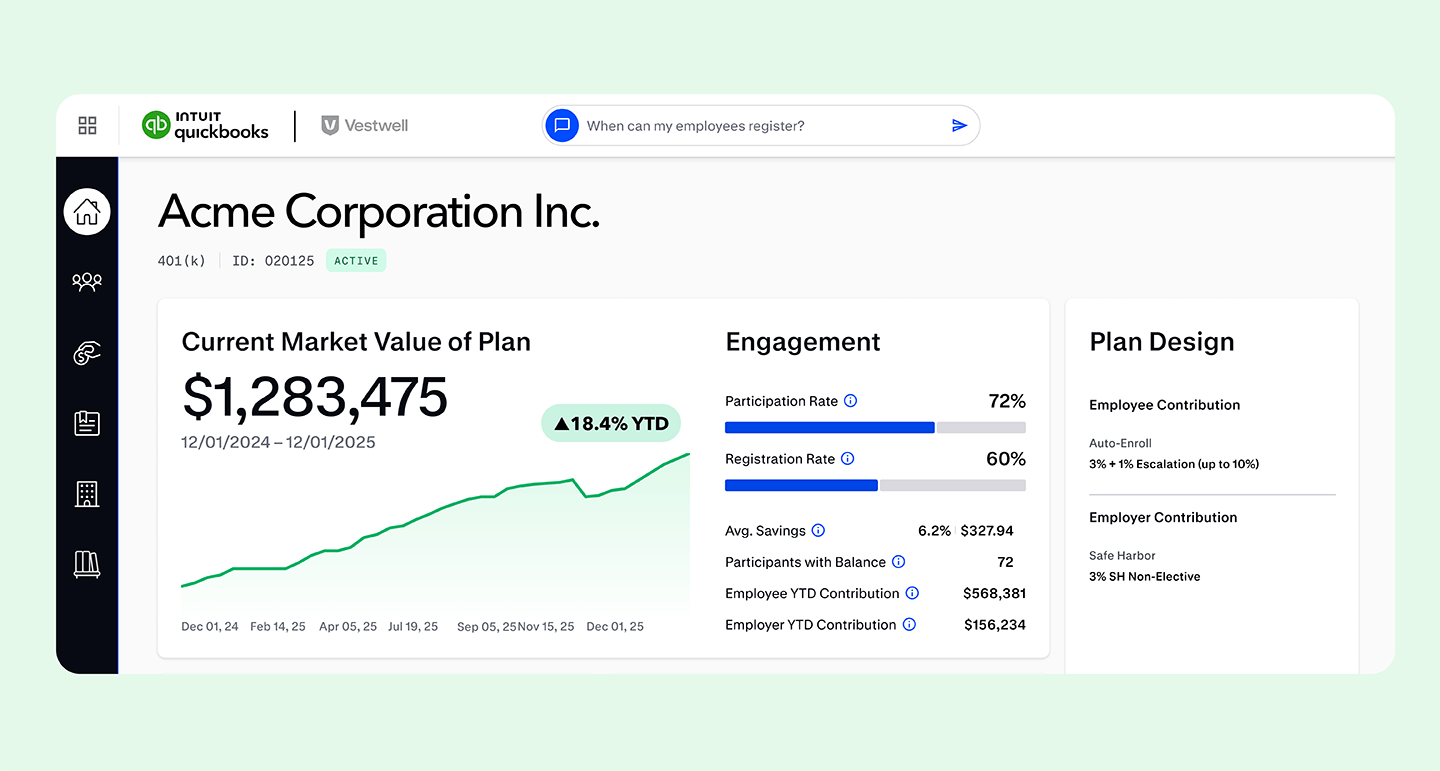
In a nutshell: QuickBooks 401(k) by Vestwell provides affordable retirement plans fully integrated with QuickBooks Workforce, so your clients can manage retirement benefits and payroll from the same platform.** 

With QuickBooks 401(k) by Vestwell, your clients get:

  • Integration: Plans connect directly with QuickBooks Workforce for automatic contribution calculation, deduction, and remittance each pay cycle—no manual entry or reconciliation required.
  • Compliance: Vestwell handles end-to-end plan administration on the back end, including non-discrimination testing, Form 5500 filing, plan documents, and participant notices.
  • Comprehensive support: Get access to Vestwell’s retirement experts and support professionals to help start, monitor, and manage your client’s 401(k) plans.

As a natural extension of the bookkeeping, payroll, and consulting work you’re already doing for clients, your firm can recommend our new 401(k) offering.

Vestwell dashboard with market value analytics
Find out more about QuickBooks 401(k) by Vestwell.

Important product and disclaimer information

Money movement services are provided by Intuit Payments Inc., licensed as a Money Transmitter by the New York State Department of Financial Services. For more information about Intuit Payments' money transmission licenses, please visit https://www.intuit.com/legal/licenses/payment-licenses/.

**Features

401(k): Retirement offerings through QuickBooks 401(k) by Vestwell are provided and administered by Vestwell, and are sold separately. Neither Intuit, QuickBooks or their affiliates are a retirement plan administrator, fiduciary or other provider. Vestwell pays Intuit a fee for referred clients.

Agreement to Vestwell’s services agreement is required. Vestwell's fees are disclosed in and controlled by its services agreement and fee disclosure notices. Pricing may change during the three year term if there are material changes to the plan features or our scope of services, if the plan sponsor is or becomes a member of a controlled group or group of related entities, or due to applicable laws and regulations. Cannot be combined with other offers. Offer may be extended, modified or discontinued at any time without notice. 

One unified application to activate Payments and Bill Pay for your clients

In a nutshell: You can now start the money movement application for QuickBooks Payments and Bill Pay on behalf of your new clients, directly in Intuit Accountant Suite and QuickBooks Online Accountant. 

How it works

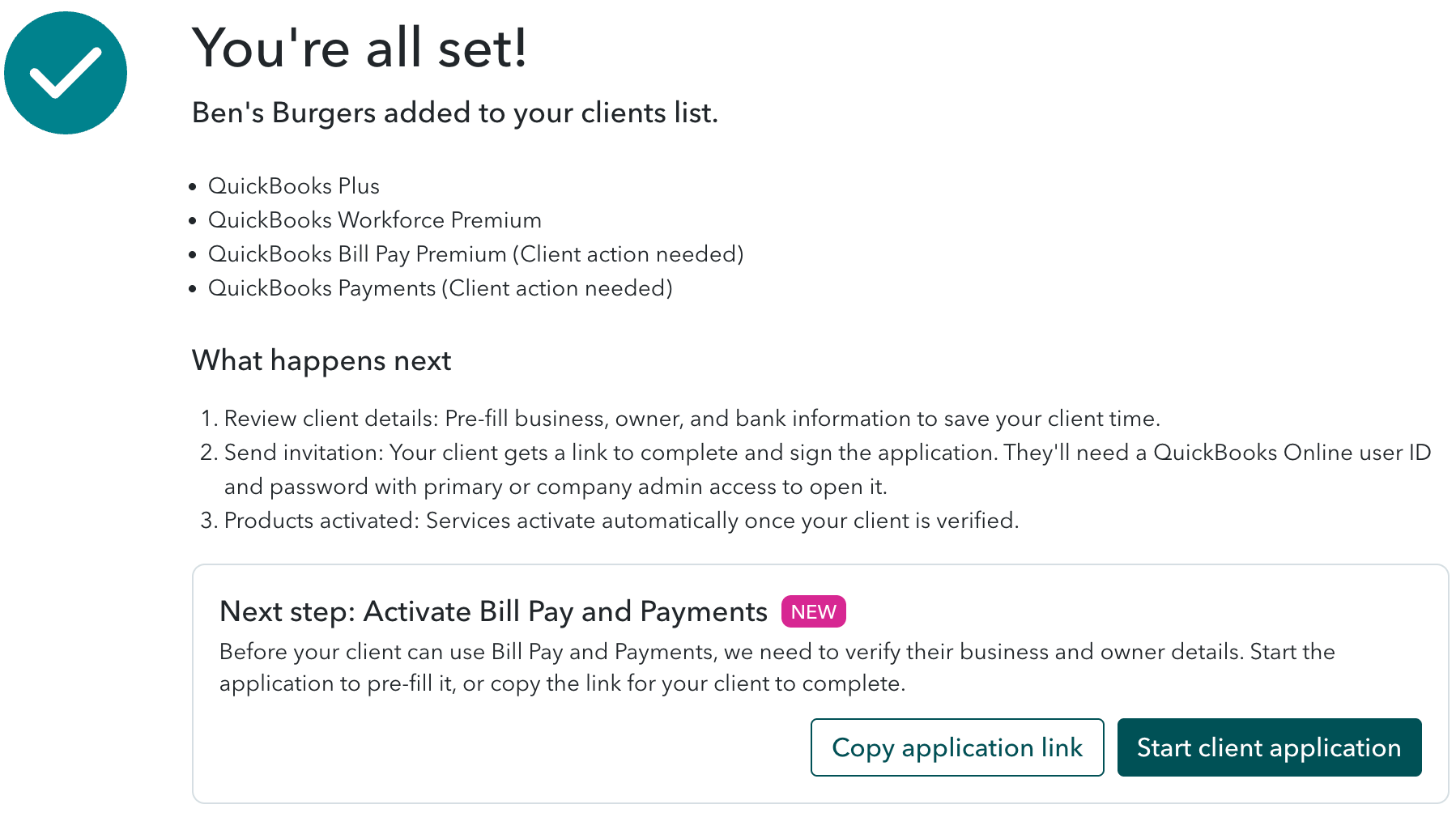
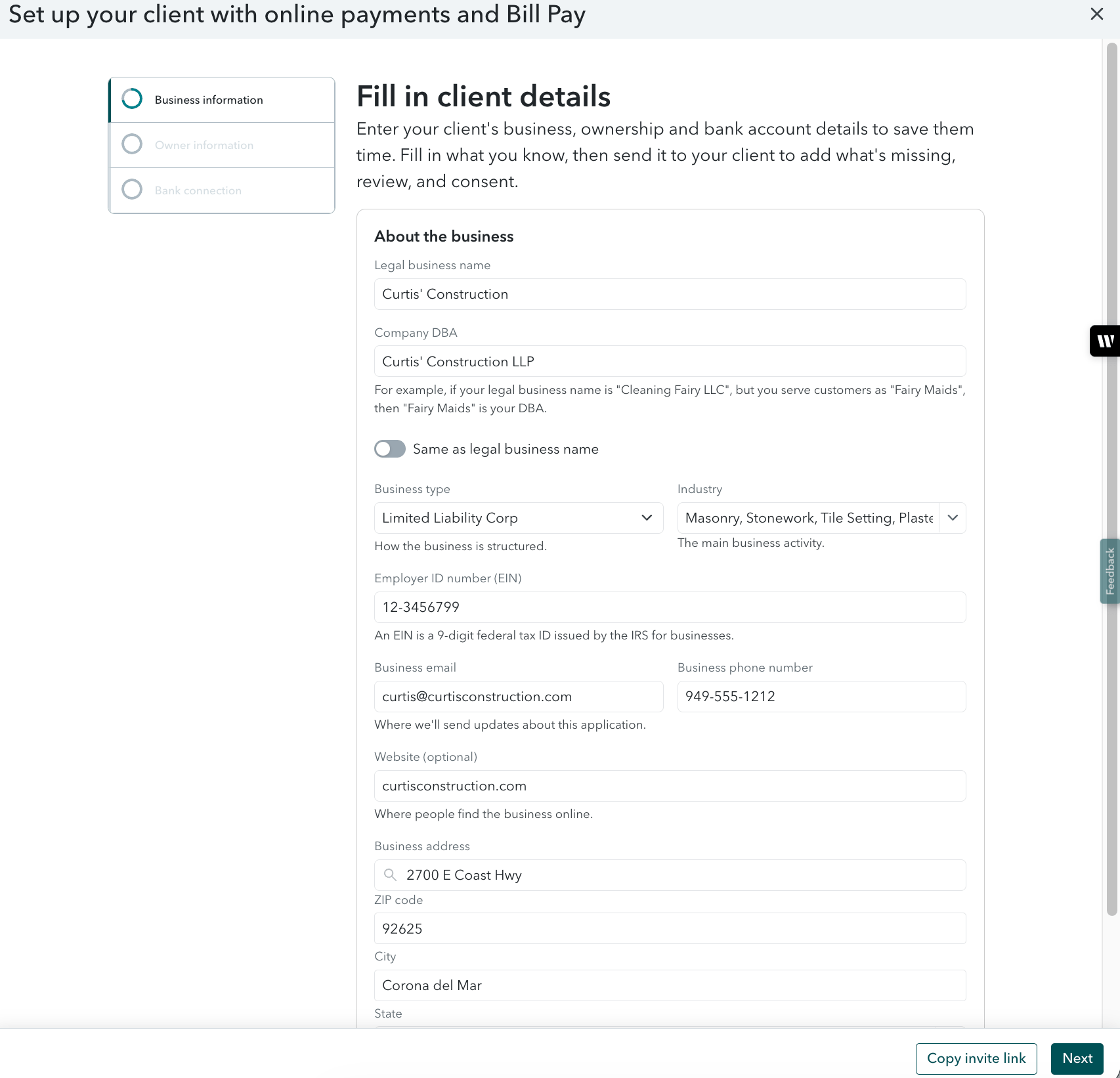
When you add a new client through the Add client flow and select Payments and/or Bill Pay with their QuickBooks Online subscription, you can start their application immediately after checkout and enter the business and ownership information you have available.

You can then invite your client to complete the remaining details, provide consent, and submit the application. Your client receives an email from QuickBooks with a link to the application. Alternatively, you can copy the application link and share it with your client directly. Once the application is approved, the products are fully activated. 

This one unified application means less paperwork for clients, fewer walkthrough calls for you, and faster activation for everyone.

Keep in mind: Your client needs a QuickBooks login with a primary admin or company admin role to open and submit the application.

This feature is available only when money movement products are added for new clients through the Add client flow.

Coming soon: A client onboarding dashboard to track your clients’ application status and resend notifications as needed.

QuickBooks Delegated Onboarding client setup confirmation screen
QuickBooks Delegated Onboarding Online client setup form for business payments
Add a new client today.

Two-way inventory sync between QuickBooks Online and Shopify

In a nutshell: QuickBooks Online now two-way syncs inventory data with your clients’ Shopify stores, automatically keeping stock levels accurate across both systems, with QuickBooks as the source of truth.

Two-way inventory sync keeps Shopify inventory and QuickBooks records aligned automatically, updating both as sales and purchases occur. For your firm, that means ecommerce clients arrive with accurate, current books, reducing the manual reconciliation that typically falls to month-end. Here’s how it works:

  • Purchase orders: When your client receives stock against a purchase order in QuickBooks, on-hand quantities update and sync to Shopify, including partial shipments. QuickBooks records what was received and continues tracking the remaining quantity.
  • Sales orders: When an order is placed in Shopify, it imports into QuickBooks as a sales receipt or invoice that automatically updates inventory on hand, cost of goods sold, and inventory asset values.
  • One source of truth: QuickBooks remains the source of truth, and each adjustment it makes is recorded in Shopify’s audit log for full traceability.

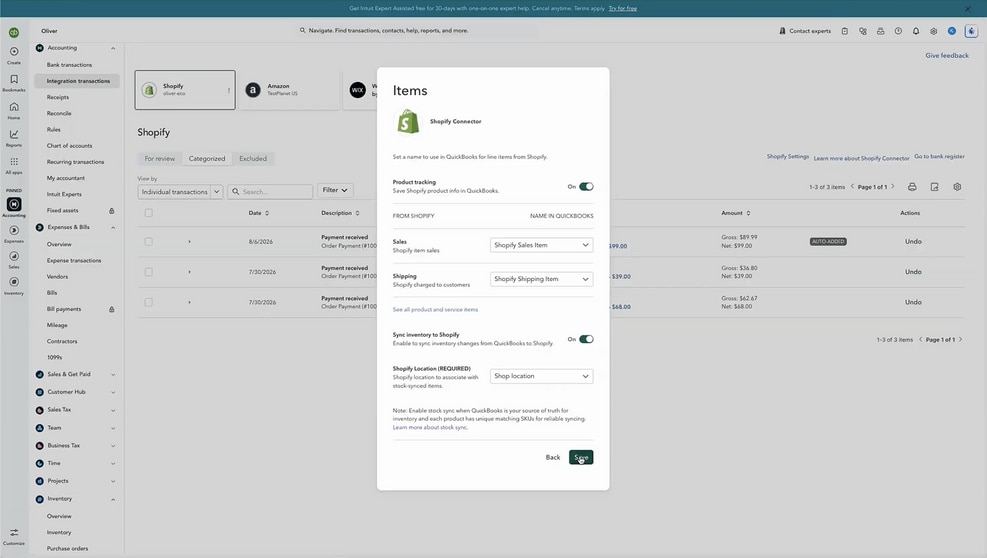
Getting started: Inventory sync is turned on in the Shopify app settings within QuickBooks Online. Select the Shopify location to sync, and make sure items use the same SKU in both systems. 

A screenshot of the Shopify Connector app in Quickbooks
Try Shopify Connector now.

Recommended for you

Looking for something else?

Get QuickBooks

Smart features made for your business. We've got you covered.

Tax Pro Center

Expert advice and resources for today’s accounting professionals.

QuickBooks Support

Get help with QuickBooks. Find articles, video tutorials, and more.

How can we help?
Talk to sales 1-800-497-1712

Monday - Friday, 5 AM to 6 PM PT

Get product support